Openshift: Cluster is not operational after performing power cycle on one control plane node
Oversigt: One control plane node is non-gracefully shutdown, after it is powered on, it will go to "not ready" state and cause the cluster not operational.
Denne artikel gælder for
Denne artikel gælder ikke for
Denne artikel er ikke knyttet til et bestemt produkt.
Det er ikke alle produktversioner, der er identificeret i denne artikel.
Symptomer
Directly power cycle one control plane node, after the node boots up, the cluster is not recovered.
UI pages will display error or empty information, for example:

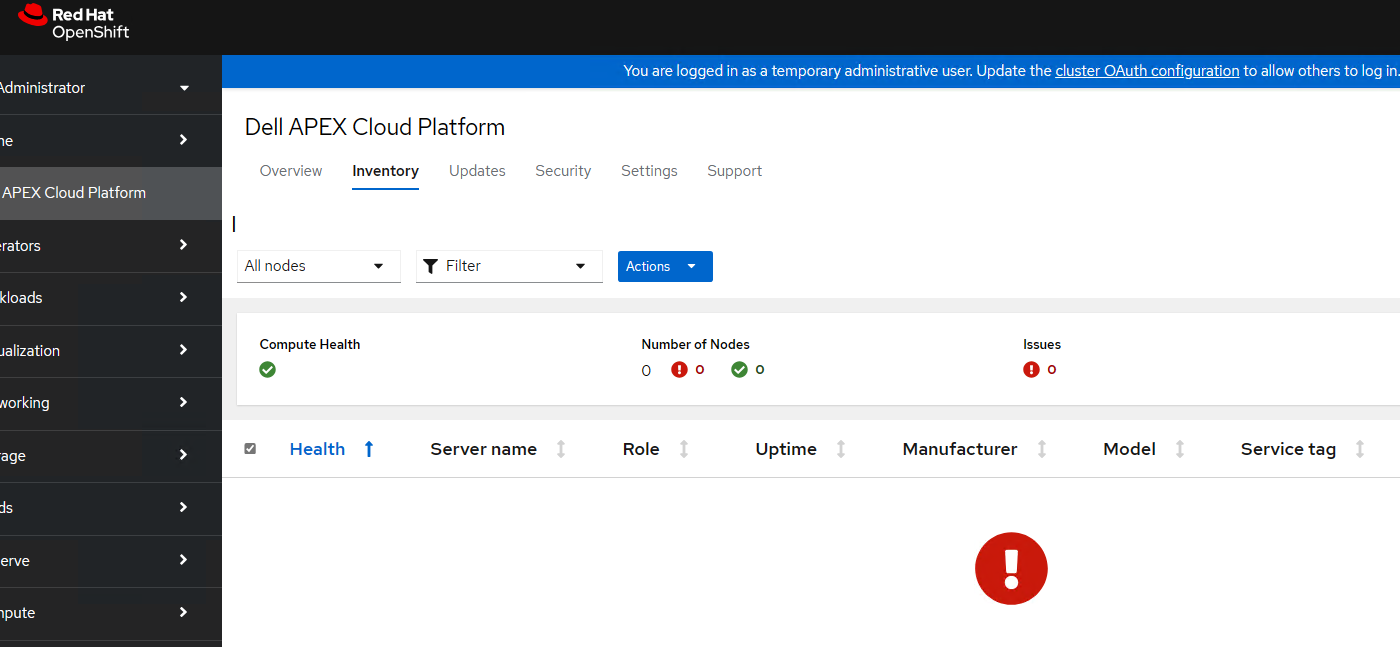
UI pages will display error or empty information, for example:
Årsag
Directly power cycle one control plane node is not supported. This is a disaster recovery scenario.
When the control plane node is un-gracefully shutdown, the Container Storage Interface (CSI) drivers do not automatically detach volumes, which will cause the pods are in "Container Creating" state. When the control plane node boots up after an un-graceful shutdown, it will lose any docker image local cache and try to retrieve from depo manager, while the depo manager pod was not in Running state after the control plane node power cycle, so the control plane node will go to "not ready" state and cause the cluster not operational.
When the control plane node is un-gracefully shutdown, the Container Storage Interface (CSI) drivers do not automatically detach volumes, which will cause the pods are in "Container Creating" state. When the control plane node boots up after an un-graceful shutdown, it will lose any docker image local cache and try to retrieve from depo manager, while the depo manager pod was not in Running state after the control plane node power cycle, so the control plane node will go to "not ready" state and cause the cluster not operational.
Løsning
Follow below instruction to detach CSI volumes after non-graceful node shutdown.
1. After a node is detected as unhealthy, shut down the worker node.
2. Ensure that the node is shut down by running the following command and checking the status is NotReady
3. Taint the corresponding node object by running the following command:
5. Remove the taint by running the following command:
Note: In above commands, <node name> = name of the non-gracefully shutdown node
1. After a node is detected as unhealthy, shut down the worker node.
2. Ensure that the node is shut down by running the following command and checking the status is NotReady
oc get node <node name>Important: If the node is not completely shut down, do not proceed with tainting the node. If the node is still up and the taint is applied, filesystem corruption can occur.
3. Taint the corresponding node object by running the following command:
oc adm taint node <node name> node.kubernetes.io/out-of-service=nodeshutdown:NoExecute4. Restart the node.
5. Remove the taint by running the following command:
oc adm taint node <node name> node.kubernetes.io/out-of-service-
Note: In above commands, <node name> = name of the non-gracefully shutdown node
Berørte produkter
APEX Cloud Platform for Red Hat OpenShiftArtikelegenskaber
Artikelnummer: 000217678
Artikeltype: Solution
Senest ændret: 20 feb. 2026
Version: 3
Find svar på dine spørgsmål fra andre Dell-brugere
Supportservices
Kontrollér, om din enhed er dækket af supportservices.