Openshift: Remove node fails if OperatorHub is configured on disconnected cluster
Oversigt: In disconnected environment (cluster in restricted networks or without internet connection), when a user tries to remove a node via Dell APEX Cloud Platform web console plugin, the process fails at step "Check if the node had bare pods". ...
Denne artikel gælder for
Denne artikel gælder ikke for
Denne artikel er ikke knyttet til et bestemt produkt.
Det er ikke alle produktversioner, der er identificeret i denne artikel.
Symptomer
Login to Red Hat OpenShift web console, navigate to Inventory tab, select one worker node, and click Actions → Remove worker node, then click Remove button to confirm the action.
The remove process fails at step "Check if the node had bare pod" with error description "The bare pods openshift-marketplace/redhat-operator-index-wltgx cannot be automatically migrated during drain node, please handle them manually."
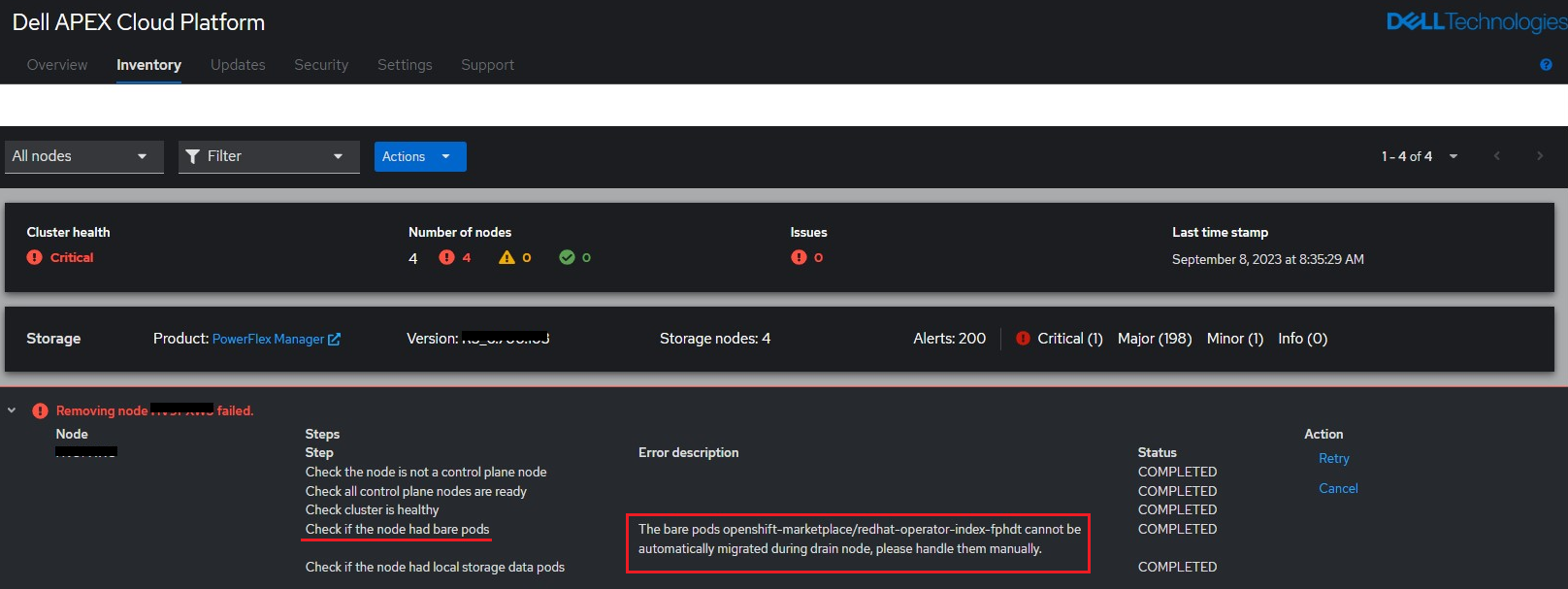
The remove process fails at step "Check if the node had bare pod" with error description "The bare pods openshift-marketplace/redhat-operator-index-wltgx cannot be automatically migrated during drain node, please handle them manually."
Årsag
The node remove process will first perform some prechecks before the actual removal starts. The precheck includes a validation whether there are bare pods living in the cluster. If those bare pods exist, user need to handle them manually.
For a cluster in restricted networks or without internet connection, if user configured OperatorHub following SolVe procedure "APEX Cloud Platform for Red Hat OpenShift - Configure OperatorHub procedure" section 3 "Configuring CatalogSource and ImageContentSourcePolicy for OperatorHub on disconnected cluster", it brings the pod "redhat-operator-index-wltgx" into cluster, and it will cause node removal precheck failure.
For a cluster in restricted networks or without internet connection, if user configured OperatorHub following SolVe procedure "APEX Cloud Platform for Red Hat OpenShift - Configure OperatorHub procedure" section 3 "Configuring CatalogSource and ImageContentSourcePolicy for OperatorHub on disconnected cluster", it brings the pod "redhat-operator-index-wltgx" into cluster, and it will cause node removal precheck failure.
Løsning
1. To migrate the pod to other nodes forcibly, user need to drain the node manually.
Note: please appropriately handle the customer-owned workloads/data on this node before performing the following commands.
2. Retry node remove.
Note: please appropriately handle the customer-owned workloads/data on this node before performing the following commands.
oc adm cordon <target-hostname-to-remove>

oc adm drain <target-hostname-to-remove> --ignore-daemonsets --delete-emptydir-data --force

oc adm uncordon <target-hostname-to-remove>
2. Retry node remove.
Berørte produkter
APEX Cloud Platform for Red Hat OpenShiftArtikelegenskaber
Artikelnummer: 000217681
Artikeltype: Solution
Senest ændret: 20 feb. 2026
Version: 3
Find svar på dine spørgsmål fra andre Dell-brugere
Supportservices
Kontrollér, om din enhed er dækket af supportservices.