Openshift: Cluster LCM failed during node reboot
Oversigt: LCM failed during node reboot due to CSI controller pod and depot manager pod run into deadlock.
Denne artikel gælder for
Denne artikel gælder ikke for
Denne artikel er ikke knyttet til et bestemt produkt.
Det er ikke alle produktversioner, der er identificeret i denne artikel.
Symptomer
LCM failed during OCP upgrade or node reboot, the update UI lost access.
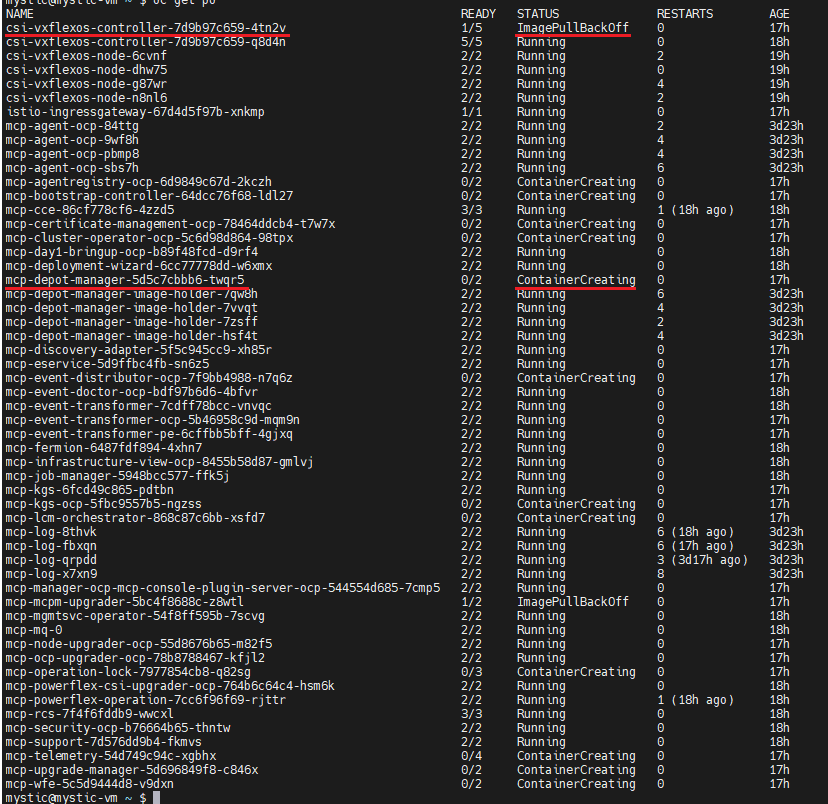
Log in OCP run "oc get pods -n dell-acp" command to check pods status, find one csi-vxflexos-controller pod is in ImagePullBackOff status and one mcp-depot-manager pod is in ContainerCreating status. For example:
Run "oc logs <pod_name> -n dell-acp -c driver" command to check the pod logs.
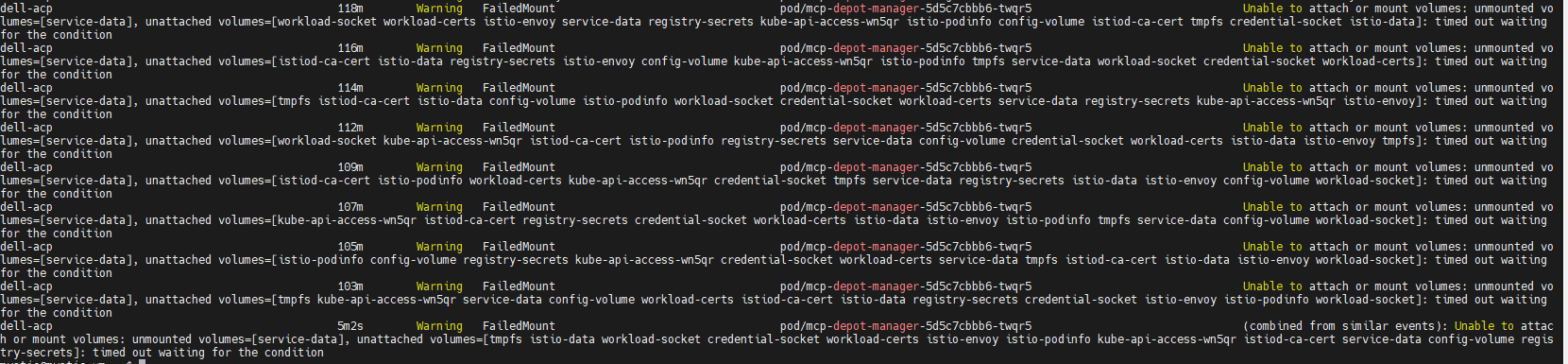
Run "oc describe pod <pod_name> -n dell-acp" command to check the ContainerCreating mcp-depot-manager (in the example screenshot above, the pod name is mcp-depot-manager-5d5c7cbbb6-twqr5), it reports FailedMount warning as below:
Run "oc get nodes" command to check node status, there is one node in SchedulingDisabled status, for example:

Log in OCP run "oc get pods -n dell-acp" command to check pods status, find one csi-vxflexos-controller pod is in ImagePullBackOff status and one mcp-depot-manager pod is in ContainerCreating status. For example:
Run "oc logs <pod_name> -n dell-acp -c driver" command to check the pod logs.
- In the Running csi-vxflexos-controller pod, log shows it is attempting to acquire leader lease, for example:
mystic@mystic-vm:~$ oc logs csi-vxflexos-controller-7d9b97c659-q8d4n -n dell-acp -c driver
I0918 08:33:23.460955 1 leaderelection.go:248] attempting to acquire leader lease dell-acp/driver-csi-vxflexos-dellemc-com...
I0918 08:33:23.460955 1 leaderelection.go:248] attempting to acquire leader lease dell-acp/driver-csi-vxflexos-dellemc-com...
- In the ImagePullBackOff csi-vxflexos-controller pod, log shows it successfully acquired leader lease, for example:
mystic@mystic-vm:~$ oc logs csi-vxflexos-controller-7d9b97c659-4tn2v -n dell-acp -c driver
I0918 09:07:30.076298 1 leaderelection.go:248] attempting to acquire leader lease dell-acp/driver-csi-vxflexos-dellemc-com...
I0918 09:07:46.074524 1 leaderelection.go:258] successfully acquired lease dell-acp/driver-csi-vxflexos-dellemc-com
time="2023-09-18T09:07:46Z" level=info msg="configured 69de1f95f50e390f" allSystemNames= endpoint="https://dellpowerflex.h01.com" isDefault=true nasName=0xc000489950 nfsAcls= password="********" skipCertificateValidation=false systemID=69de1f95f50e390f user=admin
time="2023-09-18T09:07:46Z" level=info msg="driver configuration file " file=/vxflexos-config-params/driver-config-params.yaml
time="2023-09-18T09:07:46Z" level=info msg="Read CSI_LOG_FORMAT from log configuration file" format=text
time="2023-09-18T09:07:46Z" level=info msg="Read CSI_LOG_LEVEL from log configuration file" fields.level=debug
time="2023-09-18T09:07:46Z" level=info msg="array configuration file" file=/vxflexos-config/config
time="2023-09-18T09:07:46Z" level=info msg="Probing all arrays. Number of arrays: 1"
time="2023-09-18T09:07:46Z" level=info msg="default array is set to array ID: 69de1f95f50e390f"
time="2023-09-18T09:07:46Z" level=info msg="69de1f95f50e390f is the default array, skipping VolumePrefixToSystems map update. \n"
time="2023-09-18T09:07:46Z" level=info msg="array 69de1f95f50e390f probed successfully"
time="2023-09-18T09:07:46Z" level=info msg="configured csi-vxflexos.dellemc.com" IsApproveSDCEnabled=false IsHealthMonitorEnabled=false IsQuotaEnabled=false IsSdcRenameEnabled=false MaxVolumesPerNode=0 allowRWOMultiPodAccess=false autoprobe=true externalAccess= mode=controller nfsAcls= privatedir=/dev/disk/csi-vxflexos sdcGUID= sdcPrefix= thickprovision=false
time="2023-09-18T09:07:46Z" level=info msg="identity service registered"
time="2023-09-18T09:07:46Z" level=info msg="controller service registered"
time="2023-09-18T09:07:46Z" level=info msg="Registering additional GRPC servers"
time="2023-09-18T09:07:46Z" level=info msg=serving endpoint="unix:///var/run/csi/csi.sock"
I0918 09:07:30.076298 1 leaderelection.go:248] attempting to acquire leader lease dell-acp/driver-csi-vxflexos-dellemc-com...
I0918 09:07:46.074524 1 leaderelection.go:258] successfully acquired lease dell-acp/driver-csi-vxflexos-dellemc-com
time="2023-09-18T09:07:46Z" level=info msg="configured 69de1f95f50e390f" allSystemNames= endpoint="https://dellpowerflex.h01.com" isDefault=true nasName=0xc000489950 nfsAcls= password="********" skipCertificateValidation=false systemID=69de1f95f50e390f user=admin
time="2023-09-18T09:07:46Z" level=info msg="driver configuration file " file=/vxflexos-config-params/driver-config-params.yaml
time="2023-09-18T09:07:46Z" level=info msg="Read CSI_LOG_FORMAT from log configuration file" format=text
time="2023-09-18T09:07:46Z" level=info msg="Read CSI_LOG_LEVEL from log configuration file" fields.level=debug
time="2023-09-18T09:07:46Z" level=info msg="array configuration file" file=/vxflexos-config/config
time="2023-09-18T09:07:46Z" level=info msg="Probing all arrays. Number of arrays: 1"
time="2023-09-18T09:07:46Z" level=info msg="default array is set to array ID: 69de1f95f50e390f"
time="2023-09-18T09:07:46Z" level=info msg="69de1f95f50e390f is the default array, skipping VolumePrefixToSystems map update. \n"
time="2023-09-18T09:07:46Z" level=info msg="array 69de1f95f50e390f probed successfully"
time="2023-09-18T09:07:46Z" level=info msg="configured csi-vxflexos.dellemc.com" IsApproveSDCEnabled=false IsHealthMonitorEnabled=false IsQuotaEnabled=false IsSdcRenameEnabled=false MaxVolumesPerNode=0 allowRWOMultiPodAccess=false autoprobe=true externalAccess= mode=controller nfsAcls= privatedir=/dev/disk/csi-vxflexos sdcGUID= sdcPrefix= thickprovision=false
time="2023-09-18T09:07:46Z" level=info msg="identity service registered"
time="2023-09-18T09:07:46Z" level=info msg="controller service registered"
time="2023-09-18T09:07:46Z" level=info msg="Registering additional GRPC servers"
time="2023-09-18T09:07:46Z" level=info msg=serving endpoint="unix:///var/run/csi/csi.sock"
Run "oc describe pod <pod_name> -n dell-acp" command to check the ContainerCreating mcp-depot-manager (in the example screenshot above, the pod name is mcp-depot-manager-5d5c7cbbb6-twqr5), it reports FailedMount warning as below:
Run "oc get nodes" command to check node status, there is one node in SchedulingDisabled status, for example:
Årsag
If the active csi-controller pod and mcp-depot-manager are on the same node, when LCM reboots the node, csi-controller and depot-manager will be rescheduled to new nodes. During pod boot up, csi-controller and depot-manager run into deadlock and cannot boot up.
Løsning
1. Run "oc get pods -n dell-acp |grep csi" command to identify the pod name of the bad status CSI controller pod.
2. Run "oc delete pod <pod_name> -n dell-acp" command to delete the identified pod/pods.
For example:

3. Wait for several minutes and run "oc get pods -n dell-acp" command to make sure all pods are in Running status. If there are still csi-controller pod or mcp-depot-manager not running, retry above step again.
4. Until all pods are in Running status, retry LCM to proceed the cluster upgrade.
2. Run "oc delete pod <pod_name> -n dell-acp" command to delete the identified pod/pods.
For example:
3. Wait for several minutes and run "oc get pods -n dell-acp" command to make sure all pods are in Running status. If there are still csi-controller pod or mcp-depot-manager not running, retry above step again.
4. Until all pods are in Running status, retry LCM to proceed the cluster upgrade.
Berørte produkter
APEX Cloud Platform for Red Hat OpenShiftArtikelegenskaber
Artikelnummer: 000217992
Artikeltype: Solution
Senest ændret: 20 feb. 2026
Version: 3
Find svar på dine spørgsmål fra andre Dell-brugere
Supportservices
Kontrollér, om din enhed er dækket af supportservices.