How to Obtain the MSI Installer for Dell Trusted Device
Oversigt: This article provides steps on retrieving the MSI installer from the Dell Trusted Device executable.
Denne artikel gælder for
Denne artikel gælder ikke for
Denne artikel er ikke knyttet til et bestemt produkt.
Det er ikke alle produktversioner, der er identificeret i denne artikel.
Instruktioner
MSI Installer
The following steps can be used to get the MSI installer:
- Go to the Dell Trusted Device Driver & Downloads page.
- Download the latest version that is available.

- Run the .exe file and go through the installation prompts.
- Proceed with the .NET installation.

- Leave the Dell Trusted Device installation window open.

- Open Windows Explorer and go to
%temp%.Note: Some versions the folder path may beC:\Users\User_Profile\AppData\Local\Downloadedinstallations.
- Browse to the {GUID} folder with the current date.
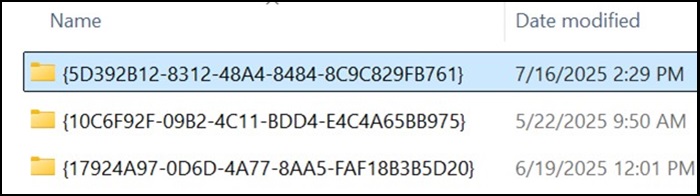
- Locate the TrustedDevice-64bit.msi file.

Berørte produkter
OptiPlex, XPS, Latitude, XPS, Fixed Workstations, Mobile Workstations, Dell Trusted DeviceArtikelegenskaber
Artikelnummer: 000348330
Artikeltype: How To
Senest ændret: 23 jul. 2025
Version: 2
Find svar på dine spørgsmål fra andre Dell-brugere
Supportservices
Kontrollér, om din enhed er dækket af supportservices.