PowerFlex: PFX00102.0000201 - NODE_STATUS_DIAGNOSTIC_FAILURE - The following nodes are not in a ready status or unreachable
Oversigt: This article explains how to troubleshoot the alert NODE_STATUS_DIAGNOSTIC_FAILURE - The following nodes are not in a ready status or unreachable status: {{node_names}}
Denne artikel gælder for
Denne artikel gælder ikke for
Denne artikel er ikke knyttet til et bestemt produkt.
Det er ikke alle produktversioner, der er identificeret i denne artikel.
Instruktioner
Error code/symptom ID: 7042012 (PFX00102.0000201) The following nodes are not in a ready status or unreachable status: {{node_names}}
Symptom - A node event failure occurs when a specific node failed three consecutive times for scheduled runs. After the third failure an event is raised, and an alert is triggered. Each scheduled run occurs every two minutes, so the alert will be triggered after six minutes. In a manual, run every time the node fails an event is raised and an alert is triggered. When a node is in a failed state, the physical node will restart or fail. Likely cause will be networking issues, disk storage issues, possible misconfiguration, or ETCD database corruption.
Resolution and troubleshooting steps:
Problem Validation
- Go to the Management Diagnostics nodes page. At least one node will be in a failed state.
- Review the node card raw output on the diagnostics tab.
- There might also be errors in business logic such as unpredicted input or cluster state, or network issues.
- There might be a slow response time.
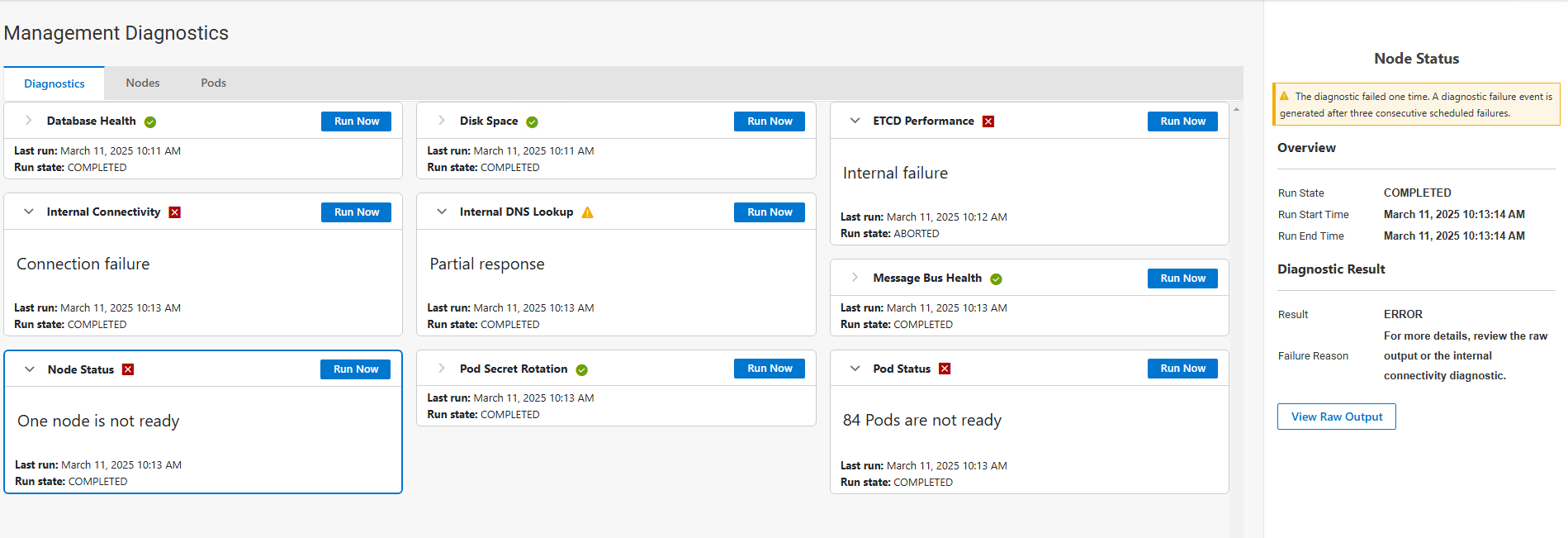
Problem Resolution
- Go to the Management Diagnostics nodes page.
- Wait 10 to 15 minutes for the node to recover.
- Check the overall PowerFlex management platform cluster status.
- Depending on the error, you can free up the disk space, fix network issues, restart the physical VM or physical node, or examine the raw output for hints.
- If this issue persists, call Dell Technologies Support for assistance.
Note: When one of the nodes is in a failing state, do not restart the other nodes. At least two nodes must be in a good state before restarting one of the nodes. If two nodes are not in a ready state, the entire node state might be lost.
Resolution Validation
- In the Management Diagnostics page, nodes tab, verify that the node is in a stable, ready state.
Flere oplysninger
Berørte produkter
PowerFlex rack, ScaleIOArtikelegenskaber
Artikelnummer: 000446630
Artikeltype: How To
Senest ændret: 31 mar. 2026
Version: 2
Find svar på dine spørgsmål fra andre Dell-brugere
Supportservices
Kontrollér, om din enhed er dækket af supportservices.