Ustalanie wersji instalatora Master Installer programu Dell Data Security
Zusammenfassung: Dowiedz się, jak zidentyfikować wersję instalatora głównego Dell Data Security (dawniej Dell Data Protection), wykonując poniższe instrukcje krok po kroku.
Dieser Artikel gilt für
Dieser Artikel gilt nicht für
Dieser Artikel ist nicht an ein bestimmtes Produkt gebunden.
In diesem Artikel werden nicht alle Produktversionen aufgeführt.
Weisungen
Uwaga:
- Od maja 2022 r. oprogramowanie Dell Endpoint Security Suite Enterprise osiągnęło koniec konserwacji. Ten produkt i związane z nim artykuły nie są już aktualizowane przez Dell.
- Od stycznia 2019 r. oprogramowanie Dell Endpoint Security Suite Pro osiągnęło koniec konserwacji. Ten produkt i związane z nim artykuły nie są już aktualizowane przez Dell.
- Aby uzyskać więcej informacji, zapoznaj się z artykułem Zasady dotyczące cyklu życia produktu (koniec wsparcia technicznego i koniec przydatności do użycia) dla programu Dell Data Security. Jeśli masz pytania dotyczące innych artykułów, skontaktuj się z działem sprzedaży lub napisz wiadomość na adres endpointsecurity@dell.com.
- Aby uzyskać dodatkowe informacje na temat aktualnych produktów, zobacz Endpoint Security.
Numer wersji instalatora Master Installer programu Dell Data Security (dawniej Dell Data Protection) można wykorzystać do:
- Identyfikowanie znanych problemów.
- Zrozumienie zmian przepływu pracy.
- Weryfikacji wymagań systemowych.
Dotyczy produktów:
- Dell Encryption Enterprise
- Dell Data Protection | Enterprise Edition
- Dell Encryption Personal
- Dell Data Protection | Personal Edition
- Dell Endpoint Security Suite Enterprise
- Dell Endpoint Security Suite Enterprise
Dotyczy systemów operacyjnych:
- Windows
- Przed ustaleniem wersji należy pobrać [MASTER INSTALLER].
- Nazwa produktu [MASTER INSTALLER] różni się w zależności od aplikacji:
DDSSetup.exeDDSSetup.exe dla Dell Encryption EnterpriseDDSSetup.exeDDSSetup.exe dla Dell Encryption PersonalDDSSuite.exeDell Endpoint Security Suite Enterprise2DDSSuite.exedla Dell Endpoint Security SuiteDDPSetup.exeDDPSetup.exe dla Dell Data Protection | Enterprise EditionDDPSetup.exeDDPSetup.exe dla Dell Data Protection | Personal EditionDDPSuite.exeDDPSuite.exe dla Dell Data Protection | Endpoint Security SuiteDDPSuite.exeDDPSuite.exe dla Dell Data Protection | Endpoint Security Suite Enterprise
Aby uzyskać informacje na temat uzyskania pliku DDPSetup.exe, zapoznaj się z tematem Pobieranie Dell Encryption Enterprise oraz Dell Encryption Personal.
- Kliknij plik [MASTER INSTALLER] prawym przyciskiem myszy, a następnie wybierz opcję Właściwości.
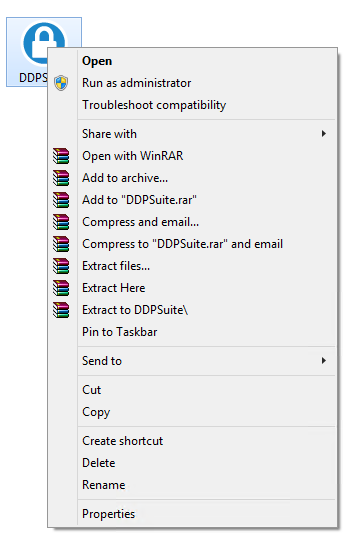
- Kliknij kartę Szczegóły.

- Zapisz informację znajdującą się w polu Wersja produktu.
 Wersja produktu Twojego klienta może różnić się od wersji widocznej na powyższym zrzucie ekranu.
Weitere Informationen
Videos
Betroffene Produkte
Dell Encryption, Dell Endpoint Security Suite Pro, Dell Endpoint Security Suite EnterpriseArtikeleigenschaften
Artikelnummer: 000124917
Artikeltyp: How To
Zuletzt geändert: 06 Aug. 2026
Version: 12
Antworten auf Ihre Fragen erhalten Sie von anderen Dell NutzerInnen
Support Services
Prüfen Sie, ob Ihr Gerät durch Support Services abgedeckt ist.