Como identificar a versão do instalador mestre do Dell Data Security
Zusammenfassung: Saiba como identificar a versão do instalador mestre do Dell Data Security (antigo Dell Data Protection) seguindo estas instruções passo a passo.
Dieser Artikel gilt für
Dieser Artikel gilt nicht für
Dieser Artikel ist nicht an ein bestimmtes Produkt gebunden.
In diesem Artikel werden nicht alle Produktversionen aufgeführt.
Weisungen
Nota:
- Em maio de 2022, o Dell Endpoint Security Suite Enterprise chegou ao fim da manutenção. Esse produto e os artigos relacionados a ele não são mais atualizados pela Dell.
- Em janeiro de 2019, o Dell Endpoint Security Suite Pro chegou ao fim da manutenção. Esse produto e os artigos relacionados a ele não são mais atualizados pela Dell.
- Para obter mais informações, consulte Política de ciclo de vida do produto (fim do suporte e fim da vida útil) do Dell Data Security. Se você tiver alguma dúvida sobre artigos alternativos, entre em contato com sua equipe de vendas ou envie um e-mail para endpointsecurity@dell.com.
- Consulte Segurança de endpoints para obter mais informações sobre os produtos atuais.
A versão do instalador mestre do Dell Data Security (anteriormente Dell Data Protection) pode ser usada para:
- Identificar problemas conhecidos.
- Compreender as alterações no fluxo de trabalho.
- Verificar os requisitos do sistema.
Produtos afetados:
- Dell Encryption Enterprise
- Dell Data Protection | Enterprise Edition
- Dell Encryption Personal
- Dell Data Protection | Personal Edition
- Dell Endpoint Security Suite Enterprise
- Dell Endpoint Security Suite Enterprise
Sistemas operacionais afetados:
- Windows
- É preciso fazer download do [INSTALADOR MESTRE] antes de identificar a versão.
- O nome do produto [INSTALADOR MESTRE] varia de acordo com o aplicativo:
DDSSetup.exeDDSSetup.exe para Dell Encryption EnterpriseDDSSetup.exeDDSSetup.exe para Dell Encryption PersonalDDSSuite.exeDell Endpoint Security Suite EnterpriseDDSSuite.exepara Dell Endpoint Security SuiteDDPSetup.exeDDPSetup.exe para Dell Data Protection | Enterprise EditionDDPSetup.exeDDPSetup.exe para Dell Data Protection | Personal EditionDDPSuite.exeDDPSuite.exe para Dell Data Protection | Endpoint Security SuiteDDPSuite.exeDDPSuite.exe para Dell Data Protection | Endpoint Security Suite Enterprise
Para saber informações sobre como obter o DDPSetup.exe, consulte Como fazer download do Dell Encryption Enterprise ou do Dell Encryption Personal.
- Clique com o botão direito em [INSTALADOR MESTRE] e selecione Propriedades.
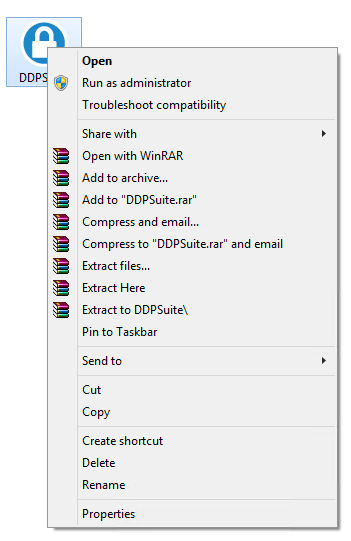
- Clique na guia Detalhes.

- Documente a Versão do produto.
 A versão do produto do seu client pode ser diferente da captura de tela acima.
Weitere Informationen
Videos
Betroffene Produkte
Dell Encryption, Dell Endpoint Security Suite Pro, Dell Endpoint Security Suite EnterpriseArtikeleigenschaften
Artikelnummer: 000124917
Artikeltyp: How To
Zuletzt geändert: 06 Aug. 2026
Version: 12
Antworten auf Ihre Fragen erhalten Sie von anderen Dell NutzerInnen
Support Services
Prüfen Sie, ob Ihr Gerät durch Support Services abgedeckt ist.