如何确定 Dell Data Security 主安装程序的版本
Zusammenfassung: 按照这些分步说明了解如何识别 Dell Data Security(以前称为 Dell Data Protection)主安装程序的版本。
Dieser Artikel gilt für
Dieser Artikel gilt nicht für
Dieser Artikel ist nicht an ein bestimmtes Produkt gebunden.
In diesem Artikel werden nicht alle Produktversionen aufgeführt.
Weisungen
注:
- 从 2022 年 5 月起,Dell Endpoint Security Suite Enterprise 停止维护。戴尔不再更新本产品及其文章。
- 从 2019 年 1 月起,Dell Endpoint Security Suite Pro 停止维护。戴尔不再更新本产品及其文章。
- 有关详细信息,请参阅 Dell Data Security 产品生命周期(结束支持和停售)政策。如果您对其他文章有任何疑问,请联系您的销售团队或联系 endpointsecurity@dell.com。
- 请参阅端点安全性,了解有关当前产品的其他信息。
Dell Data Security(旧称 Dell Data Protection)主安装程序的版本可用于:
- 识别已知问题。
- 了解工作流更改。
- 验证系统要求。
受影响的产品:
- Dell Encryption Enterprise
- Dell Data Protection | Enterprise Edition
- Dell Encryption Personal
- Dell Data Protection | Personal Edition
- Dell Endpoint Security Suite Enterprise
- Dell Endpoint Security Suite Enterprise
受影响的操作系统:
- Windows
- 在确定版本之前,必须已下载[主安装程序]。
- [主安装程序]产品名称因应用程序而异:
DDSSetup.exeDDSSetup.exe (Dell Encryption Enterprise)DDSSetup.exeDDSSetup.exe (Dell Encryption Personal)DDSSuite.exeDell Endpoint Security Suite EnterpriseDDSSuite.exe适用于 Dell Endpoint Security SuiteDDPSetup.exeDDPSetup.exe (Dell Data Protection | Enterprise Edition)DDPSetup.exeDDPSetup.exe (Dell Data Protection | Personal Edition)DDPSuite.exeDDPSuite.exe (Dell Data Protection | Endpoint Security Suite)DDPSuite.exeDDPSuite.exe (Dell Data Protection | Endpoint Security Suite Enterprise)
有关获取 DDPSetup.exe 的信息,请参阅如何下载 Dell Encryption Enterprise 或 Dell Encryption Personal。
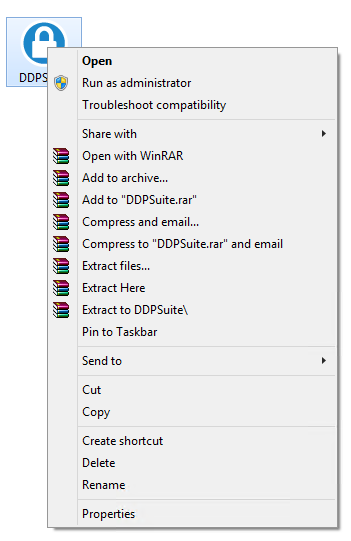
- 右键单击[主安装程序],然后选择 Properties。
- 单击详细信息选项卡。

- 记下产品版本。
 您的客户端的产品版本可能与上面的屏幕截图不同。
Weitere Informationen
Videos
Betroffene Produkte
Dell Encryption, Dell Endpoint Security Suite Pro, Dell Endpoint Security Suite EnterpriseArtikeleigenschaften
Artikelnummer: 000124917
Artikeltyp: How To
Zuletzt geändert: 06 Aug. 2026
Version: 12
Antworten auf Ihre Fragen erhalten Sie von anderen Dell NutzerInnen
Support Services
Prüfen Sie, ob Ihr Gerät durch Support Services abgedeckt ist.