Jak zjistit verzi hlavního instalačního programu Dell Data Security
Zusammenfassung: Zjistěte, jak podle těchto podrobných pokynů zjistit verzi hlavního instalačního programu nástroje Dell Data Security (dříve Dell Data Protection).
Dieser Artikel gilt für
Dieser Artikel gilt nicht für
Dieser Artikel ist nicht an ein bestimmtes Produkt gebunden.
In diesem Artikel werden nicht alle Produktversionen aufgeführt.
Weisungen
Poznámka:
- V květnu 2022 dosáhl nástroj Dell Endpoint Security Suite Enterprise ukončení údržby. Tento produkt a související články již společnost Dell neaktualizuje.
- V lednu 2019 dosáhl nástroj Dell Endpoint Security Suite Pro ukončení údržby. Tento produkt a související články již společnost Dell neaktualizuje.
- Více informací naleznete v článku Zásady životního cyklu produktu (konec podpory a životnosti) nástroje Dell Data Security. Máte-li jakékoli dotazy týkající se alternativních článků, obraťte se na prodejní tým nebo na adresu endpointsecurity@dell.com.
- Další informace o aktuálních produktech naleznete v článku Zabezpečení koncového bodu.
Verzi hlavního instalačního programu Dell Data Security (dříve Dell Data Protection) lze použít pro účely:
- identifikace známých problémů,
- porozumění změnám pracovního postupu,
- ověření systémových požadavků.
Dotčené produkty:
- Dell Encryption Enterprise
- Dell Data Protection | Enterprise Edition
- Dell Encryption Personal
- Dell Data Protection | Personal Edition
- Dell Endpoint Security Suite Enterprise
- Dell Endpoint Security Suite Enterprise
Dotčené operační systémy:
- Windows
- Před zjištěním verze je nutné stáhnout [HLAVNÍ INSTALAČNÍ PROGRAM].
- [HLAVNÍ INSTALAČNÍ PROGRAM] produktu se liší podle aplikace:
DDSSetup.exeDDSSetup.exe pro Dell Encryption EnterpriseDDSSetup.exeDDSSetup.exe pro Dell Encryption PersonalDDSSuite.exeDDSSuite.exe pro Dell Endpoint Security Suite EnterpriseDDSSuite.exeDDSSuite.exe pro Dell Endpoint Security SuiteDDPSetup.exeDDPSetup.exe pro Dell Data Protection | Enterprise EditionDDPSetup.exeDDPSetup.exe pro Dell Data Protection | Personal EditionDDPSuite.exeDDPSuite.exe pro Dell Data Protection | Endpoint Security SuiteDDPSuite.exeDDPSuite.exe pro Dell Data Protection | Endpoint Security Suite Enterprise
Informace o stažení souboru DDSSetup či DDPSetup naleznete v článku Postup stažení softwaru Dell Encryption Enterprise nebo Dell Encryption Personal.
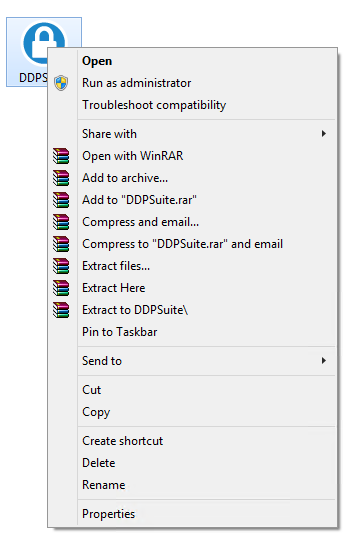
- Klikněte pravým tlačítkem myši na [HLAVNÍ INSTALAČNÍ PROGRAM] a vyberte možnost Vlastnosti.
- Klikněte na kartu Podrobnosti.

- Poznamenejte si verzi produktu.
 Verze produktu vašeho klienta se může lišit od výše uvedeného snímku obrazovky.
Weitere Informationen
Videos
Betroffene Produkte
Dell Encryption, Dell Endpoint Security Suite Pro, Dell Endpoint Security Suite EnterpriseArtikeleigenschaften
Artikelnummer: 000124917
Artikeltyp: How To
Zuletzt geändert: 06 Aug. 2026
Version: 12
Antworten auf Ihre Fragen erhalten Sie von anderen Dell NutzerInnen
Support Services
Prüfen Sie, ob Ihr Gerät durch Support Services abgedeckt ist.