Dell Latitude 3410: Guida ai tasti funzione della tastiera
Zusammenfassung: La seguente guida elenca i tasti di scelta rapida disponibili e le funzioni che eseguono sul notebook Dell Latitude 3410.
Dieser Artikel gilt für
Dieser Artikel gilt nicht für
Dieser Artikel ist nicht an ein bestimmtes Produkt gebunden.
In diesem Artikel werden nicht alle Produktversionen aufgeführt.
Symptome
Funzioni principali dei tasti di scelta rapida
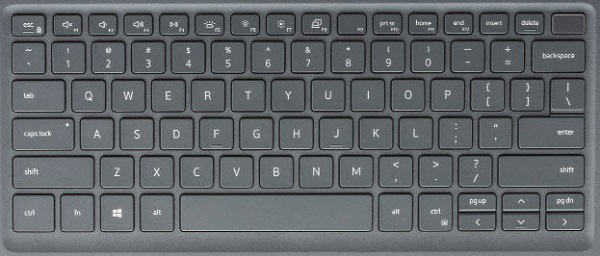
La figura seguente è una vista della tastiera con le funzioni principali disponibili sul notebook Latitude 3410.
Ursache
La seguente tabella riporta un elenco delle funzioni dei tasti di scelta rapida disponibili sul notebook Latitude 3410.
| Tasti | Comportamento principale | Comportamento secondario (Fn + Tasto) |
|---|---|---|
| Fn + Esc | Escape |
Blocco tasto Fn dell'interruttore |
| Fn + F1 |
Disattiva l'audio |
F1 |
| Fn + F2 |
Riduce il volume |
F2 |
| Fn + F3 |
Aumenta il volume |
F3 |
| Fn + F4 |
Disattiva l'audio del microfono |
F4 |
| Fn + F5 |
Attiva e disattiva la retroilluminazione della tastiera. |
F5 |
| Fn + F6 |
Riduce la luminosità |
F6 |
| Fn + F7 |
Aumenta la luminosità |
F7 |
| Fn + F8 |
Passa allo schermo esterno |
F8 |
| Fn + F10 |
STAMP |
F10 |
| Fn + F11 |
Home |
F11 |
| Fn + 12 |
Fine |
F12 |
| Fn + CTRL |
Apre il menu dell'applicazione |
-- |
Lösung
 Consultare la Knowledge Base sulla tastiera per ulteriori risorse e informazioni.
 Per ulteriori articoli e informazioni, visitare la pagina del supporto per il trackpad.
 Ulteriori articoli e informazioni sono disponibili anche nella pagina del supporto sui mouse.
Betroffene Produkte
Latitude 3410Artikeleigenschaften
Artikelnummer: 000129898
Artikeltyp: Solution
Zuletzt geändert: 19 Apr. 2026
Version: 7
Antworten auf Ihre Fragen erhalten Sie von anderen Dell NutzerInnen
Support Services
Prüfen Sie, ob Ihr Gerät durch Support Services abgedeckt ist.