Dell Data Security Shield 模式
Zusammenfassung: 本文討論 Dell Data Security (先前稱為 Dell Data Protection) 護蓋模式。
Dieser Artikel gilt für
Dieser Artikel gilt nicht für
Dieser Artikel ist nicht an ein bestimmtes Produkt gebunden.
In diesem Artikel werden nicht alle Produktversionen aufgeführt.
Symptome
受影響的產品:
- Credant Mobile Guardian
- Dell Encryption Enterprise
- Dell Data Protection | Enterprise Edition
- Dell Encryption External Media
- Dell Data Protection | External Media Edition
- Dell Encryption Personal
- Dell Data Protection | Personal Edition
- Dell Data Protection | 安全性工具
- 適用於伺服器的 Dell Encryption Enterprise
- Dell Data Protection | Server Edition
受影響的平台:
- Windows
原則式 Dell Data Security (先前稱為 Dell Data Protection) 軟體會使用遮罩模式識別符進行產品分類。
Ursache
警告:
- Shield 模式是在產品安裝時決定,無法手動修改。
- Shield 模式僅用於故障診斷產品類型或狀態。
Lösung
Dell Data Security 產品的遮罩模式為:
| ID | 模式 | 產品 |
|---|---|---|
| 0 | 未知/未初始化 | 未初始化/未佈建1 |
| 1 | Enterprise 模式 | Dell Encryption Enterprise \ Dell Data Protection Enterprise Edition 護蓋 |
| 2 | 獨立模式 | Credant Mobile Guardian |
| 3 | 僅限企業 EME 模式 | Dell Encryption External Media \ Dell Data Protection |外部媒體版 |
| 4 | 本機管理模式 | Dell Encryption Personal \ Dell Data Protection |個人版 |
| 5 | Essentials 模式 | 戴爾數據保護 |安全性工具2 |
| 6 | 伺服器加密模式 | 適用於伺服器的 Dell Encryption Enterprise \ Dell Data Protection |伺服器加密 |
| 7 | Saas 模式 | Dell Encryption Enterprise Shield |
1所有 Dell Data Protection 產品在啟動前均保持未佈建狀態。
2基本模式僅在 Dell Data Protection 安裝時發生 |安全性工具。
找到 Shield 模式:
警告:將您帶入 Windows 登錄:
- 編輯登錄可能會導致電腦在下次重新開機時沒有回應。
- 如果您對執行此步驟有任何疑慮,請聯絡 Dell Data Security 國際支援電話號碼以取得協助。
- 在 Windows「開始」功能表上按右鍵,然後選取執行。
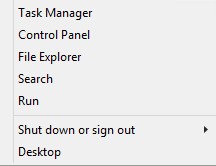
圖 1:(僅英文) 執行
- 在「執行」使用者介面 (UI) 中輸入 regedit ,然後按下 確定。
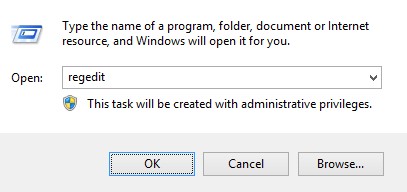
圖 2:(僅英文)鍵入 regedit
- 前往 HKEY_LOCAL_MACHINE\SOFTWARE\Credant\CMGShield。
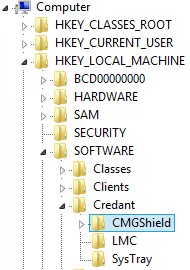
圖 3:(僅英文) CMGShield
- 找到 DWORD 金鑰 SM。
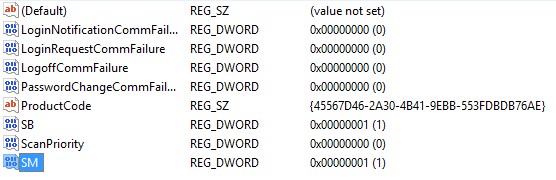
圖 4:(僅英文)SM
注意:在範例中,SM 金鑰設定為 1。這可識別 Shield 模式企業版。
如要聯絡支援部門,請參閱 Dell Data Security 國際支援電話號碼。
請前往 TechDirect,以線上產生技術支援要求。
如需更多深入見解與資源,請加入 Dell 安全性社群論壇。
Betroffene Produkte
Dell EncryptionArtikeleigenschaften
Artikelnummer: 000132837
Artikeltyp: Solution
Zuletzt geändert: 19 Apr. 2026
Version: 11
Antworten auf Ihre Fragen erhalten Sie von anderen Dell NutzerInnen
Support Services
Prüfen Sie, ob Ihr Gerät durch Support Services abgedeckt ist.