NetWorker GST crash after NMC upgrade with IM003: The specified driver could not be loaded due to system error.
Zusammenfassung: The NetWorker Management Console (NMC) server is upgraded to a newer NetWorker release. The upgrade completes successfully, but the NMC is inaccessible. The NMC servers gstd log reports IM003: The specified driver could not be loaded due to system error 126: The specified module could not be found. (PostgreSQL ANSI(x64), C:\program files\emc networker\management\GST\postgres_latest ...
Dieser Artikel gilt für
Dieser Artikel gilt nicht für
Dieser Artikel ist nicht an ein bestimmtes Produkt gebunden.
In diesem Artikel werden nicht alle Produktversionen aufgeführt.
Symptome
A Microsoft Windows-based NetWorker Management Console (NMC) is upgraded to a newer NetWorker release.
The upgrade completes successfully; however, after completing the upgrade, the NMC is inaccessible.
The ..\Program Files\EMC NetWorker\Management\GST\logs\gstd.raw reports:
0 MM/DD/YYYY HH:mm:SS  gstd NSR notice MM/DD/YYYY HH:mm:SS gstd-D1 D:/views/nw/19.11/gst/liblgodbc/odbc_lib.c(713): lgodbc_alloc_connection(): SQLConnect()
0 MM/DD/YYYY HH:mm:SS  gstd NSR notice MM/DD/YYYY HH:mm:SS gstd-D1       ODBC environment handle:
0 MM/DD/YYYY HH:mm:SS  gstd NSR notice MM/DD/YYYY HH:mm:SS gstd-D1       ODBC database connection handle:
0 MM/DD/YYYY HH:mm:SS  gstd NSR notice MM/DD/YYYY HH:mm:SS gstd-D1     IM003: Specified driver could not be loaded due to system error  126: The specified module could not be found. (PostgreSQL ANSI(x64), C:\program files\emc networker\management\GST\postgres_latest\odbc\psqlodbc30a.dll).
0 MM/DD/YYYY HH:mm:SS  gstd NSR notice MM/DD/YYYY HH:mm:SS gstd-D1 Internal error: could not get database handle.
0 MM/DD/YYYY HH:mm:SS  gstd NSR notice MM/DD/YYYY HH:mm:SS gstd-D0 Internal error: could not get database handle.
0 MM/DD/YYYY HH:mm:SS  gstd NSR notice MM/DD/YYYY HH:mm:SS gstd-D0 Please also see the log files in 'pg_log'  directory inside the product's database directory for the database server's output messages
0 MM/DD/YYYY HH:mm:SS  gstd NSR notice MM/DD/YYYY HH:mm:SS gstd-D0 Internal error: could not release database handle.
NetWorker: How to use nsr_render_log to render .raw log files
Ursache
The NMC installation path should include a symbolic link ..\Program Files\EMC NetWorker\Management\GST\postgres_latest which links to a postgres version folder under ..\Program Files\EMC NetWorker\Management\GST\postgres..
This problem is sometimes observed during NetWorker upgrades where the upgraded NetWorker version contains a newer postgres version. The upgrade process removed the postgres_latest symbolic link to the old postgres folder, but did not create a new link to the new postgres folder.
Lösung
Re-create the postgres latest symbolic Link.
- Locate the old postgres folder: <Install_Drive>:\Program Files\EMC NetWorker\Management\GST\postgres
- Open am administrative command prompt and run the following command:
Syntax:
mklink /D "path_to_new_symbolic_link "path_to_new_postgres_folder”
Example:
C:\Users\Administrator.NETWORKER>dir "C:\Program Files\EMC NetWorker\Management\GST\postgres"
 Volume in drive C is Windows
 Volume Serial Number is 46FA-BFBA

 Directory of C:\Program Files\EMC NetWorker\Management\GST\postgres

05/16/2025  02:26 PM    <DIR>          .
05/16/2025  02:51 PM    <DIR>          ..
05/13/2025  01:40 PM    <DIR>          11.21
05/13/2025  01:41 PM    <DIR>          12.18
05/13/2025  01:41 PM    <DIR>          16.4
05/13/2025  01:40 PM    <DIR>          9.2
               0 File(s)              0 bytes
               6 Dir(s)  47,118,540,800 bytes free

C:\Users\Administrator.NETWORKER>
C:\Users\Administrator.NETWORKER>mklink /D "C:\Program Files\EMC NetWorker\Management\GST\postgres_latest" "C:\Program Files\EMC NetWorker\Management\GST\postgres\16.4"
symbolic link created for C:\Program Files\EMC NetWorker\Management\GST\postgres_latest <<===>> C:\Program Files\EMC NetWorker\Management\GST\postgres\16.4
The
postgres_latest symbolic link folder should be visible from Windows File Explorer.
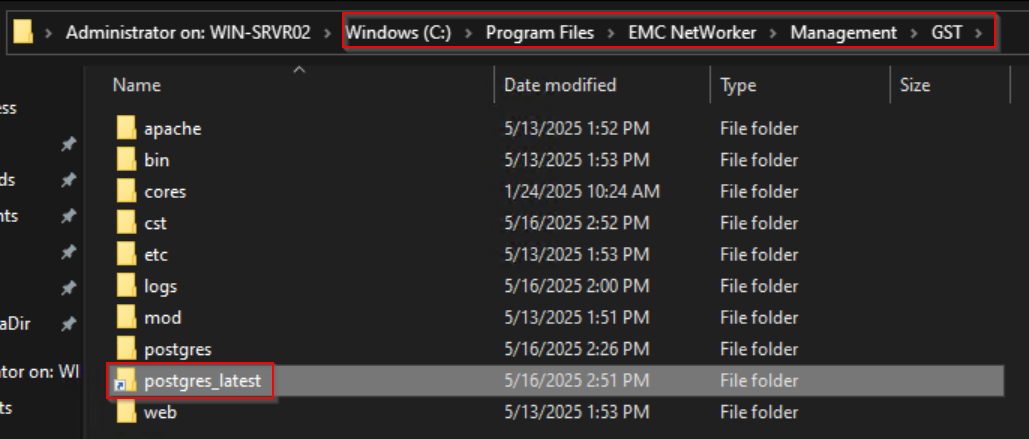
NOTE: If NetWorker is installed in another file path location; adjust your commands according to the path used on the server.
- Restart NMC services:
net stop gstd && net start gstd
Betroffene Produkte
NetWorker, NetWorker Management ConsoleProdukte
NetWorker FamilyArtikeleigenschaften
Artikelnummer: 000186359
Artikeltyp: Solution
Zuletzt geändert: 16 Mai 2025
Version: 7
Antworten auf Ihre Fragen erhalten Sie von anderen Dell NutzerInnen
Support Services
Prüfen Sie, ob Ihr Gerät durch Support Services abgedeckt ist.