Windows 11 報告的作業系統版本不正確
Zusammenfassung: 瞭解 Windows 11 上的特定應用程式和電腦設定 會偵測到作業系統是否為 Windows 10。
Dieser Artikel gilt für
Dieser Artikel gilt nicht für
Dieser Artikel ist nicht an ein bestimmtes Produkt gebunden.
In diesem Artikel werden nicht alle Produktversionen aufgeführt.
Symptome
在多個應用程式和電腦設定中,Windows 11 會識別為 Windows 10,以防止應用程式不相容。
識別為 Windows 10 的系統設定。
- Microsoft Edge 和其他 Chromium 型瀏覽器,例如 Google Chrome 瀏覽器、Brave 等會在使用者代理程式字串中顯示 Windows 10。
- Mozilla/5.0 (Windows NT 10.0;Win64;x64) AppleWebKit/537.36 (KHTML,像是 Gecko) Chrome/95.0.4638.69 Safari/537.36
- 採用使用者代理程式字串來識別數位內容的實際 Windows 版本 (例如驅動程式下載和自助) 的網站,可能會導向不正確的內容。
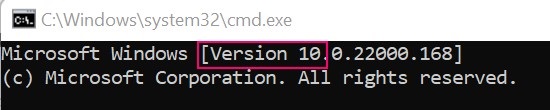
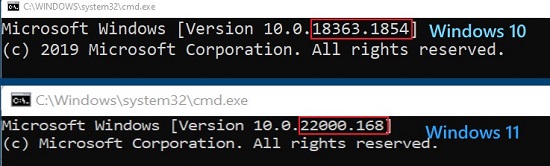
- Windows 命令提示字元識別為版本 10。
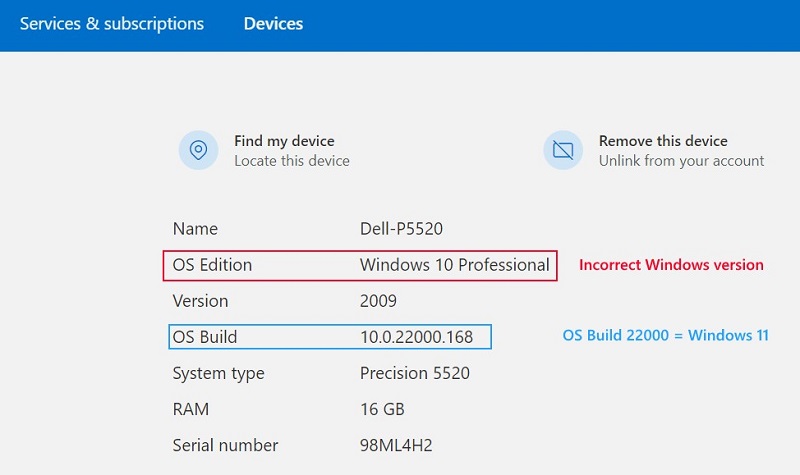
- Microsoft帳戶裝置屬性
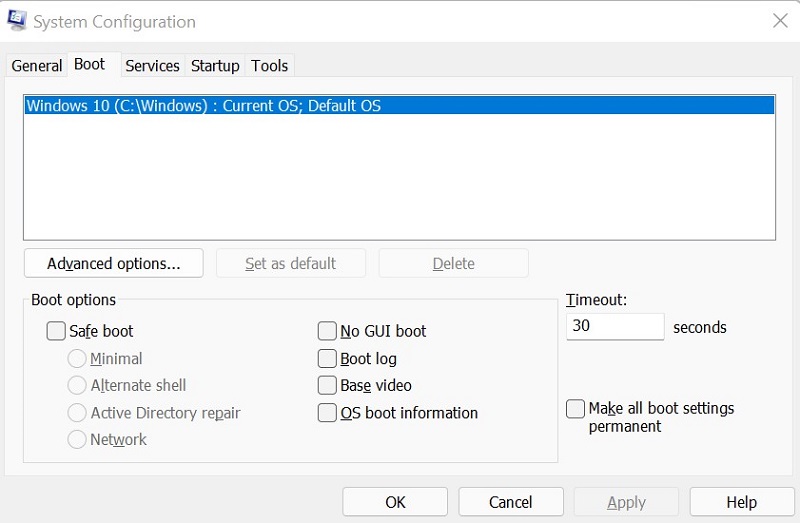
- 系統組態 (MSCONFIG)
Ursache
Windows 使用內部組建編號來區分 Windows 11 (組建 22000 及更新版本) 和 Windows 10 (組建低於 22000)。
Lösung
若要正確識別電腦上的 Windows 版本,請使用 Winver。如需指示,請參閱 Microsoft 知識文章:我執行的是哪個版本的 Windows 作業系統
Betroffene Produkte
Alienware, Inspiron, OptiPlex, Vostro, XPS, G Series, G Series, Alienware, Inspiron, Latitude, Vostro, XPS, Fixed Workstations, Mobile WorkstationsProdukte
Vostro, XPS, Vostro, XPSArtikeleigenschaften
Artikelnummer: 000193571
Artikeltyp: Solution
Zuletzt geändert: 12 Mai 2026
Version: 8
Antworten auf Ihre Fragen erhalten Sie von anderen Dell NutzerInnen
Support Services
Prüfen Sie, ob Ihr Gerät durch Support Services abgedeckt ist.