VxRail: Event Code VXR0140A4
Zusammenfassung: Event VXR0140A4 is reported when the Core and Inventory disk reaches 90% capacity.
Dieser Artikel gilt für
Dieser Artikel gilt nicht für
Dieser Artikel ist nicht an ein bestimmtes Produkt gebunden.
In diesem Artikel werden nicht alle Produktversionen aufgeführt.
Symptome
Severity: Error
A VxRail event VXR0140A4 occurs, and a red alarm appears in the vCenter portal.
A VxRail event VXR0140A4 occurs, and a red alarm appears in the vCenter portal.
Ursache
The storage of the Core and Inventory disk (/storage/db/) on vCenter has reached 90% capacity.
Lösung
Log in to the vCenter Server Appliance as root via SSH or the vCenter virtual machine Console.
If SSH is not enabled on your vCenter server, follow these steps to enable it:
- Go to
https://[vCenter_url]:5480(the vCenter Server Management UI) and log in as root. - Click Access, then click Edit to enable vCenter SSH.

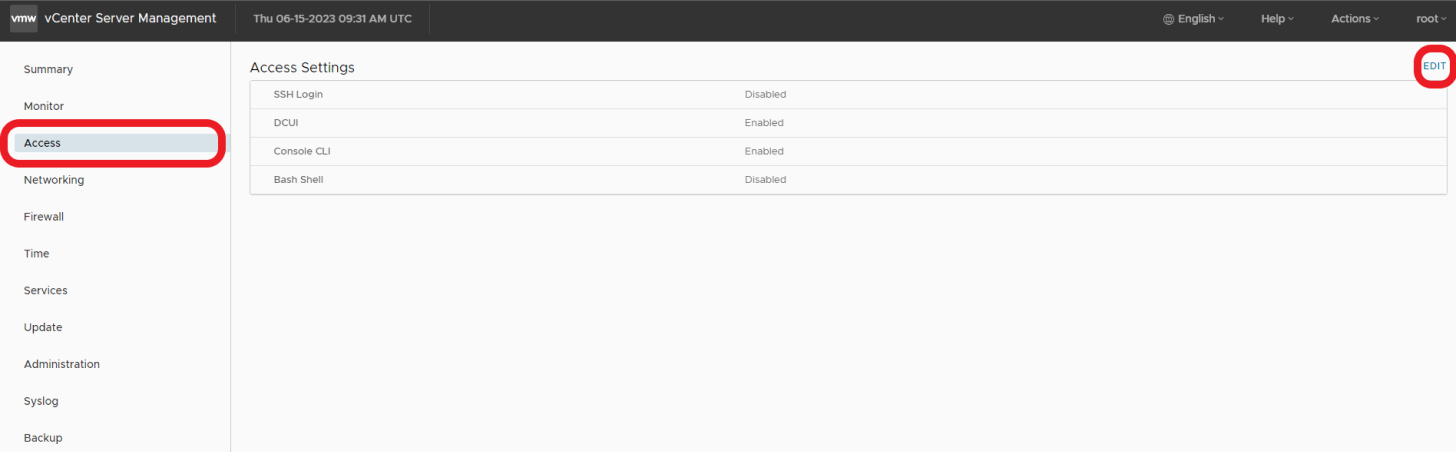

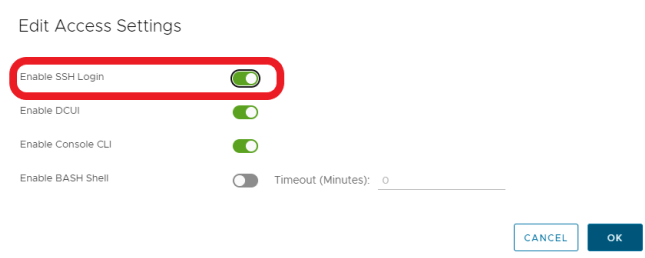
- SSH to vCenter
ssh root@[vcenter ip or fqdn]
To resolve the issue, please follow the steps outlined in these VMWare KB articles.

Betroffene Produkte
VxRail, VxRail Appliance Series, VxRail SoftwareArtikeleigenschaften
Artikelnummer: 000214541
Artikeltyp: Solution
Zuletzt geändert: 22 Mai 2026
Version: 2
Antworten auf Ihre Fragen erhalten Sie von anderen Dell NutzerInnen
Support Services
Prüfen Sie, ob Ihr Gerät durch Support Services abgedeckt ist.