NetWorker:REST API 请求失败,并显示错误消息:HTTP 状态 404 - 未找到“请求的资源不可用”
Zusammenfassung: NetWorker REST API 查询失败,并显示错误消息:HTTP 状态 404 - 未找到“请求的资源不可用。源服务器未找到目标资源的当前表示形式,或者不愿意披露存在该资源。”
Dieser Artikel gilt für
Dieser Artikel gilt nicht für
Dieser Artikel ist nicht an ein bestimmtes Produkt gebunden.
In diesem Artikel werden nicht alle Produktversionen aufgeführt.
Symptome
NetWorker REST API 请求失败,并显示错误消息:HTTP 状态 404 - 未找到“请求的资源不可用”
[root@NETWORKER_SERVER]:~# curl -ik GET -u **userid**:'***Password***' -H "Content-Type: application/json" 'https://NETWORKER_SERVER:9090/nwrestapi/v3/global/clients'
curl: (6) Could not resolve host: GET; Name or service not known
HTTP/1.1 404
Content-Type: text/html;charset=utf-8
Content-Language: en
Content-Length: 790
Date: Tue, 04 Jul 2023 12:11:41 GMT
Server: NSR SERVICES for Authentication
HTTP Status 404 – Not Foundbody {font-family:Tahoma,Arial,sans-serif;} h1, h2, h3, b {color:white;background-color:#525D76;} h1 {font-size:22px;} h2 {font-size:16px;} h3 {font-size:14px;} p {font-size:12px;} a {color:black;} .line {height:1px;background-color:#525D76;border:none;}
HTTP Status 404 – Not Found
Type Status Report
Message The requested resource [/nwrestapi/v3/global/clients] is not available
Description The origin server did not find a current representation for the target resource or is not willing to disclose that one exists.
Apache Tomcat/9.0.52 NetWorker 服务器安装缺少 nwrestapi 目录。
Linux: /nsr/authc/webapps/nwrestapi/

Windows: C:\Program Files\EMC NetWorker\nsr\authc-server\tomcat\webapps\nwrestapi
restapi.log 不存在或未更新:
Linux: /nsr/logs/restapi/restapi.log

Windows: C:\Program Files\EMC NetWorker\nsr\logs\restapi\restapi.log
Ursache
nwrestapi 路径不存在。REST API 查询无法找到任何端点或关联它应如何显示来自其他 NetWorker 数据库的数据。
Lösung
nwrestapi 与使用 Java Runtime Environment 的 NetWorker authc 服务一起配置。建议在配置 authc 时使用 NetWorker Runtime Environment (NRE) 以避免潜在的 Java 相关问题。可从 戴尔支持 NetWorker 驱动程序和下载 页面下载最新的 NRE 软件包。
Linux:
Windows:
提醒:可能已安装多个 Java 实例。例如,NRE 和 Oracle JRE 都可以安装在服务器上。以上步骤确认 NetWorker 正在使用的 Java 安装。
Linux:
- 登录到 NetWorker 服务器并切换到 root:
sudo su -
- 确认是否安装了 NRE 以及哪些 Java 实例 NetWorker 配置为使用:
rpm -qa | grep nre
cat /nsr/authc/conf/installrc

[root@networker-mc]:~# rpm -qa | grep nre
nre-8.0.15-1.x86_64
[root@networker-mc]:~#
[root@networker-mc]:~# cat /nsr/authc/conf/installrc
JAVA_HOME=/opt/nre/java/latest
提醒:可能已安装多个 Java 实例。例如,NRE 和 Oracle JRE 都可以安装在服务器上。上述步骤确认 NetWorker 正在使用什么 Java 安装。
- 运行以下脚本以重新配置 NetWorker authc 服务器。
/opt/nsr/authc-server/scripts/authc_configure.sh

[root@networker-mc]:~# /opt/nsr/authc-server/scripts/authc_configure.sh

Specify the directory where the Java Standard Edition Runtime Environment (JRE) software is installed [/opt/nre/java/latest]:

The installation process will install an Apache Tomcat instance. For optimum security, EMC NetWorker Authentication Service will use a non-root user (nsrtomcat) to start the Apache Tomcat instance.
If your system has special user security requirements, ensure that proper operational permissions are granted to this non-root user (nsrtomcat).
Please refer to NetWorker Installation Guide.

WARNING: Port 9090 is already in use.

Do you wish to specify a different port number [y]? n

The Apache Tomcat will use "networker-mc.emclab.local" as the host name.
The Apache Tomcat will use "9090" as the port number.

The NetWorker Authentication Service requires a keystore file to configure encryption and to provide SSL support.

EMC recommends that you specify a keystore password that has a minimum of six characters.

Do you want to use the existing keystore /nsr/authc/conf/authc.keystore [y]?

Specify password for the existing keystore:
The install will use the existing certificate "emcauthctomcat" for Apache Tomcat.
The install will use the existing certificate "emcauthcsaml" for Authentication Service.

Creating the installation log in /opt/nsr/authc-server/logs/install.log.

Performing initialization. Please wait...

The installation completed successfully.
提醒:需要重新启动 NetWorker 服务才能重新加载 authc。这可以通过以下 systemctl 命令完成:
systemctl stop networker
and
systemctl start networker.
- 确认已创建以下文件夹:
/nsr/authc/webapps/nwrestapi

[root@networker-mc]:~# ls -l /nsr/authc/webapps/nwrestapi/
total 0
drwx------. 2 nsrtomcat nsrtomcat  44 Jul  6 12:22 META-INF
drwx------. 3 nsrtomcat nsrtomcat  21 Jul  6 12:22 v1
drwx------. 3 nsrtomcat nsrtomcat  21 Jul  6 12:22 v2
drwx------. 3 nsrtomcat nsrtomcat  21 Jul  6 12:22 v3
drwx------. 6 nsrtomcat nsrtomcat 107 Jul  6 12:22 WEB-INF
- 如果创建了 nwrestapi 目录,请运行 REST API 查询。
Windows:
- 确认是否安装了 NRE 以及哪些 Java 实例 NetWorker 配置为使用:
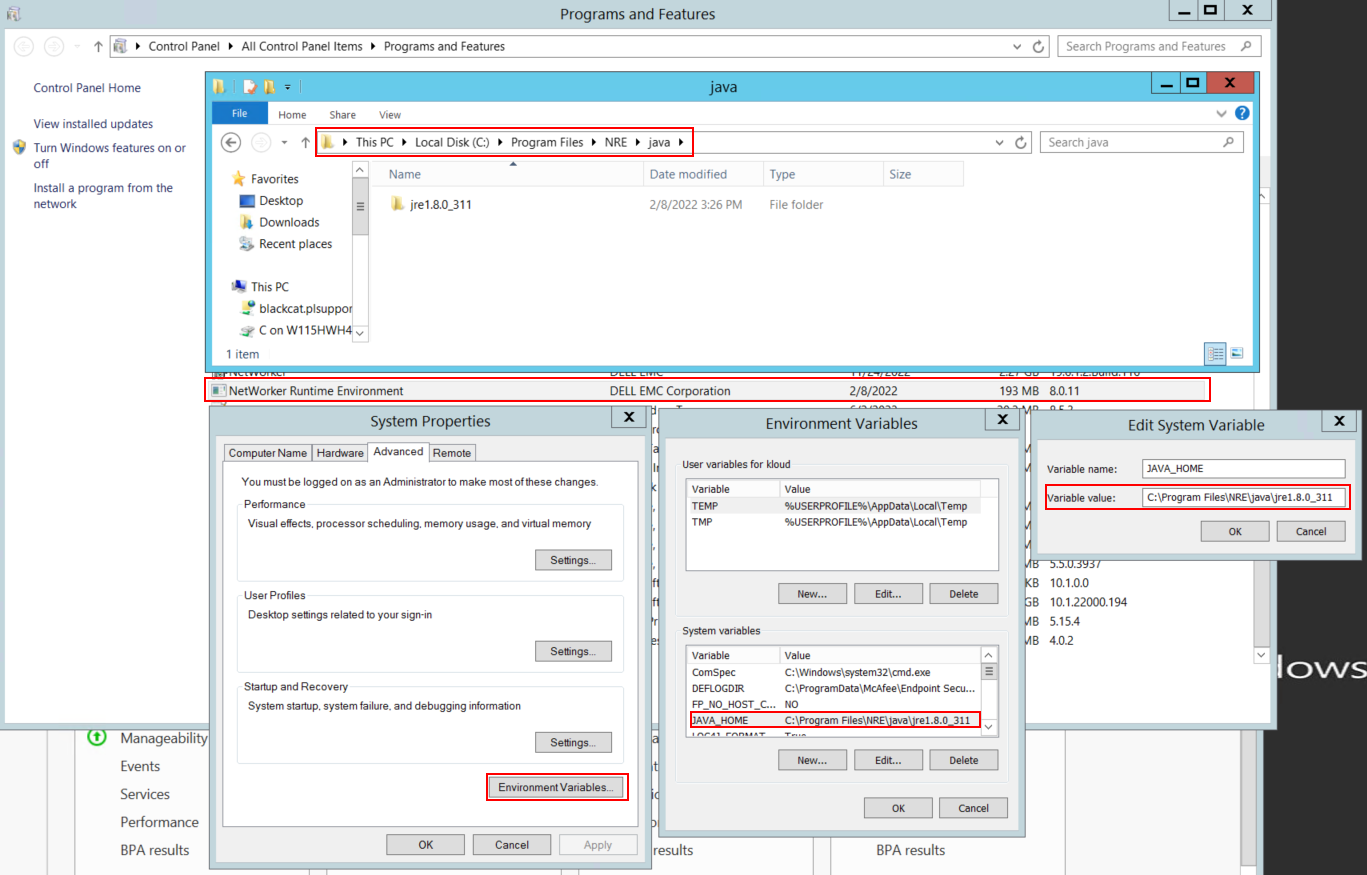
图 1:确认正在使用的 Java 实例 NetWorker。
提醒:可能已安装多个 Java 实例。例如,NRE 和 Oracle JRE 都可以安装在服务器上。以上步骤确认 NetWorker 正在使用的 Java 安装。
- 卸载 NetWorker 软件包。这不会删除任何 NetWorker 数据库或配置资源。
- 通过现有安装路径重新安装 NetWorker。重新安装 NetWorker 将重新配置 NetWorker 的身份验证服务。
- 确认存在以下路径:
C:\Program Files\EMC NetWorker\nsr\authc-server\tomcat\webapps\nwrestapi
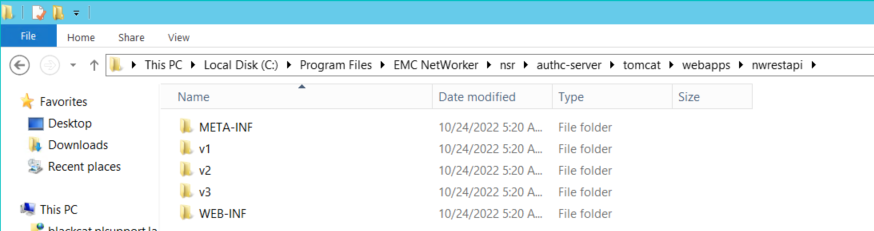
图 2:确认 NetWorker authc 路径存在。
- 如果创建了 nwrestapi 目录,请运行 REST API 查询。
Betroffene Produkte
NetWorkerProdukte
NetWorker Family, NetWorker SeriesArtikeleigenschaften
Artikelnummer: 000215602
Artikeltyp: Solution
Zuletzt geändert: 27 März 2025
Version: 7
Antworten auf Ihre Fragen erhalten Sie von anderen Dell NutzerInnen
Support Services
Prüfen Sie, ob Ihr Gerät durch Support Services abgedeckt ist.