"HYPERVISOR_ERROR" Bluescreen on Dell Pro Desktop
Zusammenfassung: Learn what to do if a "HYPERVISOR_ERROR" bluescreen occurs on a Dell Pro Micro QCM1255, Dell Pro Slim QCS1255, or Dell Pro Tower QCT1255.
Dieser Artikel gilt für
Dieser Artikel gilt nicht für
Dieser Artikel ist nicht an ein bestimmtes Produkt gebunden.
In diesem Artikel werden nicht alle Produktversionen aufgeführt.
Symptome
Dell Pro desktop computers with an AMD Ryzen 5 8500G CPU might experience "HYPERVISOR_ERROR" bluescreens. The error says, "Your device ran into a problem and needs to restart. We're just collecting some error info, and then we'll restart for you."
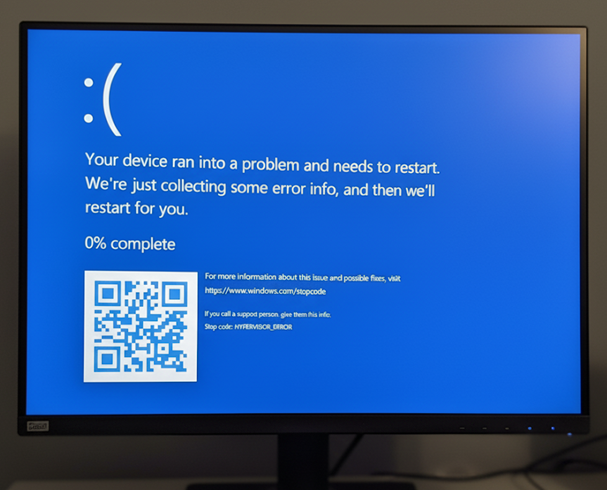
Garbage display issues may also be experienced while using the computer.
Affected Platforms:
- Dell Pro Micro QCM1255
- Dell Pro Slim QCS1255
- Dell Pro Tower QCT1255
Affected BIOS Versions:
- v1.0.5
- v1.1.3
- v1.2.1
- v1.3.2
- v1.4.1
- v1.4.2
- v1.5.0
Ursache
AMD processor power management defects cause this issue.
Lösung
Updating to BIOS version 1.6.2 or later on the computer resolves the issue. To download and install the BIOS, refer to the Dell BIOS and UEFI Update Download and Installation Guide.
Betroffene Produkte
Dell Pro Micro QCM1255, Dell Pro Slim QCS1255, Dell Pro Tower QCT1255Artikeleigenschaften
Artikelnummer: 000362072
Artikeltyp: Solution
Zuletzt geändert: 23 Mai 2026
Version: 5
Antworten auf Ihre Fragen erhalten Sie von anderen Dell NutzerInnen
Support Services
Prüfen Sie, ob Ihr Gerät durch Support Services abgedeckt ist.