Gatekeepers with Red Hat OpenShift or Upstream Kubernetes
Zusammenfassung: This KB explains how to use the Red Hat GitHub kubevirt-rawio-addon repository to present PowerMax Gatekeepers to either a Red Hat OpenShift or Upstream Kubernetes environment.
Dieser Artikel gilt für
Dieser Artikel gilt nicht für
Dieser Artikel ist nicht an ein bestimmtes Produkt gebunden.
In diesem Artikel werden nicht alle Produktversionen aufgeführt.
Weisungen
PowerMax Gatekeepers
PowerMax Gatekeepers are small devices (typically three MBs) carved from disks in the PowerMax that act as SCSI targets for Solutions Enabler commands. Configuration and status information is maintained in a PowerMax host database file, symapi_db.bin by default. It is known as the PowerMax configuration database. It reduces the number of inquiries from the host to the storage arrays. Gatekeepers must be raw devices so that the OS simply passes the SCSI commands without manipulation. While physical hosts always work with Gatekeepers (with a supported OS), virtual hosts are limited to VMware using physical raw device mappings (RDMs), in-Guest iSCSI on Windows or Linux, in-Guest NVMe/TCP on Linux, or passthrough devices (NIC or HBA). Only VMware, however, can present a true raw device that is recognized as a viable Gatekeeper. Other virtualization solutions allow the user to present devices as "raw" but their solutions block some SCSI commands, preventing their use as Gatekeepers. Solutions Enabler labels them as Gatekeepers but reports an error as below.
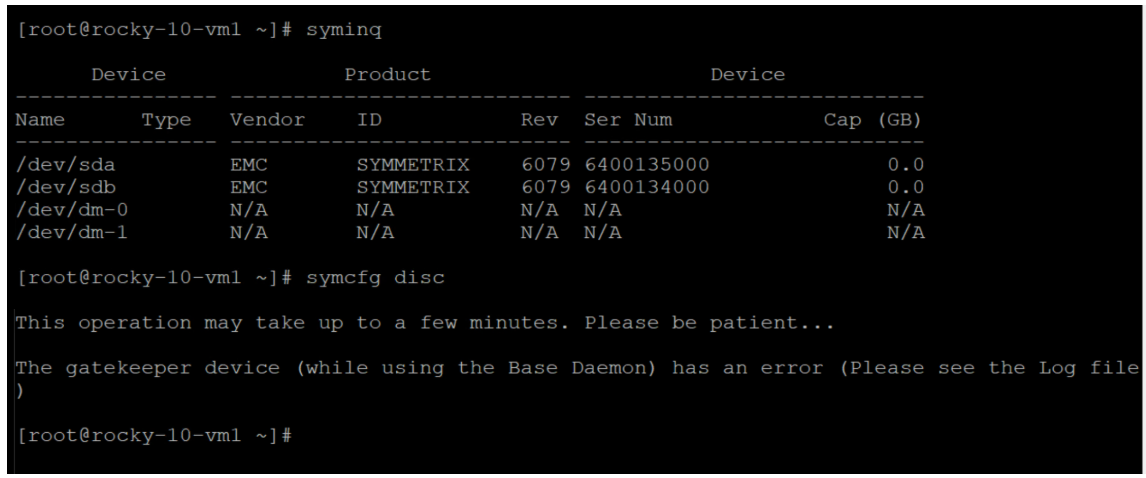
Furthermore, if you examine the Gatekeepers they show a state of "CLS" or closed.
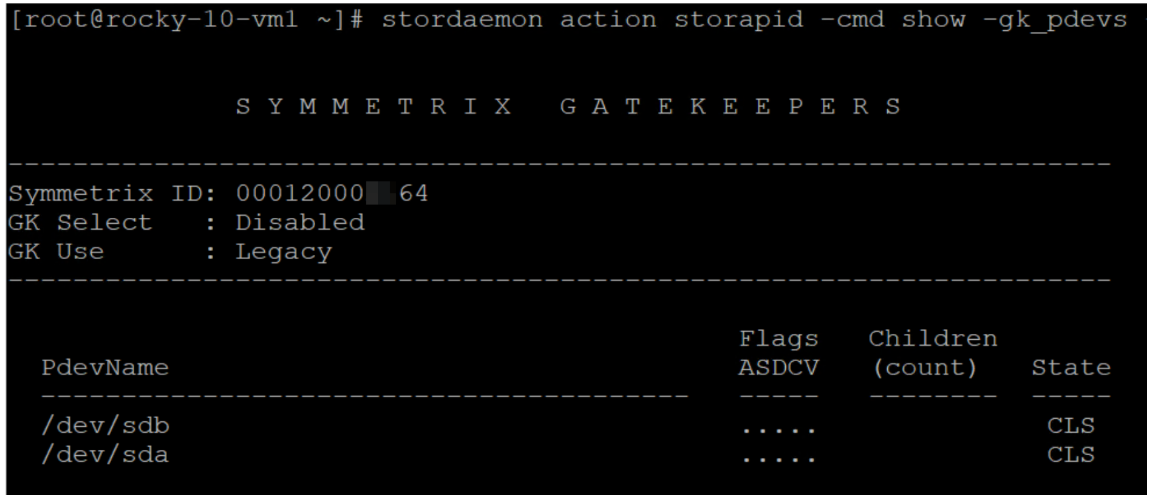
Therefore you cannot pass the necessary SCSI commands.
To take advantage of this solution you must use a protocol that Solutions Enabler supports on the chosen operating system. Please see the product documentation.
Red Hat GitHub solution
Dell requested Red Hat's assistance with developing a workaround for Gatekeepers in an OpenShift environment for some of our mutual customers. To that end, they created a solution that works for both OpenShift and Upstream Kubernetes with slight variations in implementation. The GitHub repository is called kubevirt-rawio-addon as is located here: https://github.com/openshift-cnv/kubevirt-rawio-addon The GitHub includes a readme https://github.com/openshift-cnv/kubevirt-rawio-addon/blob/main/README.md.
The add-on installs several components:
- Mutating webhooks to modify objects on the fly
- Validating webhook - an OpenShift-specific safety check
- Security config to allow privileged capabilities
- Sidecar hook
The sidecar is a small extra container that runs alongside the VM pod and modifies the VM’s low-level config before it starts. It intercepts the KubeVirt-generated VM config, finds the annotated disks, and sets rawio=yes. KubeVirt then gets back the XML. The libvirt/QEMU underlying architecture supports this, but doesn't expose it so this minor adjustment is required. It is possible that KubeVirt exposes this in the future at which point the workaround will be unnecessary.
Implementation on OpenShift
The repository contains all the instructions for implementing this solution. Because Red Hat owns the solution, Dell recommends following the current instructions which are subject to change in the future. Dell will not update the KB to reflect those changes. As a courtesy, we provide the basic information below but encourage users of this KB to use them alongside the repository.
As noted, you can implement this on OpenShift or Upstream Kubernetes. As steps are for OpenShift, there are a couple items of note if you do Upstream Kubernetes.
- If you implement on vanilla K8s, you must have cert-manager installed. If the PowerMax CSI driver is installed, then this is present.
- If you implement on vanilla K8s, you need a privileged namespace. You can use the namespace in the scripts or create your own and then modify the scripts.
The two scripts you need for implementation are in the hack folder. The rawio-setup.sh is the first script and is the same for either platform, but be aware it relies on the openshift-cnv namespace which is only present on OpenShift. Add the namespace or create a new one and modify the script for K8s. The VM creation script is unique to the platform, but again uses the openshift-cnv namespace. For OpenShift, it is rawio-create-vm-openshift.sh. The scripts are designed to create a test environment and will need modification for a production setup. In particular, the rawio-setup.sh script creates a virtual SCSI device. Instead, modify the script to use your PowerMax storage class. In addition the script assumes a single node for scheduling the VM. Modify it to allow it to run on any worker node. The script uses a pre-buit Fedora OS.
Sample scripts are in Supplemental Content.
Basic steps
- Clone the repository: git clone https://github.com/openshift-cnv/kubevirt-rawio-addon.git
- Install the manifest: oc apply -f https://github.com/openshift-cnv/kubevirt-rawio-addon/releases/download/v0.1.0/rawio-addon-openshift.yaml
- Install the sidecar: oc annotate –overwrite -n openshift-cnv hco kubevirt-hyperconverged kubevirt.kubevirt.io/jsonpatch='[{“op”: “add”, “path”: “/spec/configuration/developerConfiguration/featureGates/-“, “value”: “Sidecar”}]’
- Run the setup: rawio-setup.sh
- Create the VM: rawio-create-vm-openshift.sh
- Install your OS (assuming you aren't using a pre-built one)
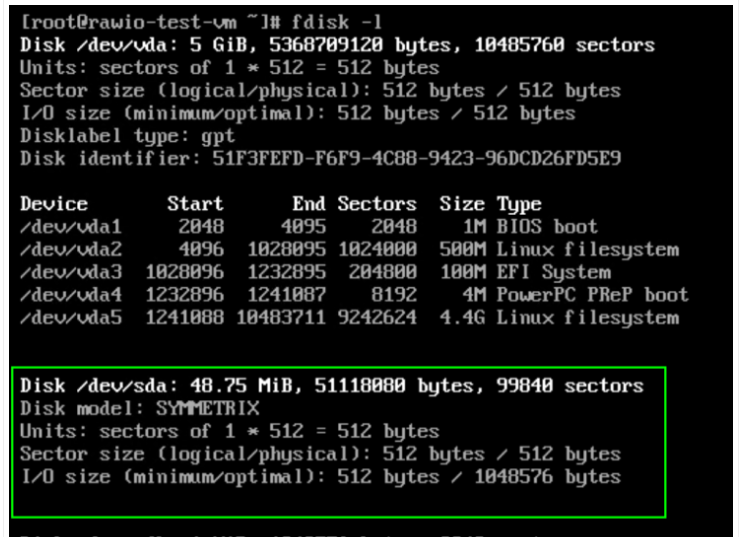
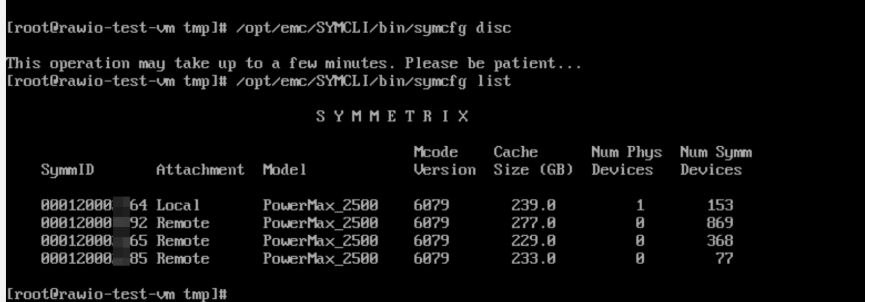
Be aware that the PowerMax CSI cannot create a device smaller than 50 MB even if you ask for a traditional 3 MB Gatekeeper. It does not cause an issue.
Other virtualization solutions
Neither of the below solutions work with this Red Hat repository.
- K8s-based solutions like SUSE Harvester - SUSE must develop their own solution
- KVM solutions like Proxmox or Oracle KVM (oVirt) - these are not KubeVirt-based and can't be used
Weitere Informationen
rawio-setup.sh
#!/bin/bash
set -euo pipefail
if [ -z "${KUBEVIRT_NAMESPACE:-}" ]; then
if kubectl get ns openshift-cnv &>/dev/null; then
NAMESPACE="openshift-cnv"
else
NAMESPACE="kubevirt"
fi
else
NAMESPACE="$KUBEVIRT_NAMESPACE"
fi
PVC_NAMESPACE="${PVC_NAMESPACE:-default}"
SC_NAME="powermax-2164-default"
PVC_NAME="scsi-rawio-pvc"
# Create namespace if it doesn't exist
kubectl get ns "$PVC_NAMESPACE" >/dev/null 2>&1 || kubectl create ns "$PVC_NAMESPACE"
# Create PVC
echo "Creating PVC $PVC_NAME in namespace $PVC_NAMESPACE..."
kubectl apply -f - <<EOF
apiVersion: v1
kind: PersistentVolumeClaim
metadata:
name: $PVC_NAME
namespace: $PVC_NAMESPACE
spec:
storageClassName: $SC_NAME
volumeMode: Block
accessModes:
- ReadWriteOnce
resources:
requests:
storage: 8Mi
EOF
echo ""
echo "=== Setup complete ==="
echo "StorageClass: $SC_NAME"
echo "PVC: $PVC_NAMESPACE/$PVC_NAME"
echo ""
*******************************************
rawio-create-vm-openshift.sh
#!/bin/bash
set -euo pipefail
PVC_NAMESPACE="${PVC_NAMESPACE:-default}"
PVC_NAME="${PVC_NAME:-scsi-rawio-pvc}"
VM_NAME="${VM_NAME:-rawio-test-vm}"
VM_SA="${VM_SA:-rawio-vm}"
CONTAINER_DISK="${CONTAINER_DISK:-quay.io/kubevirt/fedora-with-testtooling:v20240717-a087e7e}"
SCC_NAME="${SCC_NAME:-rawio-vm}"
KUBEVIRT_NAMESPACE="openshift-cnv"
echo "Creating ServiceAccount $VM_SA in namespace $PVC_NAMESPACE"
kubectl apply -f - <<EOF
apiVersion: v1
kind: ServiceAccount
metadata:
name: $VM_SA
namespace: $PVC_NAMESPACE
EOF
echo "Creating SCC $SCC_NAME for service account $VM_SA"
kubectl apply -f - <<EOF
apiVersion: security.openshift.io/v1
kind: SecurityContextConstraints
metadata:
name: $SCC_NAME
priority: 11
allowPrivilegedContainer: false
allowHostDirVolumePlugin: true
allowHostNetwork: false
allowHostPorts: false
allowHostPID: false
allowHostIPC: false
allowedCapabilities:
- NET_BIND_SERVICE
- SYS_NICE
- SYS_RAWIO
- SETFCAP
defaultAddCapabilities: []
seccompProfiles:
- runtime/default
- unconfined
- localhost/kubevirt/kubevirt.json
volumes:
- "*"
readOnlyRootFilesystem: false
runAsUser:
type: RunAsAny
seLinuxContext:
type: RunAsAny
fsGroup:
type: RunAsAny
supplementalGroups:
type: RunAsAny
users:
- system:serviceaccount:${PVC_NAMESPACE}:${VM_SA}
groups: []
EOF
echo "Creating VM $VM_NAME in namespace $PVC_NAMESPACE"
echo "PVC: $PVC_NAME"
echo "ServiceAccount: $VM_SA"
echo "Container disk: $CONTAINER_DISK"
kubectl apply -f - <<EOF
apiVersion: kubevirt.io/v1
kind: VirtualMachine
metadata:
name: $VM_NAME
namespace: $PVC_NAMESPACE
annotations:
kubevirt.io/rawioSupport: "lun0"
spec:
running: true
template:
metadata:
annotations:
kubevirt.io/rawioSupport: "lun0"
spec:
domain:
cpu:
cores: 2
resources:
requests:
memory: 2Gi
devices:
rng: {}
disks:
- name: disk0
disk:
bus: virtio
- name: lun0
lun:
bus: scsi
- name: $VM_SA
disk:
bus: virtio
volumes:
- name: disk0
containerDisk:
image: $CONTAINER_DISK
- name: lun0
persistentVolumeClaim:
claimName: $PVC_NAME
- name: $VM_SA
serviceAccount:
serviceAccountName: $VM_SA
EOF
echo ""
echo "VM $VM_NAME created. Waiting for it to start..."
echo "Watch with: kubectl get vmi -n $PVC_NAMESPACE $VM_NAME -w"
echo "Console: virtctl console -n $PVC_NAMESPACE $VM_NAME"
echo ""
echo "Cleanup:"
echo " kubectl delete vm -n $PVC_NAMESPACE $VM_NAME"
echo " kubectl delete scc $SCC_NAME"
Betroffene Produkte
PowerMax, PowerMax, PowerMax 2000, PowerMax 2500, PowerMax 8000, PowerMax 8500, PowerMaxOS 10Artikeleigenschaften
Artikelnummer: 000472526
Artikeltyp: How To
Zuletzt geändert: 03 Juni 2026
Version: 1
Antworten auf Ihre Fragen erhalten Sie von anderen Dell NutzerInnen
Support Services
Prüfen Sie, ob Ihr Gerät durch Support Services abgedeckt ist.