SourceOne Discovery Manager - Discovery Manager client is not opening after SQL Server migration
Zusammenfassung: SourceOne Discovery Manager - DM client not opening after SQL Server migration
Dieser Artikel gilt für
Dieser Artikel gilt nicht für
Dieser Artikel ist nicht an ein bestimmtes Produkt gebunden.
In diesem Artikel werden nicht alle Produktversionen aufgeführt.
Symptome
After a SourceOne Discovery Manager SQL Server migration users are seeing an error when they open their Discovery Manager client.
"server version and database version do not match"
The Client , server and Database versions are same and changes in the Discovery Manager server has also been done accordingly to point it to new SQL server.
Ursache
Caused by migrating the Discovery Manager Database to a new SQL server and the new Database server name was not changed in IIS of the discovery manager site page.
Lösung
The SQL server name of Discovery Manager you needs to be changed in IIS.
Go to the Default Web site -> Discovery Manager ->Application Bindings -> Database Server
Here you need to enter the correct SQL server that is being used.
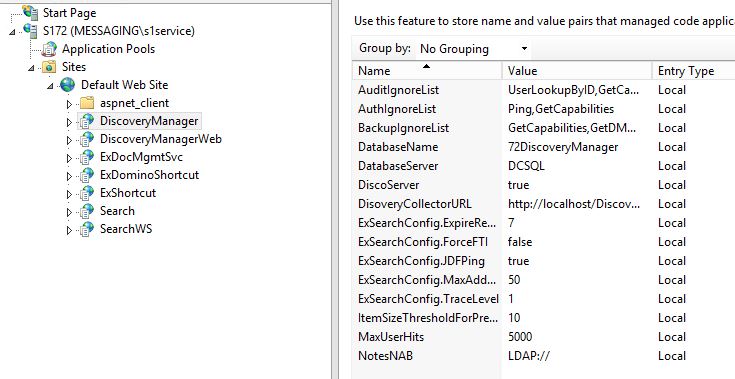
You may also repair install the Discovery Manager Server or Express setups to provide the information again.
Go to the Default Web site -> Discovery Manager ->Application Bindings -> Database Server
Here you need to enter the correct SQL server that is being used.
You may also repair install the Discovery Manager Server or Express setups to provide the information again.
Betroffene Produkte
SourceOne Email ManagementProdukte
SourceOne Email ManagementArtikeleigenschaften
Artikelnummer: 000059507
Artikeltyp: Solution
Zuletzt geändert: 18 Apr. 2026
Version: 5
Antworten auf Ihre Fragen erhalten Sie von anderen Dell NutzerInnen
Support Services
Prüfen Sie, ob Ihr Gerät durch Support Services abgedeckt ist.