Dell Data Protection Encryption Message is Displayed "Encryption Administrator Password"
Zusammenfassung: Customer may report an "Encryption Administrator Password" message occurs on every startup or reboot on computers with Dell Encryption (formerly Dell Data Protection | Encryption) installed. ...
Dieser Artikel gilt für
Dieser Artikel gilt nicht für
Dieser Artikel ist nicht an ein bestimmtes Produkt gebunden.
In diesem Artikel werden nicht alle Produktversionen aufgeführt.
Symptome
Affected Products:
- Dell Encryption
- Dell Data Protection | Encryption
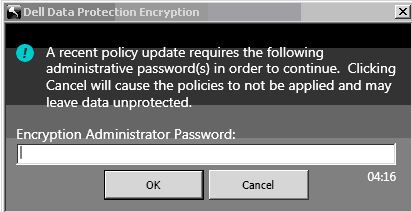
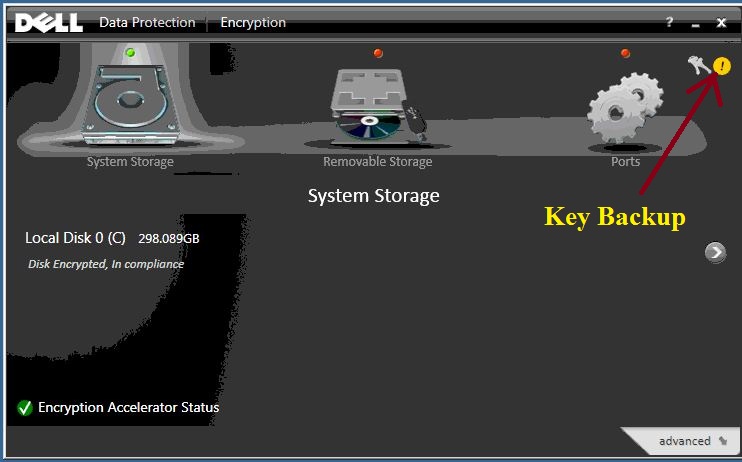
This issue occurs after changing any policy, password, or client user changes including adding a client user. Next to the Key Backup icon within the UI a yellow circle with an exclamation appears indicating that the Key Backup is required.
Ursache
Not Applicable
Lösung
To eliminate the persistent message from being displayed, double-click the Key Backup icon and follow the on-screen instructions through completion.
To contact support, reference Dell Data Security International Support Phone Numbers.
Go to TechDirect to generate a technical support request online.
For additional insights and resources, join the Dell Security Community Forum.
Betroffene Produkte
Dell EncryptionArtikeleigenschaften
Artikelnummer: 000124865
Artikeltyp: Solution
Zuletzt geändert: 15 Juni 2026
Version: 10
Antworten auf Ihre Fragen erhalten Sie von anderen Dell NutzerInnen
Support Services
Prüfen Sie, ob Ihr Gerät durch Support Services abgedeckt ist.