NetWorker: vProxy Appliance Does Not Apply Network Parameters on Deployment
Zusammenfassung: vProxy appliance does not apply or retain network parameters.
Dieser Artikel gilt für
Dieser Artikel gilt nicht für
Dieser Artikel ist nicht an ein bestimmtes Produkt gebunden.
In diesem Artikel werden nicht alle Produktversionen aufgeführt.
Symptome
The NetWorker VMware Protection (NVP) vProxy appliance deploys successfully but did not apply network parameters set during the deployment.
Ursache
There is a duplicate IP address. Another device has been assigned the same address as the vProxy appliance.
Lösung
- On the vProxy appliance, check the status of the
wickeddservice with the below command. Wickedd is the network management service used on the vProxy appliance.
NOTE: If the vProxy is not accessible over SSH, use VMware web client to console connect to the vProxy.
systemctl status wickedd
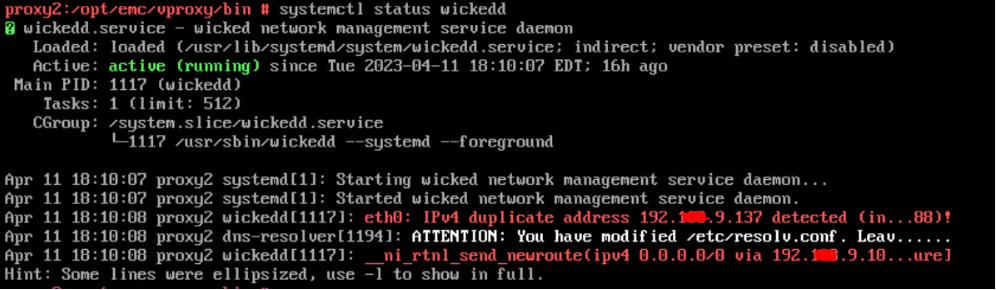
Figure 1: Message Results of
wickedd Command
To see the full messages, use the following
wickedd command:
systemctl -l status wickedd
(lower case L)
Example:

Figure 2: Message Results of Extended
wickedd Command
Write down the MAC address and work with network administrator to find the duplicate IP and resolve or assign a different IP address to the vProxy.
- Resolve duplicate IP address issue in the networking environment.
- Reconfigure the vProxy's network parameters using:
/opt/emc/vproxy/bin/network_config.sh <interface> <FQDN> <IP Address> <Netmask> <Gateway> <DNS List (comma separated)>
For more information, see: NVP vProxy: How to manually change the vProxy Appliance network interface settings
Betroffene Produkte
NetWorkerProdukte
NetWorker Family, NetWorker SeriesArtikeleigenschaften
Artikelnummer: 000212275
Artikeltyp: Solution
Zuletzt geändert: 27 Feb. 2026
Version: 3
Antworten auf Ihre Fragen erhalten Sie von anderen Dell NutzerInnen
Support Services
Prüfen Sie, ob Ihr Gerät durch Support Services abgedeckt ist.