Dell APEX Cloud Platform for Microsoft Azure: O reparo de nó não é compatível com cluster de único nó na versão Azure 2402.
Zusammenfassung: A versão Azure 2402 não dá suporte à operação de reparo de nó único do cluster. Se o nó falhar, será necessário implementar novamente o cluster de único nó.
Dieser Artikel gilt für
Dieser Artikel gilt nicht für
Dieser Artikel ist nicht an ein bestimmtes Produkt gebunden.
In diesem Artikel werden nicht alle Produktversionen aufgeführt.
Symptome
Para um cluster de único nó, quando o nó falhar, o usuário precisará seguir as etapas do procedimento do Dell SolVe -> Procedimentos de substituição em campo -> Substituindo um nó de cluster -> Reparar um nó em um cluster de único nó para NIM o nó (não limpar unidades de capacidade) e, em seguida, implementar novamente o cluster.
Mas se o nó estiver sendo executado na versão Azure 2402, a reimplementação do cluster falhará.
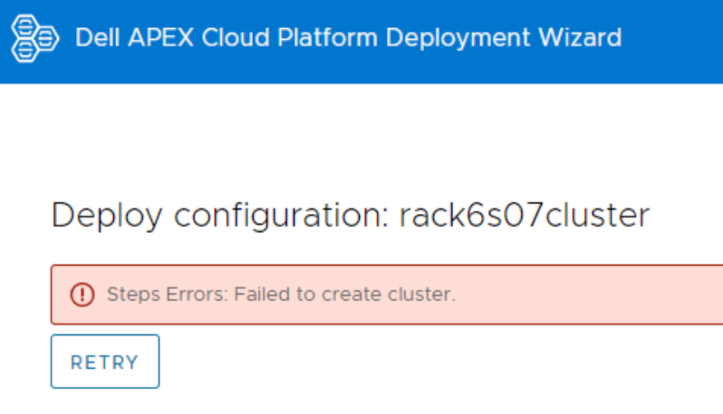
Faça log-in no nó e visualize o arquivo de log CloudDeployment.xxx em C:\CloudDeployment\Logs, ele relata que o ECE falhou em: Test-AzStackHciExternalActiveDirectory.
ECE failed at: Test-AzStackHciExternalActiveDirectory,
2024-03-12 08:13:36 Verbose  [EnvironmentValidator:ValidateExternalAD] Get-InprogressUpdateNugetStore failed. Update package nuget store was not specified in runtime parameters.
2024-03-12 08:13:36 Verbose  [EnvironmentValidator:ValidateExternalAD] EnvCheckerModuleBase: C:\Program Files\WindowsPowerShell\Modules\AzStackHci.EnvironmentChecker
2024-03-12 08:13:36 Verbose  [EnvironmentValidator:ValidateExternalAD] Gathering External Active Directory validation assets.
2024-03-12 08:13:36 Verbose  [EnvironmentValidator:ValidateExternalAD] Starting External Active Directory validation. Detail output can be found in D:\CloudContent\MASLogs\AzStackHciEnvironmentChecker*
2024-03-12 08:14:10 Warning  [EnvironmentValidator:ValidateExternalAD] Critical (blocking) ExternalAD failures found in validation. 1 Rules failed:
2024-03-12 08:14:10 Verbose  [EnvironmentValidator:ValidateExternalAD] Validator failed. ExternalAD requirements not met. Review output and remediate:
Rule:

HealthCheckSource  : Deployment\ExternalActiveDirectory\16be73a5
Name               : AzStackHci_ExternalActiveDirectory_Test_OrganizationalUnit_ExecutingAsDeploymentUser
DisplayName        : Test AD Organizational Unit - ExecutingAsDeploymentUser
Tags               : {}
Title              : Test AD Organizational Unit - ExecutingAsDeploymentUser
Status             : FAILURE
Severity           : CRITICAL
Description        : Tests that the specified organizational unit exists and contains the proper OUs
Remediation        : https://learn.microsoft.com/en-us/azure-stack/hci/deploy/deployment-tool-prerequisites
TargetResourceID   : Test_AD_OU_HCIH06S3-101
TargetResourceName : Test_AD_OU_HCIH06S3-101
TargetResourceType : ActiveDirectory
Timestamp          : 3/12/2024 8:14:10 AM


 AdditionalData:

Key   : Detail
Value : The ActiveDirectory user account 'lab30114.local\MGMT' is ineligible to be used as a deployment user: the user
        is missing the GenericAll permission to the organizational unit 'OU=OUH06S3,DC=lab30114,DC=local'

Key   : Status
Value : FAILURE

Key   : TimeStamp
Value : 03/12/2024 08:14:10

Key   : Resource
Value : ExecutingAsDeploymentUser

Key   : Source
Value : HCIH06S3-101


2024-03-12 08:14:10 Verbose  [EnvironmentValidator:ValidateExternalAD] at ParseResult, C:\NugetStore\AzStackHci.EnvironmentChecker.Deploy.1.2100.2599.333\content\Classes\EnvironmentValidator\EnvironmentValidator.psm1: line 857
at Test-AzStackHciExternalActiveDirectory, C:\Program Files\WindowsPowerShell\Modules\AzStackHci.EnvironmentChecker\AzStackHciExternalActiveDirectory\AzStackHciExternalActiveDirectory.psm1: line 60
at <ScriptBlock>, <No file>: line 1
at RunSingleValidator, C:\NugetStore\AzStackHci.EnvironmentChecker.Deploy.1.2100.2599.333\content\Classes\EnvironmentValidator\EnvironmentValidator.psm1: line 429
at ValidateExternalAD, C:\NugetStore\AzStackHci.EnvironmentChecker.Deploy.1.2100.2599.333\content\Classes\EnvironmentValidator\EnvironmentValidator.psm1: line 262
at <ScriptBlock>, C:\CloudDeployment\ECEngine\InvokeInterfaceInternal.psm1: line 127
at Invoke-EceInterfaceInternal, C:\CloudDeployment\ECEngine\InvokeInterfaceInternal.psm1: line 123
2024-03-12 08:14:10 Verbose  [EnvironmentValidator:ValidateExternalAD] ECE PowerShellHost Script End
Ursache
A reparação de um nó em um cluster de único nó não é compatível com a versão Azure 2402.
Lösung
Para um cluster de único nó, faça backup de seus dados regularmente.
Quando você encontrar o erro ECE e o reparo de único nó estiver quebrado, ligue para a equipe de Suporte Dell para implementar novamente o cluster. Depois que o cluster for reimplementado, restaure os dados no cluster.
Quando você encontrar o erro ECE e o reparo de único nó estiver quebrado, ligue para a equipe de Suporte Dell para implementar novamente o cluster. Depois que o cluster for reimplementado, restaure os dados no cluster.
Betroffene Produkte
APEX Cloud Platform for Microsoft AzureArtikeleigenschaften
Artikelnummer: 000223387
Artikeltyp: Solution
Zuletzt geändert: 26 März 2026
Version: 2
Antworten auf Ihre Fragen erhalten Sie von anderen Dell NutzerInnen
Support Services
Prüfen Sie, ob Ihr Gerät durch Support Services abgedeckt ist.