PowerEdge : Comment installer la sauvegarde Windows Server à l’aide de PowerShell
Summary: Installation de Windows Server Backup à l’aide de PowerShell pour Windows Server. Suivez ces étapes pour installer et gérer efficacement vos sauvegardes de serveur.
Αυτό το άρθρο ισχύει για
Αυτό το άρθρο δεν ισχύει για
Αυτό το άρθρο δεν συνδέεται με κάποιο συγκεκριμένο προϊόν.
Δεν προσδιορίζονται όλες οι εκδόσεις προϊόντων σε αυτό το άρθρο.
Instructions
- Pour démarrer Windows PowerShell, saisissez dans la fenêtre d’invite de commande
Start PowerShell - Pour installer le type de sauvegarde Windows Server
Install-WindowsFeature Windows-Server-Backup
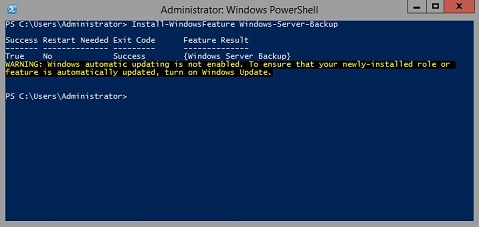
Informations supplémentaires :
Sauvegarde Windows Serverhttps://learn.microsoft.com/en-us/previous-versions/windows/it-pro/windows-server-2012-r2-and-2012/jj614621(v=ws.11)

Sauvegarde de serveur Windows PowerShell Cmdletshttps://learn.microsoft.com/en-us/powershell/module/windowsserverbackup/?view=windowsserver2022-ps
Επηρεαζόμενα προϊόντα
Microsoft Windows 2012 Server, Microsoft Windows 2012 Server R2Προϊόντα
C Series, HS Series, Modular Infrastructure, Rack Servers, Tower Servers, XE Servers, XR Servers, OEM Server Solutions, Microsoft Windows Server 2016, Microsoft Windows Server 2019, Microsoft Windows Server 2022, Microsoft Windows 2008 Server R2
, Microsoft Windows 2008 Server Service Pack 2, Microsoft Windows 2012 Server, Microsoft Windows 2012 Server R2
...
Ιδιότητες άρθρου
Article Number: 000122393
Article Type: How To
Τελευταία τροποποίηση: 05 Σεπ 2025
Version: 9
Βρείτε απαντήσεις στις ερωτήσεις σας από άλλους χρήστες της Dell
Υπηρεσίες υποστήριξης
Ελέγξτε αν η συσκευή σας καλύπτεται από τις Υπηρεσίες υποστήριξης.