Dell Latitude 9520 Notebook Keyboard Function Key Guide
Summary: The following article provides information about the functions keys on the Dell Latitude 9520 Qwerty Keyboard.
Αυτό το άρθρο ισχύει για
Αυτό το άρθρο δεν ισχύει για
Αυτό το άρθρο δεν συνδέεται με κάποιο συγκεκριμένο προϊόν.
Δεν προσδιορίζονται όλες οι εκδόσεις προϊόντων σε αυτό το άρθρο.
Instructions
Dell Latitude 9520 Notebook Keyboard Guide
The following article provides information about the functions keys on the Dell Latitude 9520 Qwerty Keyboard.
Keyboard Shortcut Key Functions
The below table is a list of combination short-cut key functions available on the Latitude 9520.
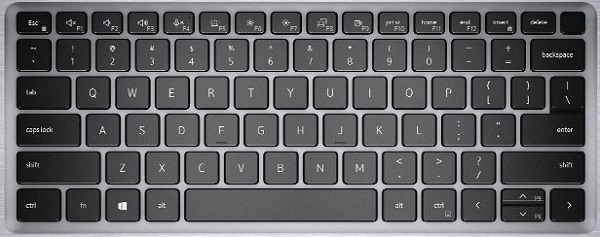
| Function key combo | Result | Secondary Behavior |
|---|---|---|
| Fn + F1 | Mute Audio | F1 |
| Fn + F2 | Decrease Volume | F2 |
| Fn + F3 | Increase Volume | F3 |
| Fn + F4 | Microphone Mute | F4 |
| Fn + F5 | Toggle Keyboard Backlight (Optional) | F5 |
| Fn + F6 | Decrease Brightness | F6 |
| Fn + F7 | Increase Brightness | F7 |
| Fn + F8 | Switch to External Display | F8 |
| Fn + F9 | SafeShutter Control | F9 |
| Fn + F10 | Print Screen | F10 |
| Fn + F11 | Home | F11 |
| Fn + F12 | End | F12 |
| Fn + Num Lock | Insert | Num Lock |
| Fn + Esc | Escape | Toggle Fn-key lock |
| Fn + Right CTRL | Emulates Right Click | - |
| Fn + Up (Arrow) Cursor | Page Up | Up Cursor |
| Fn + Down (Arrow) Cursor | Page Down | Down Cursor |
Latitude, 15" screen, 9520, Keyboard shortcuts, Function keys, Latitude 15 9520, Laptop, QWERTY, Notebook,
 Visit our Keyboard knowledge base for additional resources and information.
 For additional articles and information visit our Touchpad support page.
 Additional articles and information can also be found on our Mouse support page.
Επηρεαζόμενα προϊόντα
Latitude 9520Ιδιότητες άρθρου
Article Number: 000184477
Article Type: How To
Τελευταία τροποποίηση: 16 Ιουλ 2025
Version: 2
Βρείτε απαντήσεις στις ερωτήσεις σας από άλλους χρήστες της Dell
Υπηρεσίες υποστήριξης
Ελέγξτε αν η συσκευή σας καλύπτεται από τις Υπηρεσίες υποστήριξης.