Dell Encryption Agent Reporting a Different Hostname in Dell Data Security Server Console
Summary: This article provides steps to correct an issue with inventory reporting as the wrong hostname with Windows clients.
Αυτό το άρθρο ισχύει για
Αυτό το άρθρο δεν ισχύει για
Αυτό το άρθρο δεν συνδέεται με κάποιο συγκεκριμένο προϊόν.
Δεν προσδιορίζονται όλες οι εκδόσεις προϊόντων σε αυτό το άρθρο.
Symptoms
Affected Products:
- Dell Encryption
- Dell Endpoint Security Suite Enterprise
Affected Operating Systems:
- Windows
Cause
Dell Data Security products can report the wrong hostname during inventory uploads to the server if there is a different hostname in the hosts file before the current hostname.
Resolution
- Edit the hosts file located at C:\Windows\System32\drivers\etc.
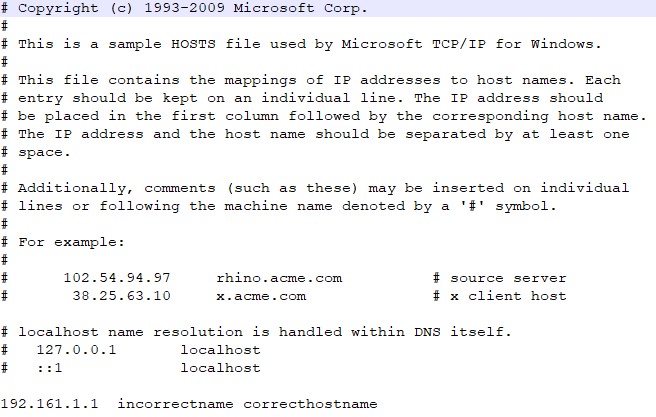
- Change the order to reflect the current hostname to be the first entry in the hosts file.
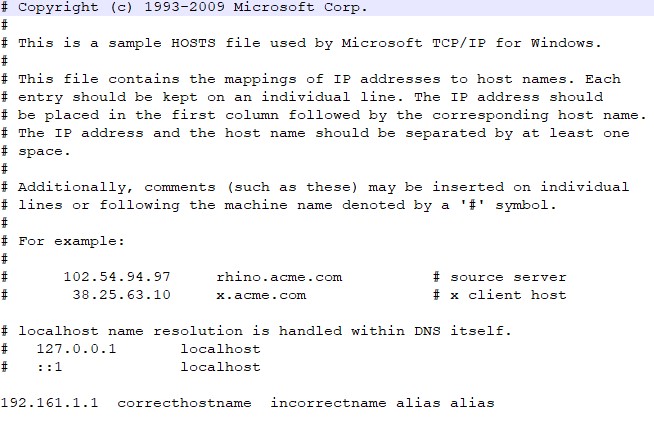 Note: You can still have other aliases in the hosts file that have to be after the current hostname.
 - When finished, click File > Save.
- The hostname will change within the server upon the next inventory upload.
To contact support, reference Dell Data Security International Support Phone Numbers.
Go to TechDirect to generate a technical support request online.
For additional insights and resources, join the Dell Security Community Forum.
Επηρεαζόμενα προϊόντα
Dell Encryption, Dell Endpoint Security Suite EnterpriseΙδιότητες άρθρου
Article Number: 000187320
Article Type: Solution
Τελευταία τροποποίηση: 02 Ιουν 2026
Version: 6
Βρείτε απαντήσεις στις ερωτήσεις σας από άλλους χρήστες της Dell
Υπηρεσίες υποστήριξης
Ελέγξτε αν η συσκευή σας καλύπτεται από τις Υπηρεσίες υποστήριξης.