VMware: How to Migrate VMkernel Port vmk0 From a Distributed Switch to a Standard Switch
Summary: This article shows how to migrate vmk0 from a vDS to Standard switch through command line.
Αυτό το άρθρο ισχύει για
Αυτό το άρθρο δεν ισχύει για
Αυτό το άρθρο δεν συνδέεται με κάποιο συγκεκριμένο προϊόν.
Δεν προσδιορίζονται όλες οι εκδόσεις προϊόντων σε αυτό το άρθρο.
Instructions
Procedure:
Steps to migrate VMkernel port vmk0 from a distributed switch to a standard switch:
- Gather IP information for current VMkernel port vmk0 (IP address, netmask, default gateway, and VLAN).
- Remove a
vmnicfrom a current distributed switch (vDS).- Get Port ID of
vmnicand vDS Name using the following command:
- Get Port ID of
esxcli network vswitch dvs vmware list
Below is an example of the output, name is
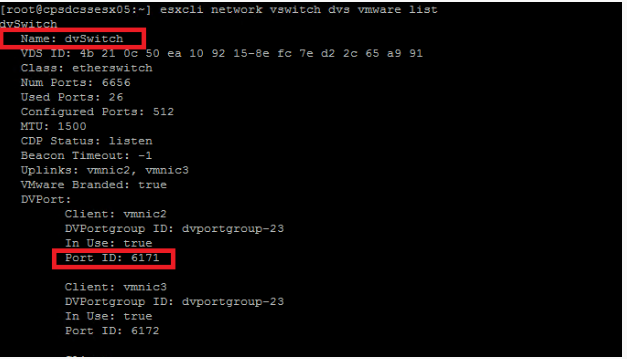
dvSwitch, and Port ID for vmnic2 is 6171.
Figure 1: Port ID and vDS Name of vmnic
- Run the following command to remove a vmnic from the vDS:
esxcfg-vswitch -Q vmnic -V dvPort_ID_of_vmnic dvSwitch
Example:
esxcfg-vswitch -Q vmnic2 -V 6171 dvSwitch
- Delete current vmk0 with the command:
esxcli network ip interface remove --interface-name=vmk0
If network coredump is set on vmk0, disable it with the following command:
esxcli system coredump network set --enable false
- Create a Standard Switch with the command:
esxcli network vswitch standard add -v vSwitchName
Example:
esxcli network vswitch standard add -v vSwitch0(Creates a vSwitch with the name vSwitch0.)
- Create a port group to assign vmk0 to with command:
esxcli network vswitch standard portgroup add -p portgroup_name -v vSwitch
Example:
esxcli network vswitch standard port group add -p management -v vSwitch0
(Creates a port group that is named management on vSwitch0.)
- Assign vmk0 to the port group with the command:
esxcli network ip interface add -i vmk0 -p portgroup_name
Example:
esxcli network ip interface add -i vmk0 -p management(Adds
vmk0 to management port group.)
- Set the IP address of vmk0 with the command:
esxcli network ip interface ipv4 set -i vmk0 -I ipaddress -N netmask -t static
Example:
esxcli network ip interface ipv4 set -i vmk0 -I 10.1.1.10 -N 255.255.255.0 -t static(Set
vmk0 to 10.1.1.10 with netmask 255.255.255.0 as static IP.)
- Set the VLAN for the port group where vmk0 resides with the command:
esxcli network vswitch standard portgroup set -p portgroup -v VLAN
Example:
esxcli network vSwitch standard port group set -p management -v 10(Assigns VLAN
10 to port group management.)
- Set the default gateway for vmk0 with the command:
esxcfg-route -a default defaultGW
Example:
esxcfg-route -a default 10.1.1.1(Set default gateway to
10.1.1.1.)
- Set vmk0 as management with command:
esxcli network ip interface tag add -i vmk0 -t Management
- Enable network core dump if it was enabled on vmk0 with the command:
esxcli system coredump network set --enabled true
Επηρεαζόμενα προϊόντα
VxBlock and Vblock Systems, VMware ESXi 7.x, VMware ESXi 8.xΙδιότητες άρθρου
Article Number: 000206306
Article Type: How To
Τελευταία τροποποίηση: 22 Ιουλ 2025
Version: 3
Βρείτε απαντήσεις στις ερωτήσεις σας από άλλους χρήστες της Dell
Υπηρεσίες υποστήριξης
Ελέγξτε αν η συσκευή σας καλύπτεται από τις Υπηρεσίες υποστήριξης.