Data Domain: Loop di riavvio al caricamento e inizializzazione del driver NVRAM
Summary: I sistemi PowerProtect Data Domain hanno segnalato il blocco in un loop di riavvio. Il driver NVRAM non viene caricato o inizializzato correttamente, con conseguente riavvio del sistema. ...
Αυτό το άρθρο ισχύει για
Αυτό το άρθρο δεν ισχύει για
Αυτό το άρθρο δεν συνδέεται με κάποιο συγκεκριμένο προϊόν.
Δεν προσδιορίζονται όλες οι εκδόσεις προϊόντων σε αυτό το άρθρο.
Instructions
Sistemi interessati:
- PowerProtect DD6400 | DD6900 | DD9400 | DD9900
- Tutte le versioni di DDOS
Sintomi:
- Impossibile avviare DDOS
- L'uscita seriale (Virtual Console - iDRAC) mostra il riavvio del processo di avvio dopo il caricamento e l'inizializzazione del driver NVRAM
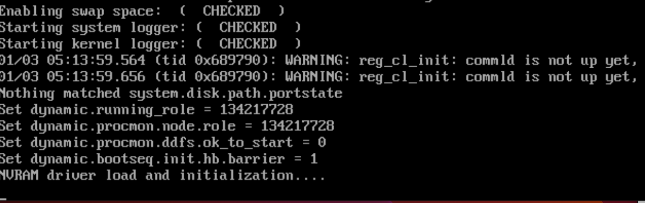
Causa:
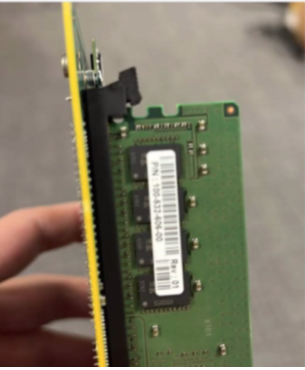
- Il modulo DIMM situato sulla scheda NVRAM non è inserito o installato correttamente.
- OPPURE
- La scheda NVRAM non è installata correttamente o è difettosa.
Azione richiesta:
Con il sistema spento:
- Controllare e ricollocare il modulo DIMM sulla scheda NVRAM.
- Di seguito è riportata un'immagine che mostra il DIMM NVRAM non inserito correttamente
- Accertarsi che la scheda NVRAM o il riser PCI siano posizionati saldamente.
- Accendere e riprovare ad avviare il sistema.
- Se i sintomi persistono, sostituire la NVRAM (numero parte: DGK85).
Επηρεαζόμενα προϊόντα
Data Domain, DD6400 ApplianceΠροϊόντα
Data Domain, Data Domain Deduplication Storage Systems, DD6900 Appliance, DD9400 Appliance, DD9900 ApplianceΙδιότητες άρθρου
Article Number: 000208323
Article Type: How To
Τελευταία τροποποίηση: 29 Σεπ 2025
Version: 5
Βρείτε απαντήσεις στις ερωτήσεις σας από άλλους χρήστες της Dell
Υπηρεσίες υποστήριξης
Ελέγξτε αν η συσκευή σας καλύπτεται από τις Υπηρεσίες υποστήριξης.