Dell APEX Cloud Platform for Red Hat OpenShift : Le lien PowerFlex Manager ne fonctionne pas
Summary: Dans l’interface utilisateur de l’extension APEX Cloud Platform (ACP) for Red Hat OpenShift, le lien PowerFlex Manager ne parvient pas à rediriger vers la destination prévue, mais ouvre la page du cluster OpenShift Container Platform (OCP). Ce problème est dû au fait que le pod ACP « mcp-powerflex-operation » ne parvient pas à établir une connexion à PowerFlex Manager à l’aide des informations d’identification et du certificat stockés dans les secrets OCP. ...
Symptoms
Dans l’interface utilisateur de l’extension APEX Cloud Platform (ACP) for Red Hat OpenShift, le lien PowerFlex Manager ne fonctionne pas comme prévu. Au lieu de diriger les utilisateurs vers l’interface utilisateur de PowerFlex Manager, le lien ouvre toujours la page du cluster OCP.

Ouvrez l’outil d’inspection du navigateur pour passer en revue la réponse du réseau. Le entry_point affiche un retour vide au lieu de l’adresse IP de PowerFlex Manager.
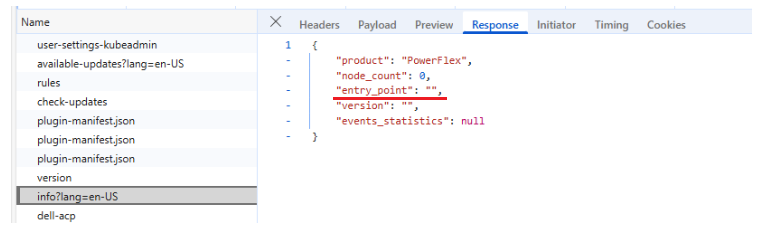
Cause
L’ACP 'mcp-powerflex-operation' ne peut pas se connecter à PowerFlex Manager à l’aide des informations d’identification et du certificat stockés dans les secrets OCP.
Des problèmes de réseau ou de pare-feu bloquent la connexion, ou les informations d’identification ou le certificat du PowerFlex Manager ont été modifiés, mais ne sont pas mis à jour dans les secrets OCP.
Resolution
1. Accédez au pod ACP 'mcp-powerflex-operation-xxxxxxxxx' pour vérifier que la connectivité réseau est correcte à partir du pod ACP 'mcp-powerflex-operation' dans PowerFlex Manager.
Par exemple :
##Get pod name
oc get pods -n dell-acp | grep mcp-powerflex-operation
mcp-powerflex-operation-596f4567d7-hvxtj                         2/2     Running   2              2d13h

##Enter the pod
oc exec -it mcp-powerflex-operation-596f4567d7-hvxtj -n dell-acp -- bash

##Inside the pod, test curl command using the correct PowerFlex Manager's username and password.
mcp-powerflex-operation-596f4567d7-hvxtj:/home/app>
mcp-powerflex-operation-596f4567d7-hvxtj:/home/app> curl -v -s -k -u "admin:<password>" https://<PowerFlex Manager IP>/api/login
*   Trying <PowerFlex Manager IP>:443...
* Connected to <PowerFlex Manager IP> port 443
... ...
... ...
... ...
< HTTP/2 200
< date: Tue, 16 Sep 2025 07:25:59 GMT
< content-type: application/json;charset=UTF-8
< content-length: 1459
< cache-control: no-cache
< permissions-policy: accelerometer=(), ambient-light-sensor=(), autoplay=(), battery=(), camera=(), cross-origin-isolated=(), display-capture=(), document-domain=(), encrypted-media=(), execution-while-not-rendered=*, execution-while-out-of-viewport=*, fullscreen=(), geolocation=(), gyroscope=(), keyboard-map=(), magnetometer=(), microphone=(), midi=(), navigation-override=*, payment=(), picture-in-picture=(), publickey-credentials-get=(), screen-wake-lock=(), sync-xhr=*, usb=(), web-share=(), xr-spatial-tracking=()
< content-security-policy: default-src 'self'; script-src 'self' 'unsafe-eval' 'sha256-wEjfu8jbv0QjgpzoBjFStdBGKLI4oBTlVy9H+Z55OLM=' 'sha256-2mvMk0Nvn96VqS1UEmAZSVSEkK0CkPNV60oBnurB4/c='; connect-src 'self'; img-src 'self'; style-src 'self' 'unsafe-inline';base-uri 'self';form-action 'self'; font-src 'self' data: fonts.gstatic.com
< x-content-security-policy: default-src 'self'; script-src 'self' 'unsafe-eval' 'sha256-wEjfu8jbv0QjgpzoBjFStdBGKLI4oBTlVy9H+Z55OLM=' 'sha256-2mvMk0Nvn96VqS1UEmAZSVSEkK0CkPNV60oBnurB4/c='; connect-src 'self'; img-src 'self'; style-src 'self' 'unsafe-inline';base-uri 'self';form-action 'self'; font-src 'self' data: fonts.gstatic.com
< x-webkit-csp: default-src 'self'; script-src 'self' 'unsafe-eval' 'sha256-wEjfu8jbv0QjgpzoBjFStdBGKLI4oBTlVy9H+Z55OLM=' 'sha256-2mvMk0Nvn96VqS1UEmAZSVSEkK0CkPNV60oBnurB4/c='; connect-src 'self'; img-src 'self'; style-src 'self' 'unsafe-inline';base-uri 'self';form-action 'self'; font-src 'self' data: fonts.gstatic.com
< pragma: no-cache
< expires: Thu, 01 Jan 1970 00:00:00 GMT
< cache-control: no-store
< x-id: 20ff0adcfd41365d
< strict-transport-security: max-age=15724800; includeSubDomains
< x-xss-protection: 1; mode=block
< x-frame-options: DENY
< x-content-type-options: nosniff
< vary: accept-encoding
<
"eyJhbGciOiJSUzI1NiIsInR5cCIgOiAiSldUIiwia2lkIiA6ICJmdXBCN1Z0SEVOdWVhSDk2WkNIcUU0eXF6VmFGZkc3SUd1UklVWlBDeF9RIn0.eyJleHAiOjE3NTgwMDg0NTksImlhdCI6MTc1ODAwNzU1OSwianRpIjoiNjc1YTZiODctMjZmZS00MDE5LTk1ZWItY2ZjZDE1MzRjNmFmIiwiaXNzIjoiaHR0cHM6Ly8xNzIuMzEuMTAwLjE3NC9hdXRoL3JlYWxtcy9wb3dlcmZsZXgiLCJhdWQiOlsiUG93ZXJmbGV4U2VydmljZXMiLCJhY2NvdW50Il0sInN1YiI6ImQwMTk1OWMzLTM4MjItNDcxYi1hNDc4LTZmYjJiZGNiZGZkZCIsInR5cCI6IkJlYXJlciIsImF6cCI6InBvd2VyZmxleFJlc3QiLCJzZXNzaW9uX3N0YXRlIjoiOGY5MDc2MGItZTQxNi00MzNiLTk1ODItMDhkN2Y1NTNlZDhkIiwiYWNyIjoiMSIsImFsbG93ZWQtb3JpZ2lucyI6WyIqIl0sInJlYWxtX2FjY2VzcyI6eyJyb2xlcyI6WyJTdXBlclVzZXIiXX0sInJlc291cmNlX2FjY2VzcyI6eyJhY2NvdW50Ijp7InJvbGVzIjpbIm1hbmFnZS1hY2NvdW50IiwibWFuYWdlLWFjY291bnQtbGlua3MiLCJ2aWV3LXByb2ZpbGUiXX19LCJzY29wZSI6Im9wZW5pZCBwcm9maWxlIGVtYWlsIiwic2lkIjoiOGY5MDc2MGItZTQxNi00MzNiLTk1ODItMDhkN2Y1NTNlZDhkIiwiZW1haWxfdmVyaWZpZWQiOnRydWUsInBvd2VyZmxleCI6eyJwZXJtaXNzaW9ucyI6eyJTdXBlclVzZXIiOlsiR0xCOkdMQiJdfX0sIm5hbWUiOiJhZG1pbiBhZG1pbiIsInByZWZlcnJlZF91c2VybmFtZSI6ImFkbWluIiwiZ2l* Connection #0 to host <PowerFlex Manager IP> left intact
S’il ne parvient pas à établir la connexion, vérifiez s’il existe des règles de pare-feu bloquant la connexion.
2. Si la commande curl step1 à l’intérieur du pod ACP 'mcp-powerflex-operation-xxxxxxxxx' peut se connecter avec succès à PowerFlex Manager, suivez les 000217834 de la base de connaissances pour mettre à jour les informations d’identification et/ou le certificat PowerFlex Manager dans les secrets OCP.