PowerProtect Data Manager: Error Configuring Disaster Recovery Replication Target System | DR
Summary: Disaster Recovery configuration fails on a DM5500 source system due to a version mismatch between the source and target PowerProtect Data Manager systems.
Symptoms
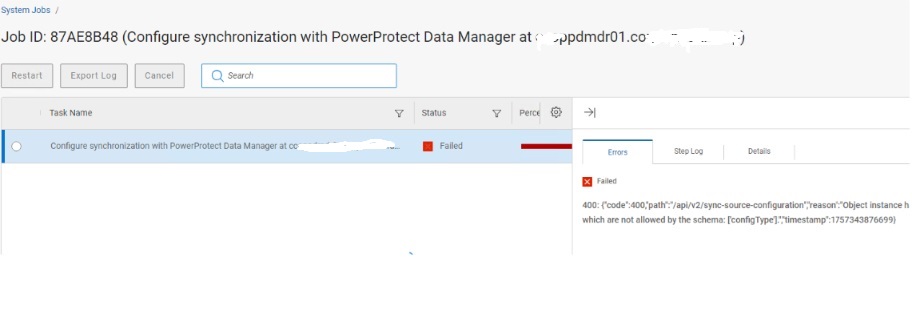
The process fails during the Configure Synchronization Job step when configuring Disaster Recovery from a DM5500 to a PowerProtect Data Manager target.
- This issue was observed with a DM5500 as the source and a PowerProtect Data Manager as the target, but it can also occur between two DM5500 systems or two PowerProtect Data Manager systems.
- Error message displayed:
{"code":400,"path":"/api/v2/sync-source-configuration","reason":"Object instance has properties which are not allowed by the schema: ['configType'].","timestamp":1757343876699}
Cause
A version mismatch between the source and target PowerProtect Data Manager systems results in this issue:
- Source: DM5500 running PowerProtect Data Manager version 19.19.0-27
- Target: PowerProtect Data Manager system running version 19.19.0-15
The newer DM5500 appliance includes a configType property in its REST API payload, which the older target system schema does not recognize. This results in a 400 Bad Request error during the /api/v2/sync-source-configuration call
Log analysis also shows:
configType: null in the payloadMultiple BeanCreationNotAllowedException warnings
This issue can occur in any combination of DM5500 and PowerProtect Data Manager systems if their versions are not aligned.
Resolution
Upgrade the target PowerProtect Data Manager system to version 19.19.0-20 or later.
- PowerProtect Data Manager versions 19.19.0-20 and 19.19.0-27 are compatible for Disaster Recovery configuration.
- Once versions are aligned, the synchronization job should complete successfully.
Additional Information
/var/log/brs/replmgr/sync.log shows:
[c.e.b.s.o.s.i.ConfigureSyncServiceImpl.checkSystemVersion(512)][512 ] - checkSystemVersion - remote ver: 19.19.0-15 and local ver: 19.19.0-27 <==== PLEASE NOTE Source and Destination revisions are not the same!