PowerProtect: 보고 노드 문제를 해결하는 방법
Summary: 이 문서에서는 PPDM(PowerProtect Data Manager) 보고 문제의 초기 분석 방법을 간략하게 설명합니다.
Instructions
로그 위치
19.17 이전 버전:
기본 로그 위치: /opt/emc/dpa/
상담원 로그: /opt/emc/dpa/agent/dpaagent.log
서버 로그: //opt/emc/dpa/services/server.logs
데이터 저장소 로그: /opt/emc/dpa/services/datastore*.logs
보고 관리: /opt/emc/dpa/reporting/reportingmgmt.log
버전 19.17 이상 버전:
기본 로그 위치: /var/log/dellemc/reporting
보고 데이터 수집기(에이전트): /var/log/dellemc/reporting/reporting-data-collector/reporting-data-collector.log
보고 서비스: /var/log/dellemc/reporting/reporting-service/reporting-service.log
포스트그레스SQL: /var/log/dellemc/reporting/postgresql/postgresql*.log
보고 관리: /var/log/dellemc/reporting/reportingmgmt/reportingmgmt.log
버전 19.17 이상 버전의 로그 수준 변경:
- 구성 위치:
/var/lib/dellemc/reporting/config/logback-config.xml - 서비스별 로깅 수준:
<service-name>.log.level
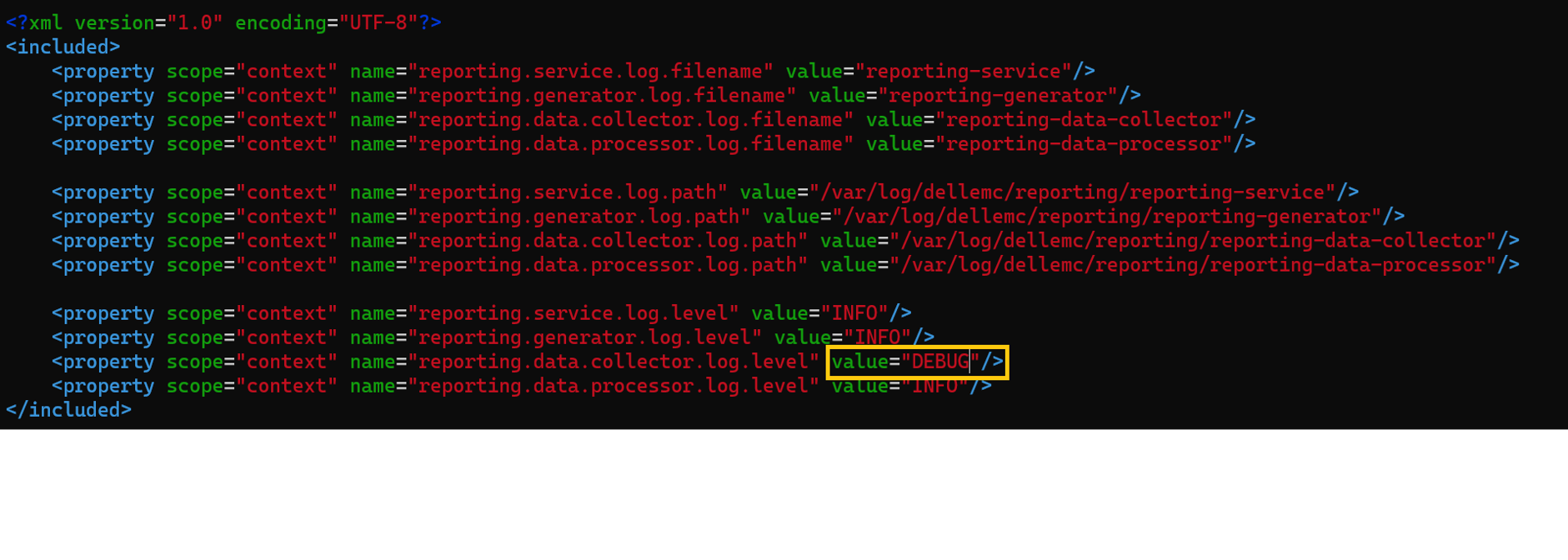
19.17 이전 버전:
명령 형식:
기본 위치: /opt/emc/dpa/services/bin
dpa.sh <service> <operation>
Operation: start, stop, restart
서비스: svc, app, ds, agent
예: dpa.sh svc start
버전 19.17 이상 버전:
명령 형식: systemclt <operation> <service name>
Operation: start, stop, restart, status
서비스:
보고 서비스: reporting-service, reporting-data-collector, reporting-generator, reporting-data-processor
외부 서비스: postgresql , rabbitmq-server
예: systemclt restart reporting-service
각 서비스는 개별적으로 관리해야 합니다.
알려진 문제/문제 해결
배포/업그레이드 실패: 보고 엔진 배포에 성공하려면 네트워크 구성이 올바른지 확인합니다. 정방향 및 역방향 조회는 모두 PPDM 호스트로 확인되고 PPDM에서 보고 엔진 호스트로 확인되어야 합니다.
발견된 오류:Error : InfrastructureNodeSessions unsuccessful during initialization. Unable to deploy node <Reporting/Search_Engine_FQDN>. Unable to determine the state of node VM '<Reporting/Search_Engine_FQDN>' or the 'vProxy Agent' agent running on it. Unable to connect to Node VM: dial tcp: lookup <Reporting/Search_Engine_FQDN> on <DNS_Server>:53: no such host
이름 확인 확인:nslookup PPDM FQDNnslookup PPDM IPnslookup reporting node FQDNnslookup reporting node IP
19.18 이전 버전에서는 여러 DNS(Domain Name System) 호스트가 구성되어 업데이트 실패 문제가 제기되었습니다. 이 문서를 참조하여 문제를 해결하십시오. PowerProtect Data Manager 보고 엔진을 19.17 보고 엔진으로 배포하거나 업그레이드하지 못할 수 있음
19.20 이후 버전으로 업그레이드한 후 보고 노드가 유지 보수 모드에서 멈춥니다.
Tthe reportingmgmt.log 이것을 보여줍니다 data-migration 오류가 발생합니다.
2025-08-11T12:54:33.434+09:30: reportingmgmt: data-migration: ERROR: Error while checking if data is present: relation "reportdata.client_config_tmp" does not exist
LINE 1: SELECT COUNT(1) FROM reportdata.client_config_tmp
이 KB 문서의 해결 방법을 따르십시오. Powerprotect Data Manager: 보고 엔진이 업그레이드 후 유지 보수 모드에서 멈춤
인증서 오류로 인해 보고 노드 서비스를 시작하지 못함:
보고 서비스 로그 /opt/dell/reporting/log/reporting-service/reporting-service.log 다음을 표시합니다. missing required certificates 받으십시오.
2025-03-04T00:00:06.416Z ERROR [17574] [main] [c.e.c.s.CoreStartupApplication.init(39)] -  Not able to initialize services, missing required certificates.
2025-03-04T00:00:06.418Z ERROR [17574] [main] [c.e.c.s.CoreStartupApplication.init(43)] -  Error in initializing services
java.lang.IllegalArgumentException: Context must not be null

아래 KB의 해결 방법에 따라 인증서를 재생성합니다.
KB 문서 PowerProtect Data Manager: 인증서 오류로 인해 보고 서비스를 시작하지 못함
보고 노드에서 이메일을 보낼 수 없음:
보고 노드에서 메일 서버에 연결하고 이름 확인을 확인합니다.
에 reporting-service.log 유사한 오류가 나타납니다.
2024-02-05 15:32:37,010 오류 [com.emc.dpa.command.notification.NotificationSenderMDB](Thread-131073) 이메일 알림을 보내는 동안 발생하는 문제: com.sun.mail.smtp.SMTPSendFailedException: 메일을 보내려면 451 5.7.3 STARTTLS가 필요합니다. [MailServer 2024-02-05T08:32:36.994Z 08DC257F199B3AC5]
이 KB 문서에 따라 보고 노드에서 TLS 시작 스위치를 수동으로 활성화합니다. PowerProtect: Data Manager 보고서 브라우저에서 StartTLS가 활성화된 SMTP 서버를 사용하여 이메일 보고서를 보낼 수 없습니다.
버전 19.20 이상부터는 SMTP 구성 페이지의 UI에 있는 스위치가 TLS 시작을 활성화합니다.