NetWorker:ファイル システムのリカバリーが失敗し、「file Index is missing」というエラーが表示される
Summary: ファイル システムのリカバリーが失敗し、「file Index is missing Please contact the system administrator to recover or re-create the index.」というエラーが表示されます。
This article applies to
This article does not apply to
This article is not tied to any specific product.
Not all product versions are identified in this article.
Symptoms
NETWorker管理コンソール(NMC)からNetWorkerクライアントのファイル レベル のリカバリーを実行するときに、ファイル インデックスが見つからないことを示すエラーが返されます。
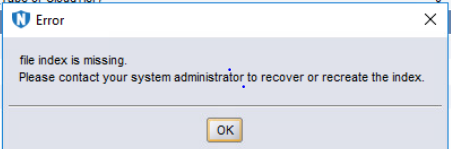
図1: エラーメッセージ:ファイル インデックスがありません。
図1: エラーメッセージ:ファイル インデックスがありません。
Cause
クライアント ファイル インデックス フォルダーが見つからないか空の場合:Linux:
/nsr/index/CLIENT-NAME
Windows: C:\Program Files\EMC NetWorker\nsr\index\CLIENT-NAME
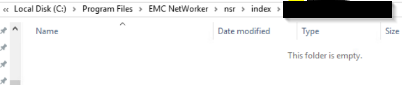
図2:クライアント ファイル インデックス フォルダーが見つからない場合のスクリーンショット
/nsr/index/CLIENT-NAME
Windows: C:\Program Files\EMC NetWorker\nsr\index\CLIENT-NAME
図2:クライアント ファイル インデックス フォルダーが見つからない場合のスクリーンショット
Resolution
NetWorkerサーバーで、管理者プロンプトを開き、rootとして実行します。
nsrckコマンドの出力でエラーがないか監視します。完了したら、クライアント インデックス フォルダーを再入力し、データのリストアを実行できます。
nsrck -L7 client-name
メモ: Client-name は、NetWorker管理コンソールの[クライアント]タブでクライアント名を指定する方法と一致する必要があります。必要に応じて、NetWorkerクライアントのnsraldbにもこれを表示します。NetWorkerクライアントで、管理者プロンプトを開き、rootとして実行します。
nsradmin -p nsrexecd "nsrla"
nsrckコマンドの出力でエラーがないか監視します。完了したら、クライアント インデックス フォルダーを再入力し、データのリストアを実行できます。
Additional Information
これは、NetWorker VMware Protection(NVP)vProxyアプライアンスを使用してバックアップされたVMware仮想マシンのファイル レベルのリカバリーには適用されません。
Affected Products
NetWorker FamilyArticle Properties
Article Number: 000200061
Article Type: Solution
Last Modified: 19 Mar 2025
Version: 4
Find answers to your questions from other Dell users
Support Services
Check if your device is covered by Support Services.