NetWorker:檔案系統復原失敗,出現錯誤「file Index is missing」
Summary: 文件系統復原失敗,出現錯誤「檔案索引遺失請聯絡系統管理員以復原或重新建立索引。」
This article applies to
This article does not apply to
This article is not tied to any specific product.
Not all product versions are identified in this article.
Symptoms
從 NetWorker 管理控制台 (NMC) 執行 NetWorker 用戶端檔案層級復原時,系統會傳回錯誤,指出檔索引遺失:

圖 1:錯誤訊息:檔案索引遺失。
圖 1:錯誤訊息:檔案索引遺失。
Cause
用戶端檔案索引資料夾遺失或空白:
Linux:/nsr/index/CLIENT-NAME
Windows:C:\Program Files\EMC NetWorker\nsr\index\CLIENT-NAME
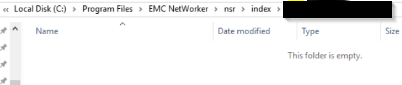
圖 2:遺失用戶端檔案索引資料夾的螢幕快照
Linux:/nsr/index/CLIENT-NAME
Windows:C:\Program Files\EMC NetWorker\nsr\index\CLIENT-NAME
圖 2:遺失用戶端檔案索引資料夾的螢幕快照
Resolution
在 NetWorker 伺服器上開啟管理員提示字元,並以 root 身分執行:
監視 nsrck 命令輸出是否有任何錯誤。完成後,應重新填入用戶端索引資料夾,並執行數據還原。
nsrck -L7 client-name
注意:用戶端名稱應與 NetWorker 管理主控台「客戶端」標籤中指定的用戶端名稱方式相符;或者,NetWorker 用戶端上的 nsraldb 也會顯示這一點。在 NetWorker 用戶端上開啟管理員提示,並以 root 身分執行:
nsradmin -p nsrexecd "nsrla"
監視 nsrck 命令輸出是否有任何錯誤。完成後,應重新填入用戶端索引資料夾,並執行數據還原。
Additional Information
這不適用於使用 NetWorker VMware Protection (NVP) vProxy 應用裝置備份的 VMware 虛擬機檔案層級復原。
Affected Products
NetWorker FamilyArticle Properties
Article Number: 000200061
Article Type: Solution
Last Modified: 19 Mar 2025
Version: 4
Find answers to your questions from other Dell users
Support Services
Check if your device is covered by Support Services.