Alienware Command Center Custom Lighting Settings Do Not Work in a Video Game on an Alienware Area-51 AAT2250 or Alienware Aurora ACT1250
Summary: Learn what to do if Alienware Command Center ecosystem lighting presets do not load for a game on an Alienware Area-51 AAT2250 or Alienware Aurora ACT1250.
This article applies to
This article does not apply to
This article is not tied to any specific product.
Not all product versions are identified in this article.
Symptoms
An Alienware Area-51 AAT2250 or Alienware Aurora ACT1250 may use default lighting settings instead of customized lighting settings in Alienware Command Center (AWCC).
Affected Platforms:
- Alienware Area-51 AAT2250
- Alienware Aurora ACT1250
Affected Software:
- Alienware Command Center
Customized lighting settings are configured in Alienware Command Center.
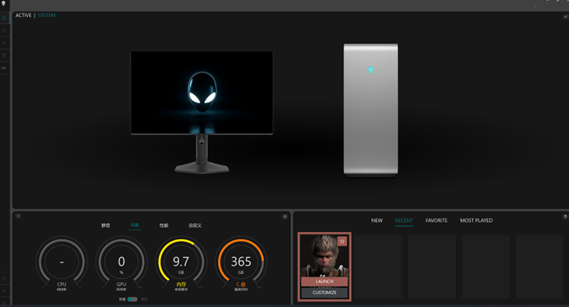
- Go to Alienware Command Center and then click Home.
- Select the game that you want to set custom lighting settings for and then click CUSTOMIZE.
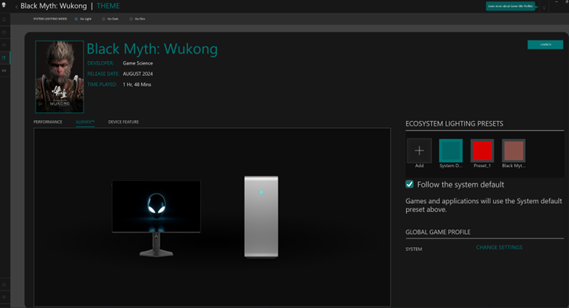
- Under ECOSYSTEM LIGHTING PRESETS, add lighting presets for the game.
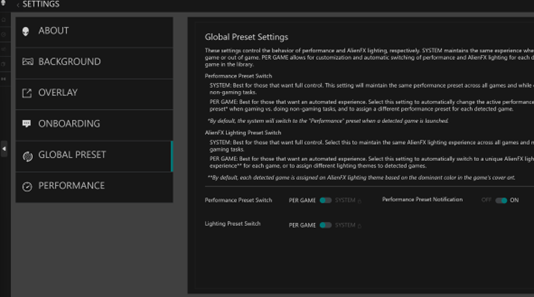
The lighting reverts to the default setting if the Lighting Preset Switch is set to SYSTEM.
- Go to Alienware Command Center.
- Go to SETTINGS, then select GLOBAL PRESET.
- Set the Lighting Preset Switch to SYSTEM.

Cause
An Alienware Command Center issue causes this behavior.
Resolution
Long-term Resolution
The engineering department is working on a fix to be released in Alienware Command Center version 6.9 and later. The updated version is posted to the computer's support page once it is made available. Alienware Command Center version 6.9 is expected to be released in August 2025.
Workaround
Switch to the PER GAME setting for game and app lighting.
- Go to Alienware Command Center.
- Go to SETTINGS, then select GLOBAL PRESET.
- Set the Lighting Preset Switch to PER GAME.
Affected Products
Alienware Area-51 AAT2250, Alienware Aurora ACT1250, Alienware Command CenterArticle Properties
Article Number: 000335100
Article Type: Solution
Last Modified: 15 Sept 2025
Version: 2
Find answers to your questions from other Dell users
Support Services
Check if your device is covered by Support Services.