PowerFlex 3.X: Switch performance metrics are not visisble in PFxM
Summary: PowerFlex Manager switch performance metrics are blank, performance metrics are not being updated in PFxM, which is shown using https protocol.
This article applies to
This article does not apply to
This article is not tied to any specific product.
Not all product versions are identified in this article.
Symptoms
PowerFlex Manager > Resources > Cisco 9 K switch > View details:

The performance tab shows no metrics.

Cause
Cause: On Cisco Nexus switches, command-line interfaces (CLIs) are run only on the switch. NX-API CLI improves the accessibility of these CLIs by making them available outside of the switch by using HTTP or HTTPS.
NX-API uses HTTP or HTTPS as its transport. CLIs are encoded into the HTTP or HTTPS POST body.
Starting with Cisco NX-OS Release 9.2(1), the NX-API feature is enabled by default on HTTPS port 443. HTTP port 80 is disabled.
NX-API uses HTTP or HTTPS as its transport. CLIs are encoded into the HTTP or HTTPS POST body.
Starting with Cisco NX-OS Release 9.2(1), the NX-API feature is enabled by default on HTTPS port 443. HTTP port 80 is disabled.
Resolution
Solution:
1) log in to switch > enable nxapi feature:
conf t
feature nxapi Note:
Note:
PFxM 3.6 and higher uses https (NOT http) for status check and metrics fetching, therefore for security reasons, nxapi can be disabled on http.
! Enable and configure NXAPI.
config t
Feature nxapi
! Disable http, only https supported for security.
no nxapi http
! Use the management interface only to communicate for NXAPI.
nxapi use-vrf management
PFxM 3.5 and earlier uses https & http for status check and metrics fetching, therefore keep nxapi enabled for http.
Note: If we enable the nxapi with feature nxapi command it only listens on HTTPS not HTTP, so we need NXAPI to listen on HTTP.
! Enable and configure NXAPI.
config t
feature nxapi
nxapi http port 80
2) After changing the switch, go to Resources > add checkbox next to switch > Run Inventory. 3) View details now show switch performance metrics.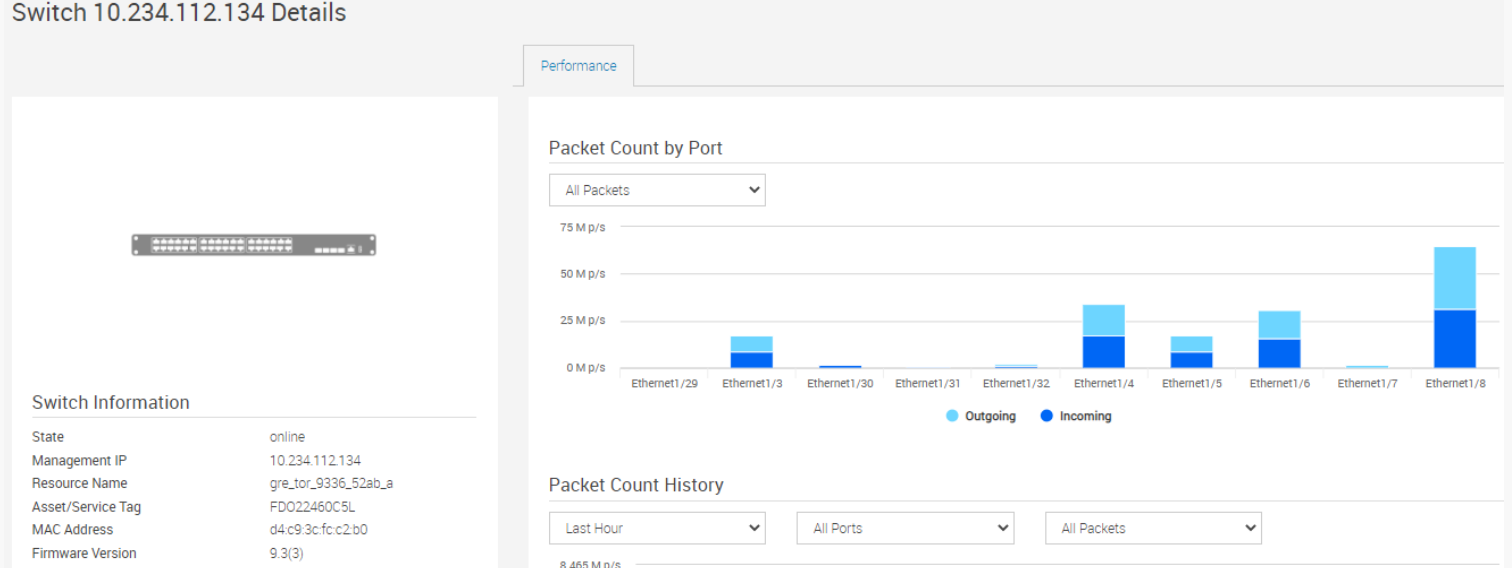
Additional Information
Cisco Switch (3K/9K):
- Both HTTP and HTTPS must be enabled on the Cisco switch.
- PFxM uses HTTP to check NXAPI status and then collect metrics using HTTPS
Dell switch:
- Metrics for OS9 switches (REST API - HTTP port 8008) must be enabled for metrics collection
- Metrics for OS10 switches (RESTCONF API -HTTPS) must be enabled for metrics collection
Affected Products
PowerFlex rack, PowerFlex ApplianceArticle Properties
Article Number: 000198385
Article Type: Solution
Last Modified: 19 Nov 2025
Version: 2
Find answers to your questions from other Dell users
Support Services
Check if your device is covered by Support Services.