PowerProtect Cyber Recovery || CyberSense: How to properly setup the Scratch storage configuration
Summary: By Default editing Pool while creating the scratch storage the "Do not use more than:" field retains the value 0. This field must be blank and NOT contain a zero before selecting "Submit". ...
This article applies to
This article does not apply to
This article is not tied to any specific product.
Not all product versions are identified in this article.
Instructions
The scratch storage with below restriction leads to the Job analysis taking a long time to complete.

Correct it by deleting the "zero", as shown here:
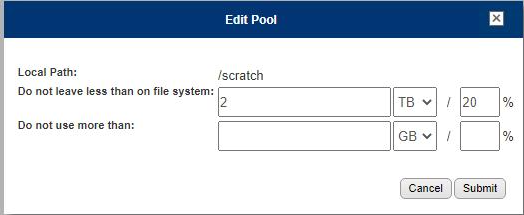
Click submit after making the change.
2023/05/12 01:38:37 notice: [7f3fda7fe700] fcacheAlloc: not enough space for 346 bytes of
[/opt/ie/var/mnt/dispatch/crawl_TG2lR0/
PP_-_CC_-_Data_VMs_-_All_Disks-aaaaa-46c1a/PLCTLP-d30d52f0-0891-403a-9ab3-a25785b2f173/
Backups/12a81d2a-0087-4e9e-b9b6-866e5e1cb602/503a5c1b-a47e-9556-6deb-8b4ccc8eaef1/
1683824429512032045/vm-2017-disk-key-1234.vmdk]
Correct it by deleting the "zero", as shown here:
Click submit after making the change.
Additional Information
2023/05/12 01:38:37 notice: [7f3fda7fe700] fcacheAlloc: not enough space for 346 bytes of [/opt/ie/var/mnt/dispatch/crawl_TG2lR0/PP_-_CC_-_Data_VMs_-_All_Disks-ppdm-46c1a/PLCTLP-d30d52f0-0891-403a-9ab3-a25785b2f173/Backups/12a81d2a-0087-4e9e-b9b6-866e5e1cb602/503a5c1b-a47e-9556-6deb-8b4ccc8eaef1/1683824429512032045/vm-2017-disk-key-2053.vmdk]
Affected Products
Cyber Recovery SeriesProducts
Data Backup & Protection Software, Data Protection SuiteArticle Properties
Article Number: 000214234
Article Type: How To
Last Modified: 25 Sept 2023
Version: 2
Find answers to your questions from other Dell users
Support Services
Check if your device is covered by Support Services.