PowerProtect Cyber Recovery ||CyberSense:如何正確設定 Scratch 儲存裝置組態
Summary: 依預設,在建立刮傷儲存時編輯集區時,「請勿使用超過:」欄位會保留值 0。 選取「Submit」前,此欄位必須為空白且不包含零。
This article applies to
This article does not apply to
This article is not tied to any specific product.
Not all product versions are identified in this article.
Instructions
使用以下限制的刮傷儲存裝置會導致工作分析需要很長的時間才能完成。

刪除「零」來修正此問題,如下所示:
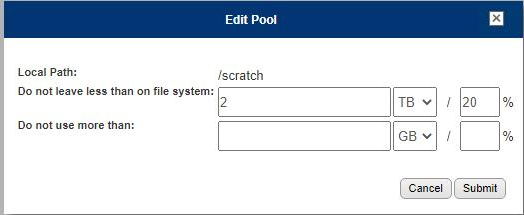
變更後按一下[submit] (提交)。
2023/05/12 01:38:37 notice: [7f3fda7fe700] fcacheAlloc: not enough space for 346 bytes of
[/opt/ie/var/mnt/dispatch/crawl_TG2lR0/
PP_-_CC_-_Data_VMs_-_All_Disks-aaaaa-46c1a/PLCTLP-d30d52f0-0891-403a-9ab3-a25785b2f173/
Backups/12a81d2a-0087-4e9e-b9b6-866e5e1cb602/503a5c1b-a47e-9556-6deb-8b4ccc8eaef1/
1683824429512032045/vm-2017-disk-key-1234.vmdk]
刪除「零」來修正此問題,如下所示:
變更後按一下[submit] (提交)。
Additional Information
2023/05/12 01:38:37 notice: [7f3fda7fe700] fcacheAlloc: not enough space for 346 bytes of [/opt/ie/var/mnt/dispatch/crawl_TG2lR0/PP_-_CC_-_Data_VMs_-_All_Disks-ppdm-46c1a/PLCTLP-d30d52f0-0891-403a-9ab3-a25785b2f173/Backups/12a81d2a-0087-4e9e-b9b6-866e5e1cb602/503a5c1b-a47e-9556-6deb-8b4ccc8eaef1/1683824429512032045/vm-2017-disk-key-2053.vmdk]
Affected Products
Cyber Recovery SeriesProducts
Data Backup & Protection Software, Data Protection SuiteArticle Properties
Article Number: 000214234
Article Type: How To
Last Modified: 25 Sept 2023
Version: 2
Find answers to your questions from other Dell users
Support Services
Check if your device is covered by Support Services.