Dell Command | Endpoint Configure for Microsoft Intune
Summary: This article provides information about Dell Command | Endpoint Configure for Microsoft Intune.
This article applies to
This article does not apply to
This article is not tied to any specific product.
Not all product versions are identified in this article.
Instructions
Affected Products:
- Dell Command | Endpoint Configure for Microsoft Intune
Dell Command | Endpoint Configure for Microsoft Intune (DCECMI) provides a way to configure and secure the BIOS configurations on Dell computers using Microsoft Intune.
Dell Command | Endpoint Configure for Microsoft Intune allows a secure package-based approach to push custom BIOS settings. These BIOS settings are configured using the Dell Command | Configure application and then applied to the BIOS using DCECMI at the endpoint.
Custom BIOS configuration profiles can be crafted based on IT environment needs such as Security, Privacy, Performance, so forth and can be assigned to various device groups. The installation is a BIOS configuration based profile. The design of this computer is secure and prevents any security gaps for the customers. Microsoft Intune administrative users can now manage the BIOS settings of a fleet of Dell devices.
Note:
- From Microsoft Intune version 2405, the
hardwarePasswordDetailApplication Programming Interface (API) is available to fetch BIOS passwords. - Along with the
hardwarePasswordDetailApplication Programming Interface (API), deleting the BIOS password information is also supported for the devices that are unenrolled from Microsoft Intune. A user with administrator privileges can delete the BIOS password information from the Microsoft Intune database. - The
hardwarePasswordInfoApplication Programming Interface (API) will be deprecated soon; the Application Programming Interface (API) may be deprecated from Microsoft Intune version 2406. - From Microsoft Intune version 2404, List
hardwarePasswordInfosrequires Global Administrator privileges.
Features
- Secure BIOS configurations for customers by using Microsoft Intune.
- A Microsoft Intune administrative user can:
- Manage their Dell client device's BIOS configurations.
- Obtain a report of their Client devices' configuration status.
- Deploy a unique-per-device BIOS password.
- The design of this computer is native to Microsoft Intune and does not require external Application Programming Interface (API) authorization, configuration, or access.
- Dell Command | Endpoint Configure for Microsoft Intune 2.0.0.10 is now compatible with ARM64-bit computers.
Prerequisites for Microsoft Intune Dell BIOS Configuration management
- You must have a Dell commercial client with Windows 10 or later operating system.
- The device must be enrolled in Intune's mobile device management (MDM).
- .NET 8.0 runtime for Windows x64 must be installed on the device.
- Dell Command | Endpoint Configure for Microsoft Intune (DCECMI) must be installed on the endpoint.
Note:
- Intune application deployment can also be used to deploy .NET 8.0 runtime for Windows x64 and DCECMI applications to the endpoints.
- Use the command
dotnet --list-runtimesfrom command prompt to check if the .NET 8.0 runtime for Windows x64 is installed on the device. - Only administrative users can install, modify, or uninstall the DCECMI application.
- Before deploying a BIOS configuration profile, see Important considerations when deploying a BIOS configuration profile in the DCECMI User's Guide for more details.
Latest Release
v2.0.1 (Released April 2025)
Enhancements
- Supports AMD Processors
- Updated OpenSSL to Version 3.4.1 and libxml2 to Version 2.13.6
Downloads
Documentation
Previous Releases
Reference the older versions section found on the Driver Details page.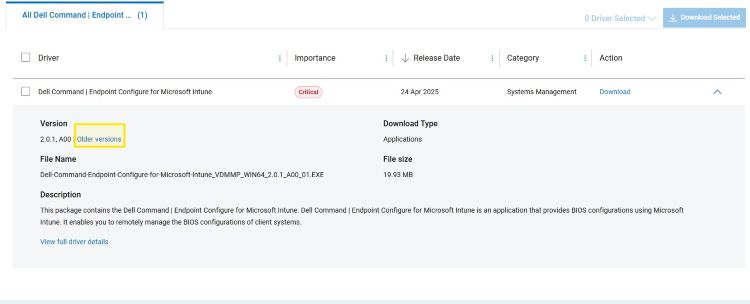
Affected Products
Dell Command | Endpoint Configure for Microsoft IntuneArticle Properties
Article Number: 000214308
Article Type: How To
Last Modified: 22 Jan 2026
Version: 11
Find answers to your questions from other Dell users
Support Services
Check if your device is covered by Support Services.