Dell APEX Cloud Platform for Microsoft Azure: Fail to upgrade a cluster when proxy settings are configured
Summary: During cluster update from Microsoft Azure Stack HCI version 10.2311.5.6 to 10.2402.2.12, a Microsoft environment check fails when the cluster is configured with a proxy server. By design, the proxy bypass list is different for winhttp and wininet, but the environment check expects them to be the same, which causes the validation failure. ...
This article applies to
This article does not apply to
This article is not tied to any specific product.
Not all product versions are identified in this article.
Symptoms
If you attempt to update a cluster that has proxy settings configured from Microsoft Azure Stack HCI version 10.2311.x.x to 10.2402.x.x, the upgrade fails. The error message in the Dell APEX Cloud Platform extension on Windows Admin Center is:
The cluster update failed. Operation failed. Internal action 'Check update readiness' failed with status 'Failed'.
See the below screenshot for an example.
On one of the cluster nodes, you can check the detailed error over cmdlet:
-
Start-MonitoringActionplanInstanceToComplete -actionPlanInstanceID "<Action reference ID>"
The error message shows "Proxy settings (Proxy Server and Bypass List) must be consistent across winhttp and environment variables and nodes."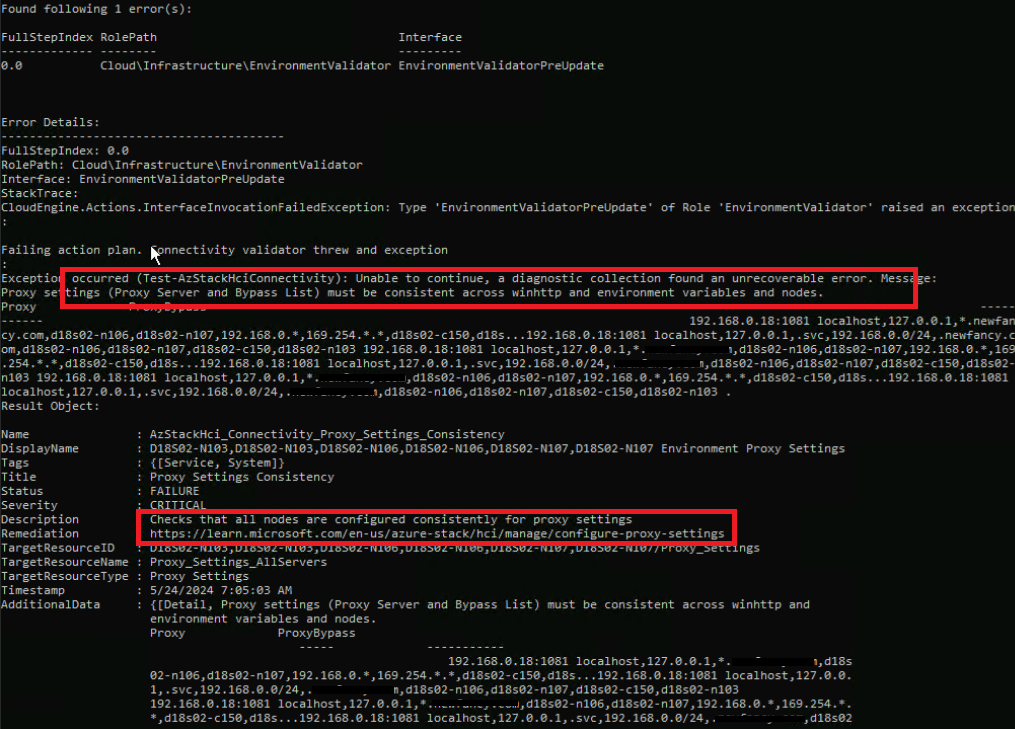
Cause
This is a Microsoft environment checker issue.
By design, the proxy bypass list is different for winhttp and wininet, but the environment check expects them to be the same, which causes the validation failure.
It usually happens when you update the cluster with proxy settings from Microsoft Azure Stack HCI version 10.2311.5.6 to 10.2402.2.12.
Resolution
Engage the Microsoft support team to resolve the issue.
Additional Information
Microsoft has fixed the issue on 10.2402.4.x and 10.2405.1.x and above releases.
Affected Products
APEX Cloud Platform for Microsoft AzureArticle Properties
Article Number: 000226211
Article Type: Solution
Last Modified: 29 July 2024
Version: 4
Find answers to your questions from other Dell users
Support Services
Check if your device is covered by Support Services.