VxRail: iDRAC Settings that Cannot be Changed
Summary: iDRAC is the backend of ISM which provides hardware monitoring functionality on the VxRail appliance. This article describes the required settings on iDRAC.
This article applies to
This article does not apply to
This article is not tied to any specific product.
Not all product versions are identified in this article.
Instructions
Part of the VxRail Manager hardware monitor function relies on the proper communication with ISM and iDRAC.
This article lists the default iDRAC settings that cannot be changed.
- OS to iDRAC Pass-through // iDRAC management UI > iDRAC Settings > Connectivity > OS to iDRAC Pass-through
State: Enabled
Pass-through mode: USB NIC
USB NIC IP address: 169.254.0.1

- Password Settings // iDRAC management UI > iDRAC settings > Users > Global User Settings > Password Settings
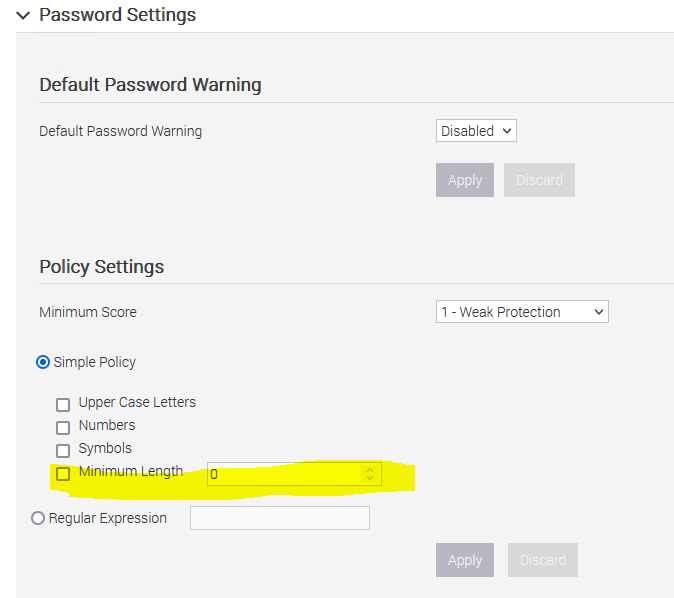
Changing the minimum length to a value greater than 9 may cause VxRail to be unable to connect to the node correctly and the RASR to fail. Consult Dell Support before changing the user password policy.
- iDRAC management UI > iDRAC settings > Services
- > Web Server > Settings
HTTPS: 443
SSL Encryption: 128-bits or higher
TLS Protocol: TLS 1.2 and higher
-
- >
SSH
- >
Status: Enabled
Port number: 22
-
- > Remote RACADM
Status: Enabled
7.0.010-8.0.311:
Note: Starting in version 8.0.320, the
vxpsvc account is no longer used. The account should be removed automatically when the cluster is updated to 8.0.320. The account is replaced with authentication tokens.
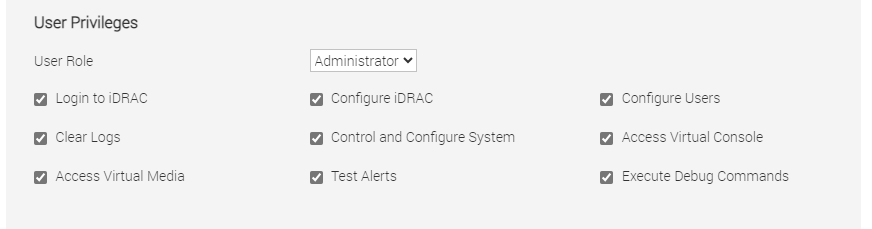
- iDRAC users // iDRAC management UI > iDRAC settings > Users > Local Users
- must have the
vxpsvcaccount as pictured below
- must have the

-
- User privileges for
vxpsvcaccount:
- User privileges for
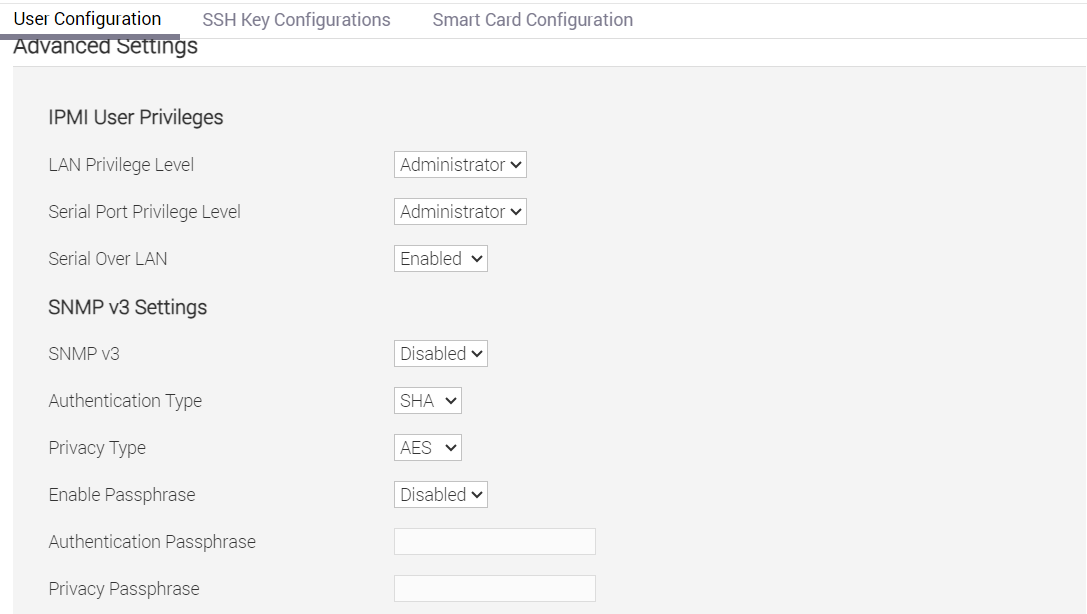
Special needs for G560 and 560F
- iDRAC Settings > Connectivity > Network > Network Settings > NIC Selection = LOM1
- iDRAC UI configuration > BIOS settings > Integrated Devices: Embedded NIC1 = enabled
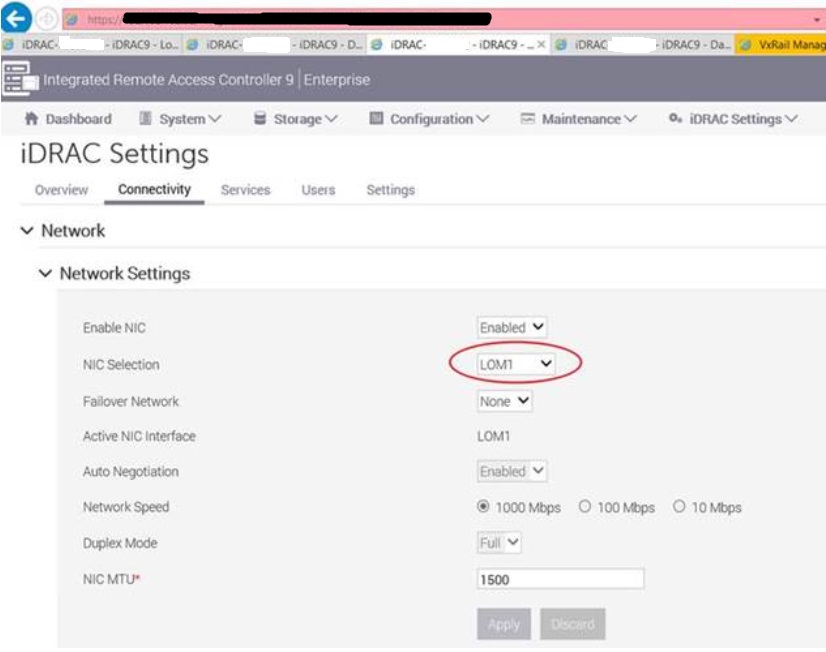
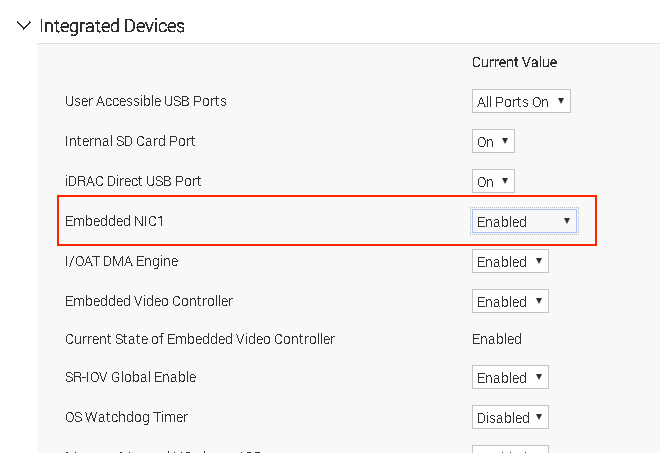
Note: After making the above changes, run command
A good example:
esxcfg-nics -l on the node to verify that the embedded NIC appears as vmnic0. If it does not, then a RASR reset of the node may be required.
A good example:
#esxcfg-nics -l

Name PCI Device Driver Admin Status Link Status Speed Duplex MAC Address MTU Description ------ ------------ --------- ------------ ----------- ----- ------ ----------------- ---- -------------------------------------------------
vmnic0 0000:04:00.0 igbn Up Up 1000 Full 50:9xxxxxxx 1500 Intel Corporation I350 Gigabit Network Connection <<<<<
vmnic1 0000:18:00.0 i40en Up Up 10000 Full 3c:fd:xxxx 1500 Intel(R) Ethernet Controller X710 for 10GbE SFP+
vmnic2 0000:18:00.1 i40en Up Up 10000 Full 3c:fd:xxxx 1500 Intel(R) Ethernet Controller X710 for 10GbE SFP+
vmnic3 0000:5e:00.0 i40en Up Down 0 Half 3c:fd:xxxx 1500 Intel(R) Ethernet Controller X710 for 10GbE SFP+
vmnic4 0000:5e:00.1 i40en Up Down 0 Half 3c:fd:xxxx 1500 Intel(R) Ethernet Controller X710 for 10GbE SFP+
vusb0 Pseudo cdc_ether Up Up 10 Half 50:9axxxxxx 1500 Unknown Unknown
Affected Products
VxRail 460 and 470 Nodes, VxRail Appliance Family, VxRail Appliance Series, VxRail G Series Nodes, VxRail D560, VxRail D560F, VxRail E Series Nodes, VxRail E460, VxRail E560, VxRail E560F, VxRail E560N, VxRail E660, VxRail E660F, VxRail E660N
, VxRail E665, VxRail E665F, VxRail E665N, VxRail G560, VxRail G560F, VxRail P Series Nodes, VxRail P470, VxRail P570, VxRail P570F, VxRail P580N, VxRail P670F, VxRail P670N, VxRail P675F, VxRail P675N, VxRail S Series Nodes, VxRail S470, VxRail S570, VxRail S670, VxRail Software, VxRail V Series Nodes, VxRail V470, VxRail V570, VxRail V570F, VXRAIL V670F, VxRail VD-4000R, VxRail VD-4510C, VxRail VD-4520C, VxRail VE-660, VxRail VE-6615, VxRail VP-760, VxRail VP-7625, VxRail VS-760
...
Article Properties
Article Number: 000157690
Article Type: How To
Last Modified: 24 Jul 2026
Version: 10
Find answers to your questions from other Dell users
Support Services
Check if your device is covered by Support Services.