Alienware Pro Wireless Gaming Mouse Lag in Battery Saver Mode
Summary: This article provides information about the Alienware Pro Wireless Gaming Mouse lag in battery saver mode.
This article applies to
This article does not apply to
This article is not tied to any specific product.
Not all product versions are identified in this article.
Symptoms
Affected Products:
- Alienware Pro Wireless Gaming Mouse
The mouse experiences latency or slow response when it reaches a specified battery level, after switching the mouse to ON Pro-Mouse Battery Saver mode in Alienware Command Center (AWCC).
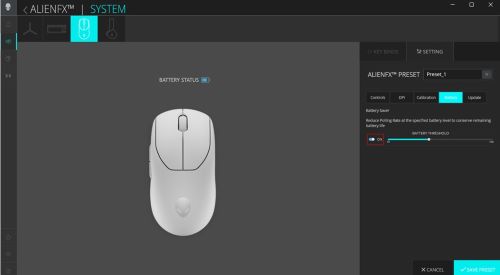
Note: By default, battery saver mode is switched OFF. When battery saver mode is switched ON, the polling rate is reset when the Pro-mouse reaches a specified battery level. The user can configure the specified battery level in AWCC.
Cause
This is due to the polling rate is set to a maximum 125Hz (instead of 1kHz) when battery saver mode is enabled.
Resolution
This fix is available in AWCC v6.3 or later.
When battery saver mode is switched ON, the permanent fix sets the polling rate to default 1kHz (regardless of the original polling rate) when Pro-Mouse reaches the specified battery level.
Affected Products
Alienware Pro Wireless Gaming MouseArticle Properties
Article Number: 000220861
Article Type: Solution
Last Modified: 12 Aug 2025
Version: 7
Find answers to your questions from other Dell users
Support Services
Check if your device is covered by Support Services.