Dell Dock Cannot Use Lan Port or Update Dock Firmware
Summary: Dell Dual Charge Dock HD22Q, Dell Dock WD19, and Dell Thunderbolt Dock - WD22TB4 cannot use LAN port and Dell Firmware Utility (DFU) cannot upgrade the dock. This occurs after disabling the Enabled External USB Port or enable Type-C dock LAN in the BIOS. ...
This article applies to
This article does not apply to
This article is not tied to any specific product.
Not all product versions are identified in this article.
Symptoms
Dock cannot use LAN port as normal and Dell Firmware utility (DFU) cannot upgrade Dock Firmware.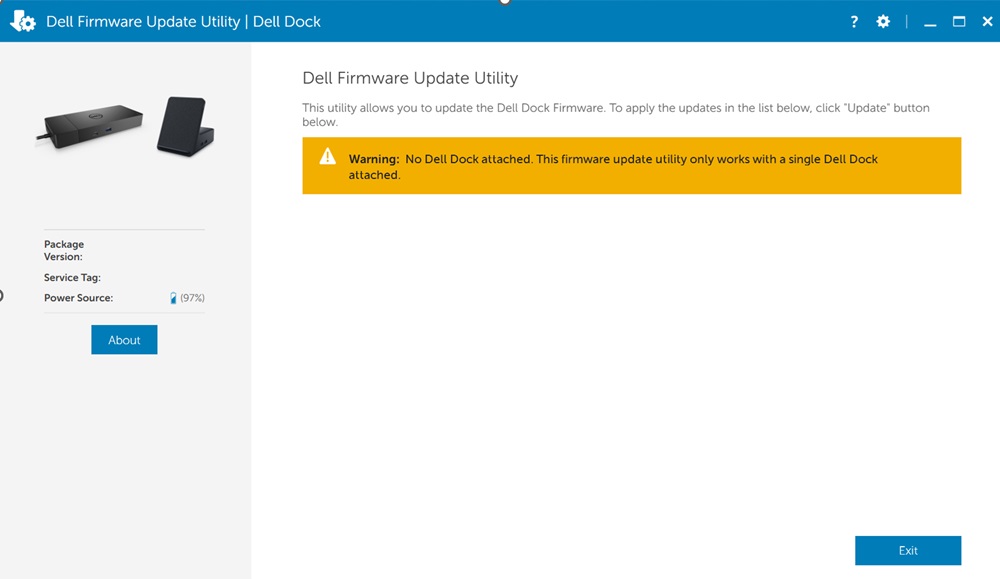
Affected Docks:
- Dell Dual Charge Dock HD22Q
- Dell Dock WD19
- Dell Thunderbolt Dock – WD22TB4
Affected Platforms:
- Dell Pro 14 Plus PB14250
- Dell Pro 16 Plus PB16250
- Dell Pro 13 Premium PA13250
- Dell Pro 14 Premium PA14250
- XPS 13 9350
Cause
The USB2 link is disabled when disabling Enable External USB Port causes this issue. When disabling the enabled external USB port and enable Type-C dock LAN in the BIOS setup menu the docks cannot use the LAN and DFU cannot upgrade dock firmware.
Resolution
This can be resolved by enabling Enable External USB Port in the BIOS Setup menu. When the computer cannot detect dock LAN and must update dock firmware using the DFU.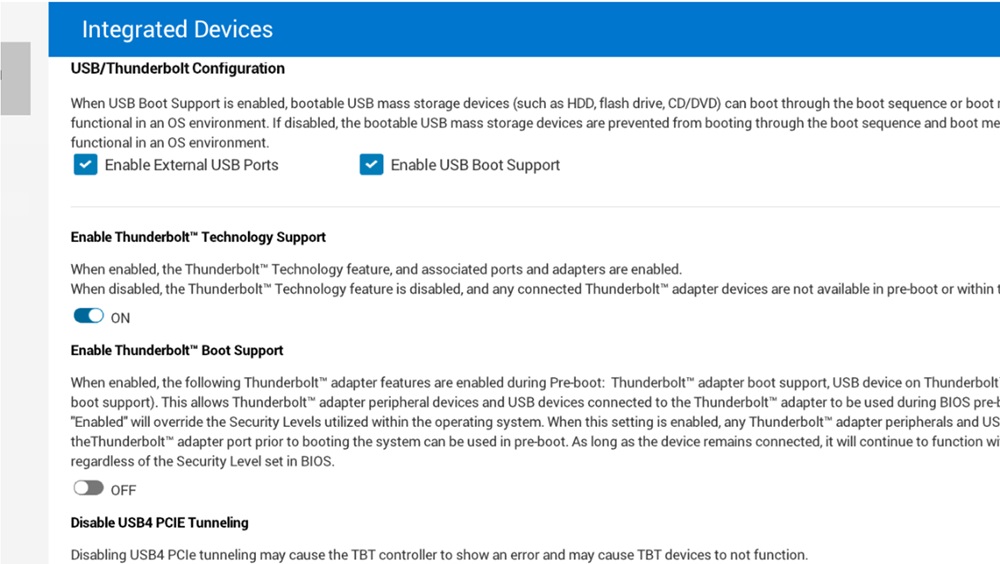
Affected Products
Dell Dual Charge Dock HD22Q, Dell Pro 13 Premium PA13250, Dell Pro 14 Premium PA14250, Dell Pro 14 Plus PB14250, Dell Pro 16 Plus PB16250, Dell Dock WD19, Dell Thunderbolt Dock – WD22TB4, XPS 13 9350Article Properties
Article Number: 000289260
Article Type: Solution
Last Modified: 24 Apr 2025
Version: 3
Find answers to your questions from other Dell users
Support Services
Check if your device is covered by Support Services.