SupportAssist for Home PCs 기록에 하드웨어 스캔 경고 표시
Summary: SupportAssist for Home PCs 버전 4.8.x에서 실행되는 하드웨어 스캔은 기록 페이지에 경고 상태를 보고하지만 모든 하드웨어는 통과 상태를 보고합니다.
This article applies to
This article does not apply to
This article is not tied to any specific product.
Not all product versions are identified in this article.
Symptoms
하드웨어 스캔을 실행할 때 SupportAssist for Home PCs 버전 4.8.x의 기록 페이지에 경고 상태가 표시될 수 있습니다. 그러나 모든 개별 하드웨어 구성 요소가 Pass 상태를 보고하고 문제가 감지되지 않습니다.
이 문제를 검증하려면 다음을 수행합니다.
- SupportAssist for Home PCs에서 기록 페이지를 엽니다.
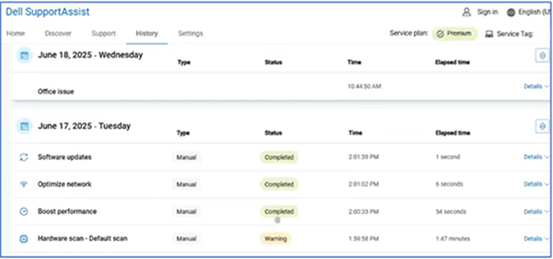
- 모든 개별 검사에서 Pass 상태를 보고하는지 확인합니다.
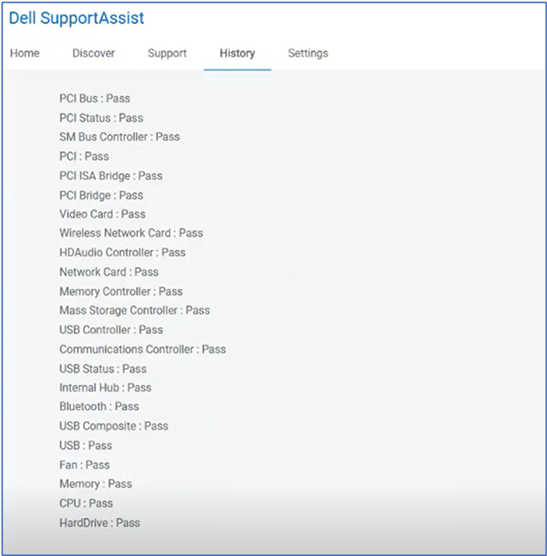
- 스캔 세부 정보에 배터리 테스트에 대한 항목이 없는지 확인합니다.
영향을 받는 소프트웨어:
- 홈 PC용 SupportAssist
영향을 받는 버전:
v4.8.x
Cause
이는 무시해도 되는 거짓 양성 경고입니다. 이 문제는 노트북 배터리가 없기 때문에 데스크탑 컴퓨터에서 발생합니다.
SupportAssist는 스캔의 일부로 배터리 정보를 검색하려고 시도합니다. 데스크탑에는 노트북 배터리가 없으므로 배터리 확인을 위해 검색 로그 No device found 가 기록됩니다. 이로 인해 데스크톱에 대해 예상되는 동작임에도 불구하고 검색 요약에서 경고 상태가 발생합니다.
Resolution
참고: 업데이트를 시작하기 전에 다음을 수행하십시오.
- 모든 개인 데이터를 백업합니다. 자세한 내용은 백업 및 복구를 참조하십시오.
- 노트북에서 업데이트가 실행 중인 경우 AC 어댑터를 연결합니다.
컴퓨터에서 SupportAssist for Home PCs 버전 4.10.x 이상으로 업데이트하면 문제가 해결됩니다. 업데이트를 다운로드하고 설치하려면 Dell 드라이버 및 펌웨어를 다운로드하고 설치하는 방법을 참조하십시오.
Affected Products
Alienware Area-51 AAT2250, Alienware Aurora ACT1250, Alienware Aurora Ryzen Edition R10, Alienware Aurora R11, Alienware Aurora R12, Alienware Aurora R13, Alienware Aurora Ryzen Edition R14, Alienware Aurora R15 AMD, Alienware Aurora R15
, Alienware Aurora R16, Alienware Aurora R5, Alienware Aurora R6, Alienware Aurora R7, Alienware Aurora R8, Alienware Aurora R9, Alienware X51 R2, Alienware X51 R3, Dell 14 Premium DA14250, Dell 16 Premium DA16250, Dell 14 Plus 2-in-1 DB04250, Dell 14 Plus 2-in-1 DB04255, Dell 16 Plus 2-in-1 DB06250, Dell 14 Plus DB14250, Dell 14 Plus DB14255, Dell 16 Plus DB16250, Dell 16 Plus DB16255, Dell 15 DC15250, Dell 15 DC15255, Dell 16 DC16250, Dell 16 DC16251, Dell Tower Plus EBT2250, Dell 24 All-in-One EC24250, Dell 27 All-in-One EC27250, Dell Slim ECS1250, Dell Tower ECT1250, SupportAssist for Home PCs, Inspiron 24 5410 All-in-One, Inspiron 24 5415 All-in-One, Inspiron 24 5420 All-in-One, Inspiron 24 5421 All-in-One, Inspiron 24 5430 All-in-One, Inspiron 27 7710 All-in-One, Inspiron 27 7720 All-in-One, Inspiron 27 7730 All-in-One, Inspiron 3020 Desktop, Inspiron 3020 Small Desktop, Inspiron 3030 Desktop, Inspiron 3030 Small Desktop, Inspiron 3250, Inspiron 3671, Inspiron 3847, Inspiron 3880, Inspiron 3881, Inspiron 3891, Inspiron 3910, Inspiron 5675, Inspiron 5676, Inspiron 5680, Vostro 3020 Tower Desktop, Vostro 3020 Small Desktop, Vostro 3030 Desktop, Vostro 3030 Small Desktop, Vostro 3268, Vostro 3470, Vostro 3471, Vostro 3681, Vostro 3690, Vostro 3710, Vostro 3900G Mini Tower, Vostro 3905, Vostro 3910, XPS 8900, XPS 8910, XPS 8920, XPS 8930, XPS 8940, XPS 8950, XPS 8960
...
Article Properties
Article Number: 000340788
Article Type: Solution
Last Modified: 27 Oct 2025
Version: 5
Find answers to your questions from other Dell users
Support Services
Check if your device is covered by Support Services.