Data Domain: DD6400: Predictive Drive Failure Reported on an Expansion Shelf Disk
Summary: A predictive drive failure is reported on the expansion shelf. This will most likely be reported by the customer when monitoring iDRAC as its currently not reported as a failure on the Data Domain. ...
This article applies to
This article does not apply to
This article is not tied to any specific product.
Not all product versions are identified in this article.
Symptoms
- The alert is not reported as a disk failure on the Data Domain since it's in a predictive failure state and has not failed yet.
- The BIOS log on the DD or the Lifecycle Log on the TSR will show the following predictive drive failure error.
"Predictive failure reported for Disk.Bay.13:Enclosure.Modular.0:NonRAID.Slot.3-1. Part Number ="
Cause
Predictive Disk Failure
Resolution
- Capture a TSR debug log to determine the location of the drive on the expansion shelf.
- For this particular example, it is on slot 13 of the expansion ES40 shelf. See below graphic for more.

- Run the command "
storage remove force 2.14" as shown in the example below to initiate a disk rebuild

- Replace disk 2.14 using the Mixed IP dispatch process. - Use the QI tool by entering the service tag of the system to determine the part number of the drive. Internal only - Quality Intelligence (dell.com)
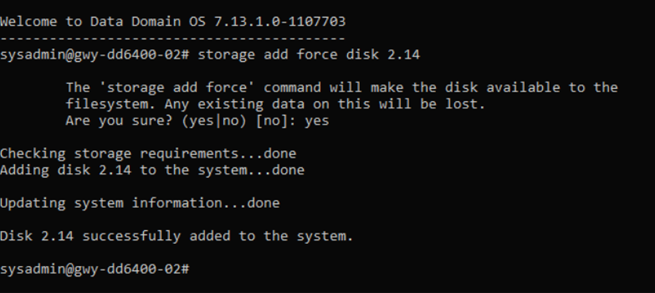
- Once the disk is replaced, run the command "
storage add force 2.14" as shown in the example below to add the disk to the array.
Affected Products
DD6400 ApplianceProducts
Data Protection, Data Backup & Protection Storage, Data Domain, Data DomainArticle Properties
Article Number: 000231270
Article Type: Solution
Last Modified: 12 Dec 2024
Version: 1
Find answers to your questions from other Dell users
Support Services
Check if your device is covered by Support Services.