Linux: Terminating a Zombie Process in Linux Environments
Summary: What is a Zombie Process, how to find it, and how to kill or terminate it.
This article applies to
This article does not apply to
This article is not tied to any specific product.
Not all product versions are identified in this article.
Instructions
What is a Zombie Process:
It is a process that ended but not all of it is Immediately removed from the memory as its process descriptor stays in memory.
What should be the normal Behavior of a Process:
When a process ends, the process's status becomes
The parent process is then supposed to run the
How to Find a Zombie Processes:
Running the command

Running the command
How to Terminate Accumulating Zombie Processes:
Most of the time, the zombie processes have the same parent process ID.
There are two methods to remove the process:
It is a process that ended but not all of it is Immediately removed from the memory as its process descriptor stays in memory.
What should be the normal Behavior of a Process:
When a process ends, the process's status becomes
EXIT_ZOMBIE and the process's parent is notified that its child process has died with the SIGCHLD signal.
The parent process is then supposed to run the
wait() for the system call to read the dead process's exit status and other information. After wait() is called, the zombie process is removed from memory. This happens quickly, so you do not see zombie processes accumulating on your system. But in cases where we see several zombie processes accumulating, this is a situation where the program code is not efficient.
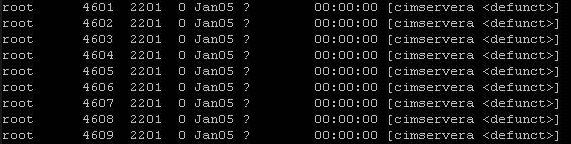
How to Find a Zombie Processes:
Running the command
top
Running the command
ps -ef | grep defunct
How to Terminate Accumulating Zombie Processes:
Most of the time, the zombie processes have the same parent process ID.
There are two methods to remove the process:
- Send the
SIGCHLDsignal to the parent process.
This signal tells the parent process to run the
wait() system call and clean up its zombie children:
kill -s SIGCHLD <PPID>
Example:
kill -s SIGCHLD 2201
- Kill the zombie parent process
kill -9 <PPID>
Example:
kill -9 2201
Affected Products
SUSE Linux Enterprise Server 12, Red Hat Enterprise Linux Version 7, Red Hat Enterprise Linux Version 9, Red Hat Enterprise Linux Version 8, SUSE Linux Enterprise Server 15, Ubuntu Server LTSArticle Properties
Article Number: 000019108
Article Type: How To
Last Modified: 03 Feb 2026
Version: 5
Find answers to your questions from other Dell users
Support Services
Check if your device is covered by Support Services.