Troubleshooting Windows 10 Not Shutting Down Properly
Summary: Discover steps to resolve Windows 10 shutdown issues with our guide. Learn about the Fast Startup feature, full shutdown methods, and command-line solutions. Ensure that your system shuts down completely for optimal performance. ...
This article applies to
This article does not apply to
This article is not tied to any specific product.
Not all product versions are identified in this article.
Instructions
Windows Shutdown
Since Windows 8.1 and through Windows 10, a feature called Fast Startup has been an option on Microsoft's Operating Systems. The feature is used to speed up the Operating System boot process by being a hybrid between a System Shutdown and Hibernation.
Fast Startup in Windows discards all your open programs and files (as it would during a traditional shutdown), but it saves the state of the Windows kernel to the hard drive (as it would during hibernation). More information can be found in the following location: Distinguishing Fast Startup from Wake-from-Hibernation

Full Shut Down and Restart
The following methods should be used if a Shut Down is needed while Troubleshooting Windows software issues.
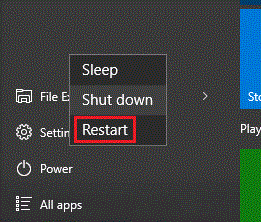
- If a Shut Down is needed, Restart should be selected instead. Windows performs a full shutdown while Restarting the computer.
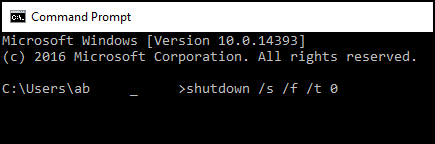
- The next option is to use the Command Line.
The following article explains how to open a Command Line in Windows: The Command Prompt: What It Is and How to Use It on a Dell System
In the Command Line, type:shutdown /s /f /t 0
Then press Enter.
- The next option is to disable the Fast Startup feature.
Note: This option should be used as a last resort as it may increase boot times for the computer.
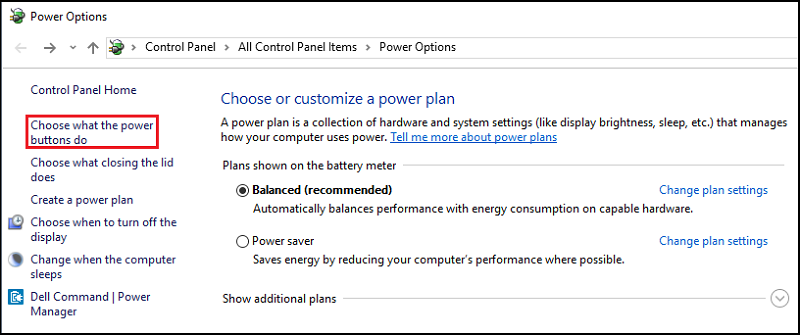
- Search for and open "Power Options" in the Start Menu.
- Click "Choose what the power buttons do" on the left side of the window.
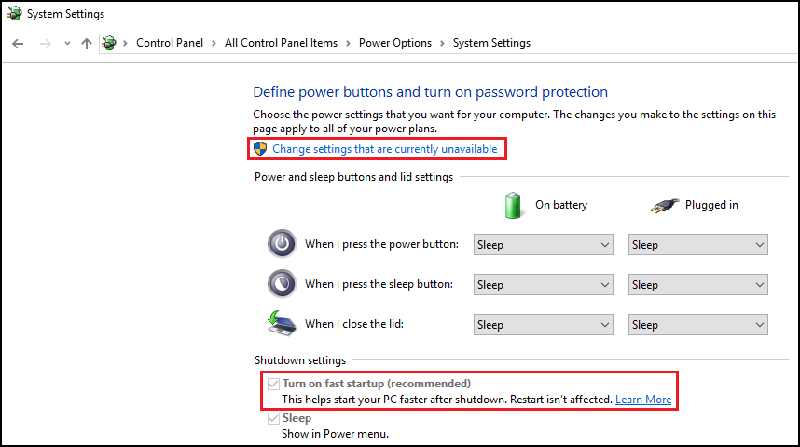
- Under "Shutdown settings," ensure "Turn on fast startup" is cleared.
Affected Products
Alienware, Dell All-in-One, Dell Pro All-in-One, Dell Pro Max Micro, Dell Pro Max Slim, Dell Pro Max Tower, Dell Pro Micro, Dell Pro Slim, Dell Pro Tower, Dell Slim, Dell Tower, Inspiron, OptiPlex, Vostro, XPS, G Series, G Series, Alienware
, Dell Laptops, Dell Plus, Dell Pro, Dell Pro Max, Dell Pro Plus, Dell Pro Premium, Inspiron, Latitude, Dell Pro Rugged, Vostro, XPS, Fixed Workstations, Mobile Workstations, Dell Pro Max Micro XE FCM2250, Dell Pro Max Slim XE FCS1250, Dell Pro Max Tower T2 XE FCT2250, Dell Pro Max 16 XE MC16250, Dell Pro Micro Plus XE QBM1250, Dell Pro Slim Plus XE5 QBS1250, Dell Pro Tower Plus XE5 QBT1250
...
Article Properties
Article Number: 000124687
Article Type: How To
Last Modified: 19 Apr 2026
Version: 11
Find answers to your questions from other Dell users
Support Services
Check if your device is covered by Support Services.