PowerEdge: Enable Intel TDX on Dell 16G Intel Servers
Summary: Prerequisites of enabling Intel Trust Domain Extension (TDX) on Dell 16G Intel PowerEdge servers
This article applies to
This article does not apply to
This article is not tied to any specific product.
Not all product versions are identified in this article.
Symptoms
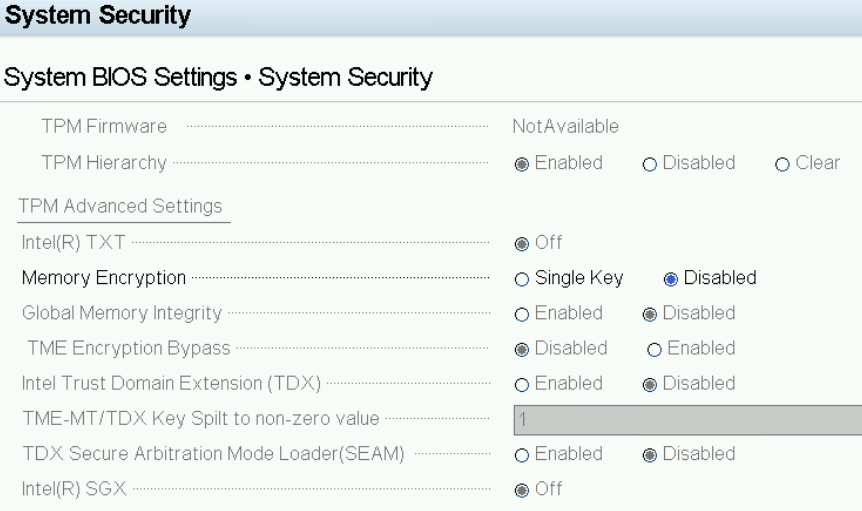
By default, the Intel TDX option in the BIOS setup is either not selectable or unavailable on Dell 16G PowerEdge Servers.
Cause
- The Intel TDX feature is not supported on 16th Generation Dell PowerEdge servers with fourth Generation Xeon Scalable Processors.
- 16th Generation Dell PowerEdge Servers that are equipped with fifth Generation Intel Xeon Scalable Processors support Intel TDX.
- Enabling Intel TDX requires meeting certain hardware support criteria and BIOS configuration prerequisites.
Resolution
For detailed information about Intel TDX, see the Intel Trust Domain Extensions (TDX) 
Hardware Requirements for Intel TDX:
- Fifth Generation Intel Xeon Scalable Processors or newer with Intel TDX support
- For information about specific processor support, consult the Intel article 91103
- For information about specific processor support, consult the Intel article 91103
- Memory configuration: 8 or 16 DIMMs per socket
Required BIOS Settings for Intel TDX:
- Memory Settings:
- Disable Node Interleaving
- Processor Settings:
- Enable x2APIC Mode
- Disable CPU Physical Address Limit
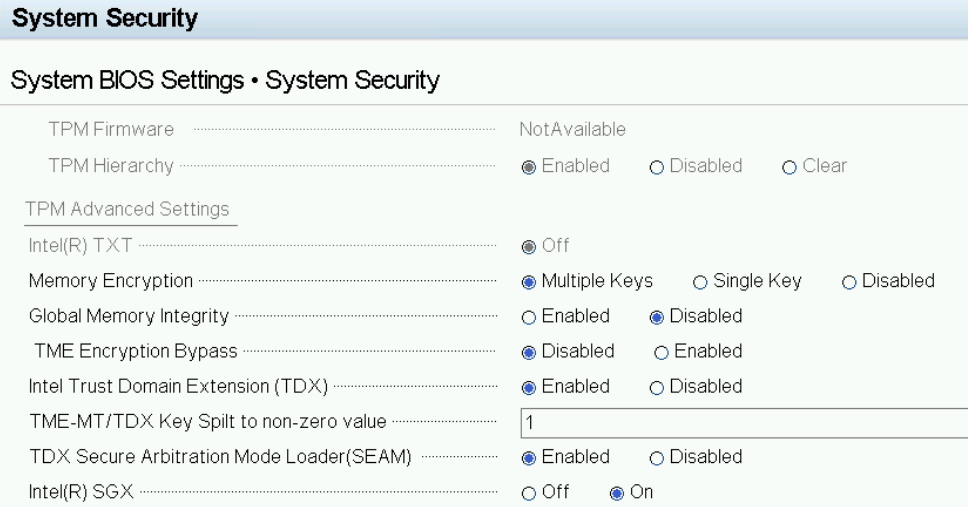
- System Security:
- Set Memory Encryption to Multiple Keys.
- Disable Global Memory Integrity.
- Enable Intel Trusted Domain Extension (TDX).
- Set TME-MT/TDX Key Split to a non-zero value (such as, 1)
- Enable TDX Secure Arbitration Mode Loader (SEAM).
- Enable Intel(R) SGX.
Affected Products
PowerEdge C6620, PowerEdge MX760c, PowerEdge R660, PowerEdge R660xs, PowerEdge R760, PowerEdge R760XA, PowerEdge R760xd2, PowerEdge R760xs, PowerEdge R860, PowerEdge R960Products
PowerEdge T360, PowerEdge T560, PowerEdge XE8640, PowerEdge XE9640, PowerEdge XE9680, PowerEdge XR5610, PowerEdge XR7620, PowerEdge XR8610t, PowerEdge XR8620tArticle Properties
Article Number: 000226452
Article Type: Solution
Last Modified: 08 Nov 2025
Version: 6
Find answers to your questions from other Dell users
Support Services
Check if your device is covered by Support Services.