Dell Unity: SPA and SPB Ethernet ports report errors though nothing is plugged in (User Correctable)
Summary: Storage Processor A (SPA) and Storage Processor B (SPB) Ethernet ports report an error or warning on a port/Small Form-Factor Pluggable (SFP). The ports are not in use or have no cables plugged in, but they were in use previously. ...
This article applies to
This article does not apply to
This article is not tied to any specific product.
Not all product versions are identified in this article.
Symptoms
Some of the warnings or errors on ports for this issue:
SPA (The Small Form-factor Pluggable (SFP) module in this Ethernet port has been removed. Since the port is in use, reinsert a supported SFP module.)

SPB (The Small Form-factor Pluggable (SFP) module in this Ethernet port has been removed. Since the port is in use, reinsert a supported SFP module.)

The port has lost communication with the network.
Cause
The port(s) were used at some point previously. This means that there was a cable plugged into the port and that I/O communicated through the port(s). The port(s) are not in use, or nothing is plugged into the port(s). It is found that there is still an interface configured, and the array reports the error or warning on the port(s).
Resolution
First, investigate to verify the port(s) and interface(s) are not needed. Once it is determined that the interface(s) are not needed, provide customer(s) the following steps to remove the interfaces.
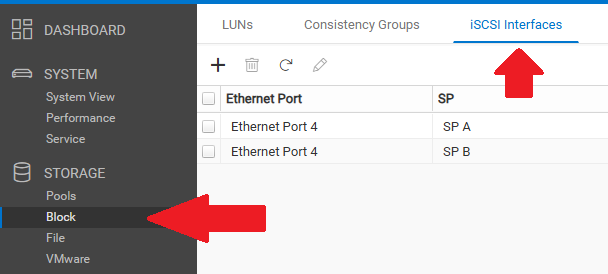
Delete the iSCSI interfaces that are no longer in use. In the Unisphere/GUI, go to Storage --> Block --> iSCSI Interface --> select the iSCSI interfaces that are not used and select Remove (the trash can icon).
Affected Products
Dell EMC UnityArticle Properties
Article Number: 000325229
Article Type: Solution
Last Modified: 29 May 2025
Version: 1
Find answers to your questions from other Dell users
Support Services
Check if your device is covered by Support Services.