Avamar: De RAM- en CPU-configuratie van Avamar Virtual Edition (AVE) wijzigen
Summary: U kunt de CPU- en geheugenconfiguratie van een Avamar Virtual Edition (AVE) virtuele machine aanpassen nadat deze is geïmplementeerd in vCenter. Dit kan nodig zijn om te voldoen aan specifieke prestatie- of maatvereisten. ...
This article applies to
This article does not apply to
This article is not tied to any specific product.
Not all product versions are identified in this article.
Instructions
Hieronder staan de aanbevolen vereisten die te vinden zijn in de Avamar Virtual Edition (AVE) installatiehandleiding:

Bij specifieke vereisten kan een AVE specifieke configuraties nodig hebben, zoals aantal processors of RAM-grootte. Het is mogelijk om de geheugengrootte en het aantal processors te vergroten, zelfs nadat de AVE is geïmplementeerd.
De volgende stappen kunnen worden gevolgd om deze configuraties voor de AVE aan te passen:
- Meld u aan bij de vSphere Web Client
- Zoek de Avamar AVE Virtual Machine (VM).
- "Klik met de rechtermuisknop" op de VM
- Aan/uit:> gastbesturingssysteem uitschakelen

- Klik met de rechtermuisknop op de VM --> Instellingen bewerken
- CPU- en RAM-configuratie wijzigen
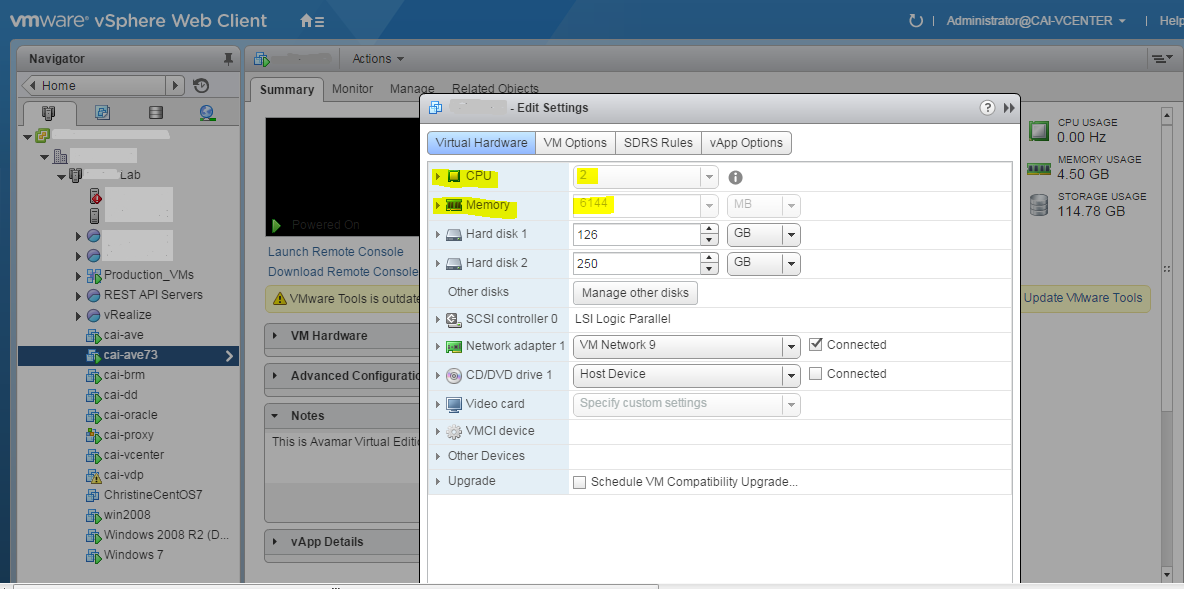
- "Klik met de rechtermuisknop" op de VM
- Power --> Power On
Opmerking: Raadpleeg altijd de Avamar Virtual Edition Installation Guide voor aanbevolen bronconfiguraties.
Affected Products
AvamarProducts
Avamar, Avamar Virtual EditionArticle Properties
Article Number: 000019945
Article Type: How To
Last Modified: 03 Oct 2025
Version: 3
Find answers to your questions from other Dell users
Support Services
Check if your device is covered by Support Services.