Dell Unity: 두 개 이상의 규칙이 있는 스냅샷 일정을 생성하는 방법
Summary: 이 문서에서는 UI를 사용하여 수행할 수 없는 CLI를 사용하여 두 개 이상의 규칙이 있는 스냅샷 일정을 생성하는 방법에 대해 설명합니다(사용자 수정 가능).
This article applies to
This article does not apply to
This article is not tied to any specific product.
Not all product versions are identified in this article.
Instructions
다음과 같은 여러 규칙을 사용하여 스냅샷 스케줄을 생성해야 할 수 있습니다.
- 24시간 동안 유지되는 시간별 체크포인트
- 7일 동안 보관하는 야간 체크포인트
- 4주 동안 유지하는 주간 체크포인트
그러나 일정당 최대 2개의 규칙을 허용하는 UI를 사용하여 이를 수행할 수 없습니다.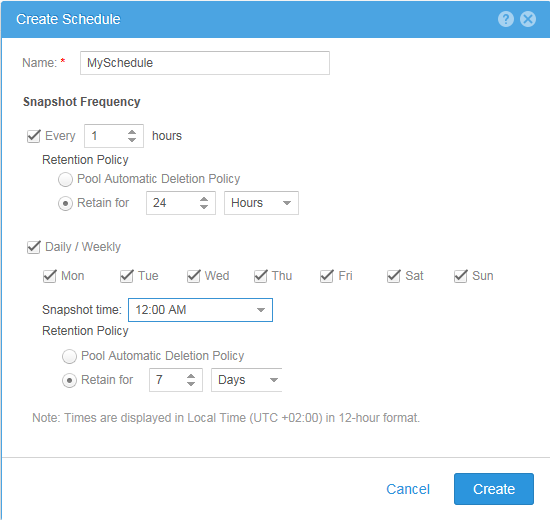
#> uemcli -no /sys/task/sched -id snapSch_19 show
1:    ID    = snapSch_19
      Name  = MySchedule
      Type  = User
      Rules = SchedRule_93, SchedRule_94

#> uemcli -no /sys/task/rule -id SchedRule_93 show
1:    ID                = SchedRule_93
      Type              = HoursInterval
      Frequency         = Every 1h
      Keep for          = 1d
      Allow auto-delete = no
      Access            = Checkpoint

#> uemcli -no /sys/task/rule -id SchedRule_94 show
1:    ID                = SchedRule_94
      Type              = WeekDaysList
      Frequency         = Every Mon, Tue, Wed, Thu, Fri, Sat, Sun at 00:00
      Keep for          = 7d
      Allow auto-delete = no
      Access            = Checkpoint
또한 LUN에는 최대 하나의 스케줄이 할당될 수 있으므로 요구 사항을 충족할 수 없습니다.
그러나 CLI를 사용하여 요구 사항을 충족할 수 있으므로, 이 예에서는 UI를 사용하여 처음 두 규칙으로 스냅샷 일정(snapSch_19)을 생성한 다음 다음 명령을 사용하여 CLI를 사용하여 일정에 세 번째 규칙을 추가했습니다.
#> uemcli -no -u <username> -p <password> /sys/task/rule create -schedId snapSch_19 -type weekdayslist -days sat -at 12:00 -keepFor 31d -access ckpt
그리고 결과는 우리의 요구 사항을 충족하는 다음과 같습니다.
#> uemcli -no /sys/task/sched -id snapSch_19 show
1:    ID    = snapSch_19
      Name  = MySchedule
      Type  = User
      Rules = SchedRule_93, SchedRule_94, SchedRule_95

#> uemcli -no /sys/task/rule -id SchedRule_93 show
1:    ID                = SchedRule_93
      Type              = HoursInterval
      Frequency         = Every 1h
      Keep for          = 1d
      Allow auto-delete = no
      Access            = Checkpoint

#> uemcli -no /sys/task/rule -id SchedRule_94 show
1:    ID                = SchedRule_94
      Type              = WeekDaysList
      Frequency         = Every Mon, Tue, Wed, Thu, Fri, Sat, Sun at 00:00
      Keep for          = 7d
      Allow auto-delete = no
      Access            = Checkpoint

#> uemcli -no /sys/task/rule -id SchedRule_95 show
1:    ID                = SchedRule_95
      Type              = WeekDaysList
      Frequency         = Every Sat at 12:00
      Keep for          = 31d
      Allow auto-delete = no
      Access            = Checkpoint
또한 동일한 일정에 더 많은 규칙을 추가할 수 있었지만 UI는 여전히 처음 두 규칙만 표시할 수 있습니다!
Affected Products
Dell EMC Unity FamilyProducts
Dell Unity 300, Dell EMC Unity 300F, Dell EMC Unity 400, Dell EMC Unity 400F, Dell EMC Unity 500, Dell EMC Unity 500F, Dell EMC Unity 600, Dell EMC Unity 600F, Dell EMC Unity Family |Dell EMC Unity All Flash, Dell EMC Unity Family
, Dell EMC Unity Hybrid, Dell EMC UnityVSA Professional Edition/Unity Cloud Edition
...
Article Properties
Article Number: 000022496
Article Type: How To
Last Modified: 02 Dec 2025
Version: 4
Find answers to your questions from other Dell users
Support Services
Check if your device is covered by Support Services.