Dell Unity:如何建立包含兩個以上規則的快照計劃
Summary: 本文說明如何使用 CLI 建立包含兩個以上規則的快照排程,這無法透過 UI 完成 (使用者可修正)
This article applies to
This article does not apply to
This article is not tied to any specific product.
Not all product versions are identified in this article.
Instructions
您可能需要建立包含多個規則的快照計劃,例如:
- 我們保留 24 小時的每小時檢查點
- 我們保留7天的夜間檢查站
- 每週檢查點,我們會保留 4 週
但是,您無法使用 UI 執行此作業,因為每個排程最多可以使用兩條規則。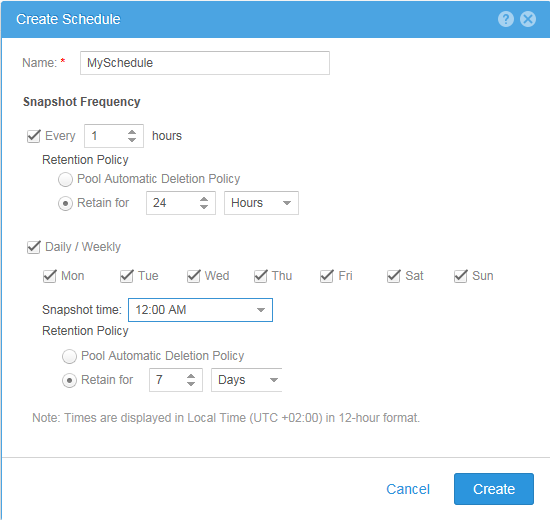
#> uemcli -no /sys/task/sched -id snapSch_19 show
1:    ID    = snapSch_19
      Name  = MySchedule
      Type  = User
      Rules = SchedRule_93, SchedRule_94

#> uemcli -no /sys/task/rule -id SchedRule_93 show
1:    ID                = SchedRule_93
      Type              = HoursInterval
      Frequency         = Every 1h
      Keep for          = 1d
      Allow auto-delete = no
      Access            = Checkpoint

#> uemcli -no /sys/task/rule -id SchedRule_94 show
1:    ID                = SchedRule_94
      Type              = WeekDaysList
      Frequency         = Every Mon, Tue, Wed, Thu, Fri, Sat, Sun at 00:00
      Keep for          = 7d
      Allow auto-delete = no
      Access            = Checkpoint
LUN 最多可以為其分配一個計劃,因此您無法滿足要求。
但是,您可以使用 CLI 滿足需求,因此在我們的範例中,我們使用 UI 建立了快照排程 (snapSch_19),並使用下列命令使用 CLI 將第三個規則新增至排程:
#> uemcli -no -u <username> -p <password> /sys/task/rule create -schedId snapSch_19 -type weekdayslist -days sat -at 12:00 -keepFor 31d -access ckpt
結果如下,符合我們的要求:
#> uemcli -no /sys/task/sched -id snapSch_19 show
1:    ID    = snapSch_19
      Name  = MySchedule
      Type  = User
      Rules = SchedRule_93, SchedRule_94, SchedRule_95

#> uemcli -no /sys/task/rule -id SchedRule_93 show
1:    ID                = SchedRule_93
      Type              = HoursInterval
      Frequency         = Every 1h
      Keep for          = 1d
      Allow auto-delete = no
      Access            = Checkpoint

#> uemcli -no /sys/task/rule -id SchedRule_94 show
1:    ID                = SchedRule_94
      Type              = WeekDaysList
      Frequency         = Every Mon, Tue, Wed, Thu, Fri, Sat, Sun at 00:00
      Keep for          = 7d
      Allow auto-delete = no
      Access            = Checkpoint

#> uemcli -no /sys/task/rule -id SchedRule_95 show
1:    ID                = SchedRule_95
      Type              = WeekDaysList
      Frequency         = Every Sat at 12:00
      Keep for          = 31d
      Allow auto-delete = no
      Access            = Checkpoint
我還能夠將更多規則添加到同一時程表中,但UI仍然只能顯示最初的兩個規則!
Affected Products
Dell EMC Unity FamilyProducts
Dell Unity 300, Dell EMC Unity 300F, Dell EMC Unity 400, Dell EMC Unity 400F, Dell EMC Unity 500, Dell EMC Unity 500F, Dell EMC Unity 600, Dell EMC Unity 600F, Dell EMC Unity Family |Dell EMC Unity All Flash, Dell EMC Unity Family
, Dell EMC Unity Hybrid, Dell EMC UnityVSA Professional Edition/Unity Cloud Edition
...
Article Properties
Article Number: 000022496
Article Type: How To
Last Modified: 02 Dec 2025
Version: 4
Find answers to your questions from other Dell users
Support Services
Check if your device is covered by Support Services.