Avamar: Data Domain shows unresponsive due to an expired DD Boost user account password
Summary: Data Domain shows Unresponsive due to an expired DD Boost account password.
This article applies to
This article does not apply to
This article is not tied to any specific product.
Not all product versions are identified in this article.
Symptoms
-
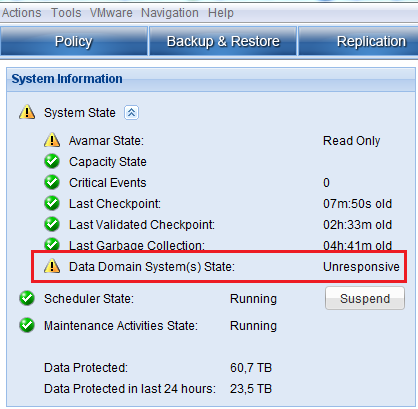
Data Domain (DD) is shown as Unresponsive in the Avamar Administrator console
-
The MCCLI Data Domain properties command shows that the DD Boost user account is valid but Simple Network Management Protocol (SNMP) is disabled:
mccli dd show-prop
0,23000,CLI command completed successfully.
IPv4Hostname                    IPv6Hostname TotalCapacity ServerUtilization BytesProtected FileSystemAvailable FileSystemUsed UserName DefaultReplicationStorageSystem TargetForAvamarCheckpointBackups MaximumStreamsForAvamarCheckpointBackups MaximumStreams MaximumStreamsLimit InstantAccessLimit DDOSVersion    SerialNumber   ModelNumber EncryptionStrength AuthenticationMode MonitoringStatus                                     DDBoostLicensed DDBoostEnabled DDBoostUserEnabled DDBoostUserStatus DDBoostOptionStatus SNMPstatus FileSystemStatus                Synchronizationofmaintenanceoperations
------------------------------- ------------ ------------- ----------------- -------------- ------------------- -------------- -------- ------------------------------- -------------------------------- ---------------------------------------- -------------- ------------------- ------------------ -------------- -------------- ----------- ------------------ ------------------ ---------------------------------------------------- --------------- -------------- ------------------ ----------------- ------------------- ---------- ------------------------------- --------------------------------------
dd.company.com       N/A          174654.5 GiB  24%               57.4 TB        132008.4 GiB        42646.1 GiB   avamaruser   Yes                             No                               0                                        100            270                 1              5.6.0.5-501748 xxxxxxxxxxxxxx DD4500      unknown            unknown            Missing SNMP community string on Data Domain system. true            true           true               User Valid        Option Enabled      Disabled   Unknown since SNMP is disabled. on
-
Attempting to log in to the Data Domain using the DD Boost user account shows that the password has expired:
ssh avamaruser@dd.company.com
Warning: Permanently added 'dd.emc.com,10.10.10.10' (RSA) to the list of known hosts.
Data Domain OS
You are required to change your password immediately (password aged)
Last login: Tue Mar  8 11:41:10 CET 2016 from 10.10.10.11 on ssh
WARNING: Your password has expired.
You must change your password now and login again!
Changing password for avamaruser.
(current) UNIX password:
Cause
-
Password aging options are set to DD Boost user on the Data Domain
user show detailed avamaruser
User:                                   avamaruser
Uid:                                    xxx
Role:                                   admin
Last Login From:                        <unknown>
Last Login Time:                        never
Status:                                 enabled
Password Last Changed:                  Apr 03, 2016
Disable Date:                           never
Minimum Days Between Password Change:   15
Maximum Days Between Password Change:   90
Warning Days Between Password Change:   15
Disable Days After Expire:              3
Force Password Change at Next Login:    no
Resolution
1. Log in to the Data Domain using SSH using the DD Boost user
2. When prompted to renew the password, enter the current and the new passwords.
Affected Products
Avamar, Avamar ServerArticle Properties
Article Number: 000064106
Article Type: Solution
Last Modified: 22 Jul 2025
Version: 5
Find answers to your questions from other Dell users
Support Services
Check if your device is covered by Support Services.